EasyManua.ls Logo

ABB Terra DC wallbox - User Manual

ABB Terra DC wallbox
20 pages
Print Icon
To Next Page IconTo Next Page
Loading...
2022-11-15 1/20
USER MANUAL
Terra DC wallbox
User and Operation Manual

Other manuals for ABB Terra DC wallbox

Question and Answer IconNeed help?

Do you have a question about the ABB Terra DC wallbox and is the answer not in the manual?

Summary

Introduction

Preface

Provides an overview of the Terra DC Wallbox Charge Stations and the manual's scope.

Intended use of this document

Defines the document's purpose for site operators and EV drivers.

Intended use of the charger

Specifies that the charger is for compatible electric vehicles and its outlets.

Owner responsibilities

Outlines requirements for site preparation, maintenance, and safe operation by owners.

Description of the product

Overview of the system

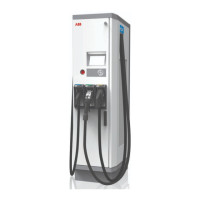
Identifies user-operated components and provides a view of the Terra DC Wallbox.

MID certified Charger identification

Explains the nameplate information related to measuring device calibration law.

Energy Meter Readout

Details the information displayed on the energy meter, including time, date, and power.

Charger configurations

Lists the supported DC charging standards like CCS and CHAdeMO.

Standard usage

Explains that the charger typically draws power from the grid for operation.

Authorization to charge

Describes how charging can be operated with or without authorization via RFID or payment.

Output Power vs. Output Voltage curve

Presents a graph showing the charger's output power relative to output voltage.

Quick instruction charging

Operator Instructions

Cleaning of the Terra DC Wallbox

Provides instructions for cleaning the DC Wallbox cabinet annually.

Service inspection of the cabinets

Lists points to be checked regularly for the charger's cabinets, cables, and buttons.

Special inspections

Specifies conditions requiring inspection by ABB service personnel before further use.

Problem resolving

Outlines the initial response for customer calls and remote problem-solving.

Overview of the WallBox

Details the components and parts of the WallBox for problem-solving context.

Troubleshooting

Lists scenarios like vehicle crash, fire, or fluid spill for future definition.

Recommended Preventive maintenance

Details the yearly inspection and servicing requirements by a certified technician.

Contact information

Summary

Introduction

Preface

Provides an overview of the Terra DC Wallbox Charge Stations and the manual's scope.

Intended use of this document

Defines the document's purpose for site operators and EV drivers.

Intended use of the charger

Specifies that the charger is for compatible electric vehicles and its outlets.

Owner responsibilities

Outlines requirements for site preparation, maintenance, and safe operation by owners.

Description of the product

Overview of the system

Identifies user-operated components and provides a view of the Terra DC Wallbox.

MID certified Charger identification

Explains the nameplate information related to measuring device calibration law.

Energy Meter Readout

Details the information displayed on the energy meter, including time, date, and power.

Charger configurations

Lists the supported DC charging standards like CCS and CHAdeMO.

Standard usage

Explains that the charger typically draws power from the grid for operation.

Authorization to charge

Describes how charging can be operated with or without authorization via RFID or payment.

Output Power vs. Output Voltage curve

Presents a graph showing the charger's output power relative to output voltage.

Quick instruction charging

Operator Instructions

Cleaning of the Terra DC Wallbox

Provides instructions for cleaning the DC Wallbox cabinet annually.

Service inspection of the cabinets

Lists points to be checked regularly for the charger's cabinets, cables, and buttons.

Special inspections

Specifies conditions requiring inspection by ABB service personnel before further use.

Problem resolving

Outlines the initial response for customer calls and remote problem-solving.

Overview of the WallBox

Details the components and parts of the WallBox for problem-solving context.

Troubleshooting

Lists scenarios like vehicle crash, fire, or fluid spill for future definition.

Recommended Preventive maintenance

Details the yearly inspection and servicing requirements by a certified technician.

Contact information

Overview

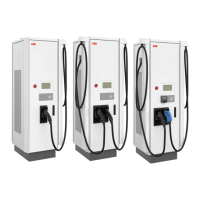
The ABB Terra DC Wallbox is a DC fast charger designed for electric vehicles, providing quick and efficient charging. It is an electrical installation that handles high electric currents. The device is intended for use by site operators responsible for its operation, daily inspection, and maintenance, as well as by EV drivers who will interact with its user interface.

Function Description

The Terra DC Wallbox charger consists of at least one power cabinet and is solely used to charge electric vehicles compatible with supported charging standards. It typically draws power from the grid. The charger supports various DC charging standards, including CCS (Combined Charging System) and CHAdeMO. Depending on the configuration, it can have one CCS outlet, one CHAdeMO outlet, or both. However, simultaneous charging with both CCS and CHAdeMO outlets is not possible in the dual-outlet configuration.

The charger can output a continuous power of 22.5 kW, with a peak output capability of 24 kW. Its output power versus voltage curve indicates that it can operate efficiently across a wide voltage range, supporting both 400VDC and 800VDC architecture battery packs. The continuous output power may be limited when the ambient temperature exceeds the optimal operating range of -35 °C to +45 °C, with an overheating protection algorithm linearly derating the unit up to +55 °C (in locations not exposed to direct solar radiation). Automatic current limitation is also in place for Vout ranges of 480-675 Vdc and 150-350 Vdc. For 1-phase 208V L-N AC supplied versions, the input max current limitation to 100A restricts the maximum output power to 19.2kW at 208 Vac.

Usage Features

The Terra DC Wallbox features a Human Machine Interface (HMI) display that guides users through the charging process with pictograms and texts, optimized for understandability and user experience. Help screens are available to provide additional information.

Charging an electric vehicle involves a few simple steps:

  1. Parking and Preparation: Park the EV with its charging inlet within reach of the connector and turn off the vehicle.
  2. Connector Selection: On the HMI display, the user first selects the desired output (e.g., Chademo or CCS).
  3. Connection: Connect the charger's connector to the vehicle's charging inlet. The display will indicate when the connection is successfully established.
  4. Authorization: Authorize the charging session using either a PIN code or an RFID card. The RFID card or tag should be held in front of the reader. Operation of the charger is possible with or without authorization, which can be based on RFID or credit card payment methods. Authorization often requires a subscription to a back office, which can be an ABB-supplied standard solution or from an external company offering authorization solutions via OCPP.
  5. Charging Process: Once authorized, the charger prepares for charging, setting up communication with the car. The display shows the charging status, including the percentage charged, delivered kWh, and elapsed time.
  6. Stopping and Disconnection: The charging process continues until the battery is full or the user manually stops it. To stop charging, select "stop" on the touch-screen. Authorization may be required again to stop the session, using the same method as for starting. For CCS, the car will unlock the outlet; for CHAdeMO, the charger will release the integrated lock. After stopping, disconnect the plug from the vehicle and return it to its holder on the charger.

Important notices for users include:

  • Locked Connector: For CCS charging, the EV locks the connector. Users may need to unlock all doors of the EV or use the 'unlock charge connector button' on the car key to release it.
  • Session End: Charging can stop automatically without user interaction when the EV indicates completion or when the maximum charge time set by the operator/owner is reached. If the battery is not fully charged, a new session can be initiated.

Maintenance Features

The owner and site operator have several responsibilities to ensure the safe and proper functioning of the charger:

  • Site Preparation: Ensure the installation site meets specified requirements and that there is sufficient space around the charger for maintenance.
  • Protective Devices: Ensure all protective devices are correctly installed and that the charging station is operated with them in place.
  • Emergency Plan: Develop an emergency plan outlining actions in case of an emergency.
  • Responsible Person: Appoint a person responsible for safe operation and work coordination, instructed by ABB or an ABB-trained service partner.

Cleaning and Inspection:

The Terra DC Wallbox cabinet should be cleaned annually as part of yearly maintenance:

  • Remove rough dirt by spraying with low-pressure tap water.
  • Clean dirt by hand with a cloth rag.
  • Rinse thoroughly with tap water.
  • Optionally, apply wax on the front for extra protection and gloss.
  • Inspect the overall enclosure and frontal cover for cracks or other damages.

Ordinary Cleaning:

  • Keep air inlets clean and free from snow, leaves, or other materials.
  • Avoid using high-pressure water jets, as water may leak into the cabinet. If used, ensure the inside of the cabinet is dry.
  • Only use cleaning agents with a pH value between 6 and 8.
  • Do not use cleaning agents with abrasive components or abrasive tools.

Rust Forming:

In corrosion-sensitive environments, superficial rust may form on welding points. This is primarily visual and does not compromise the cabinet's integrity. It can be removed with the described cleaning procedure. To prevent recurrence, prime the areas with a transparent or color-like priming finish.

Service Inspection (Advised Yearly):

  • Internal RCM: Test the correct functioning of internal RCMs by pressing the "TEST button" on the device. This should be checked during the yearly maintenance visit by a certified ABB technician.
  • Cable and Connector: Check for cracks or ruptures on the connector or cable, and ensure no internal wires are visible.
  • Display Screen: Check for damage and cracks.
  • Powder Coating: Look for damage, cracks, or ruptures.
  • Emergency Stop Button: Check for functionality and damage.

Special Inspections:

The charger must be checked by ABB service personnel before further use if:

  • It was struck by lightning.
  • It is damaged due to an accident or fire.
  • Its location has been flooded. Do not power on the charger until it has been inspected and approved.
  • De-energize Unit: De-energize the unit safely using appropriate instruments (multimeter). Open the cover, inspect the air filter, and clean or replace it as needed.
  • Input Connections: Check input connections and terminations for proper torque values.
  • Grounding Resistance: Check grounding resistance.
  • Breakers: Exercise input breaker and output DC breakers.
  • HMI Cover: Open the HMI cover, inspect capacitors and fuse connections.
  • Interior Cleaning: Clean the interior with compressed air.
  • Cooling Fins: Blow out rear cooling fins and remove any debris.
  • Reassembly and Verification: Reassemble the unit, energize it, verify input voltage, and perform a charging session.
  • Network Verification: Use the connected network to verify charging session details.

The air filters should be inspected every 12 months and replaced if required. The environment and number of charging sessions may influence the frequency of replacements.

Troubleshooting:

In case of a vehicle crash, fire, or fluid spill, specific procedures will be defined in future revisions of the manual. For general problem resolution, the site operator or helpdesk is the first point of contact and can remotely solve simple issues. For more complex problems, ABB Service may request the site operator to report on the status of internal components.

Contact Information:

For problem analysis and solving, users should contact their local ABB Service organization or Service partner. If they cannot resolve the problem, they will escalate it to the second-line Service organization.

ABB Terra DC wallbox Specifications

General IconGeneral
Output Powerup to 24 kW
Input Voltage400 VAC (3-phase)
AuthenticationRFID, App
Enclosure RatingIP54
Output Currentup to 60 A
Efficiency>95%
CommunicationOCPP 1.6
Charging StandardCHAdeMO
Operating Temperature-35°C to +50°C
Output Voltage150 - 920 V DC
Connector TypeCCS2, CHAdeMO
Communication InterfaceEthernet, Wi-Fi
Cooling MethodNatural convection

Related product manuals