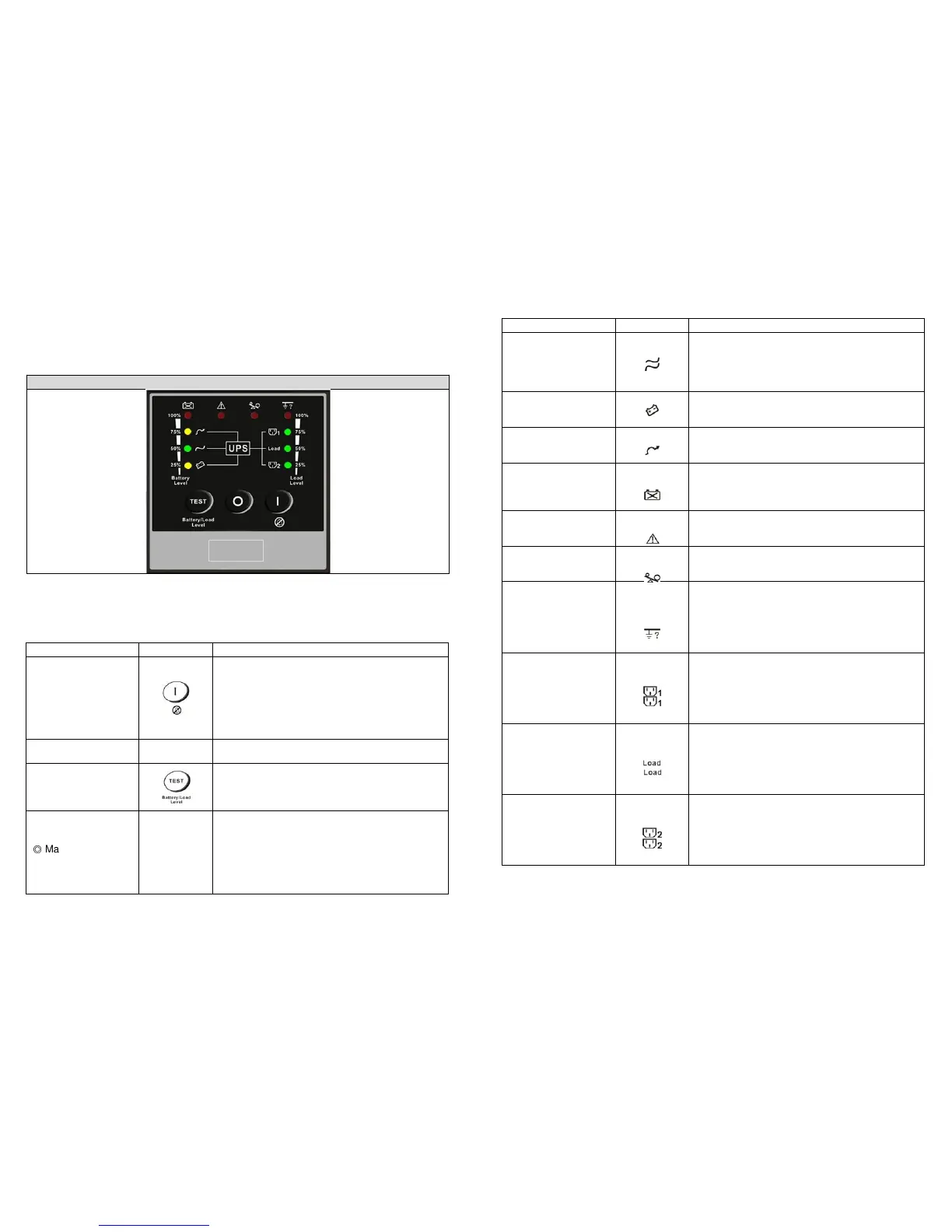
LED Indicator Symbol Description
1. Solid indicates normal utility voltage. Blinking
indicates insufficient utility voltage for the full
load. Off indicates abnormal utility voltage.
2. In Battery and Load Function Mode indicates
battery capacity is 50%.
Battery Mode LED
1. Indicates load supplied by battery power.
2. In Battery and Load Function Mode indicates
battery capacity is 25%.
Bypass Mode LED
1. Indicates load supplied by bypass.
2. In Battery and Load Function Mode indicates
battery capacity is 75%.
Battery Bad/Weak
LED
1. Indicates low battery power or faulty battery
bank.
2. In Battery and Load Function Mode indicates
battery capacity is 100%.
Fault LED
1. Solid indicates fault or abnormal condition.
2. Blinking indicates LED Panel in Error Code
Overload LED
1. Indicates UPS is overloaded.
2. In Error Code Function Mode indicates Error
Site wiring fault LED
1. Indicates live and neutral lines are connected
wrongly or high neutral-ground voltage.
2. In Battery and Load Function Mode indicates
load capacity is 100%.
3. In Error Code Function Mode indicates Error
1. Indicates UPS Outlets 1 are enabled and ready
to supply loads. (This function is optional.)
2. In Battery and Load Function Mode indicates
load capacity is 75%.
3. In Error Code Function Mode indicates Error
1. Indicates UPS outlets are enabled and ready
to supply loads.
2. In Battery and Load Function Mode indicates
load capacity is 50%.
3. In Error Code Function Mode indicates Error
1. Indicates UPS Outlets 2 are enabled and ready
to supply loads. (This function is optional.)
2. In Battery and Load Function Mode indicates
load capacity is 25%.
3. In Error Code Function Mode indicates Error
3. UPS Functional Descriptions
3.1 Front Panel Display
3.1.1 ARES RT< Convertible Type (Rack / Tower)> LED Panel (Standard)
LED Panel
Control Key Symbol Description
a. UPS Power-On Switch
(Press and hold until the buzzer beeps.)
b. Alarm silence
c. Error Code Display Function Mode
After an alarm, press to mute the alarm buzzer and
show an Error Code. (Do not hold for > 1 second.)
UPS Power-Off Switch
(Press and hold until the buzzer beeps.)
a. Commands the UPS to perform self-testing
(Press and hold until the buzzer beeps.)
b. Battery and Load Display Function Mode
(Do not hold for > 1 second.)
+
Press the "ON" key and "Self-Test" key
simultaneously for three seconds to transfer from
"Inverter to Bypass" (The bypass LED will
continuously blink and the buzzer will beep
intermittently.) or "Bypass to Inverter" when the
UPS is in on-line mode and the Bypass Voltage
Window is Normal.








 To Next Page