Web interface setup wizard
Web interface setup wizard
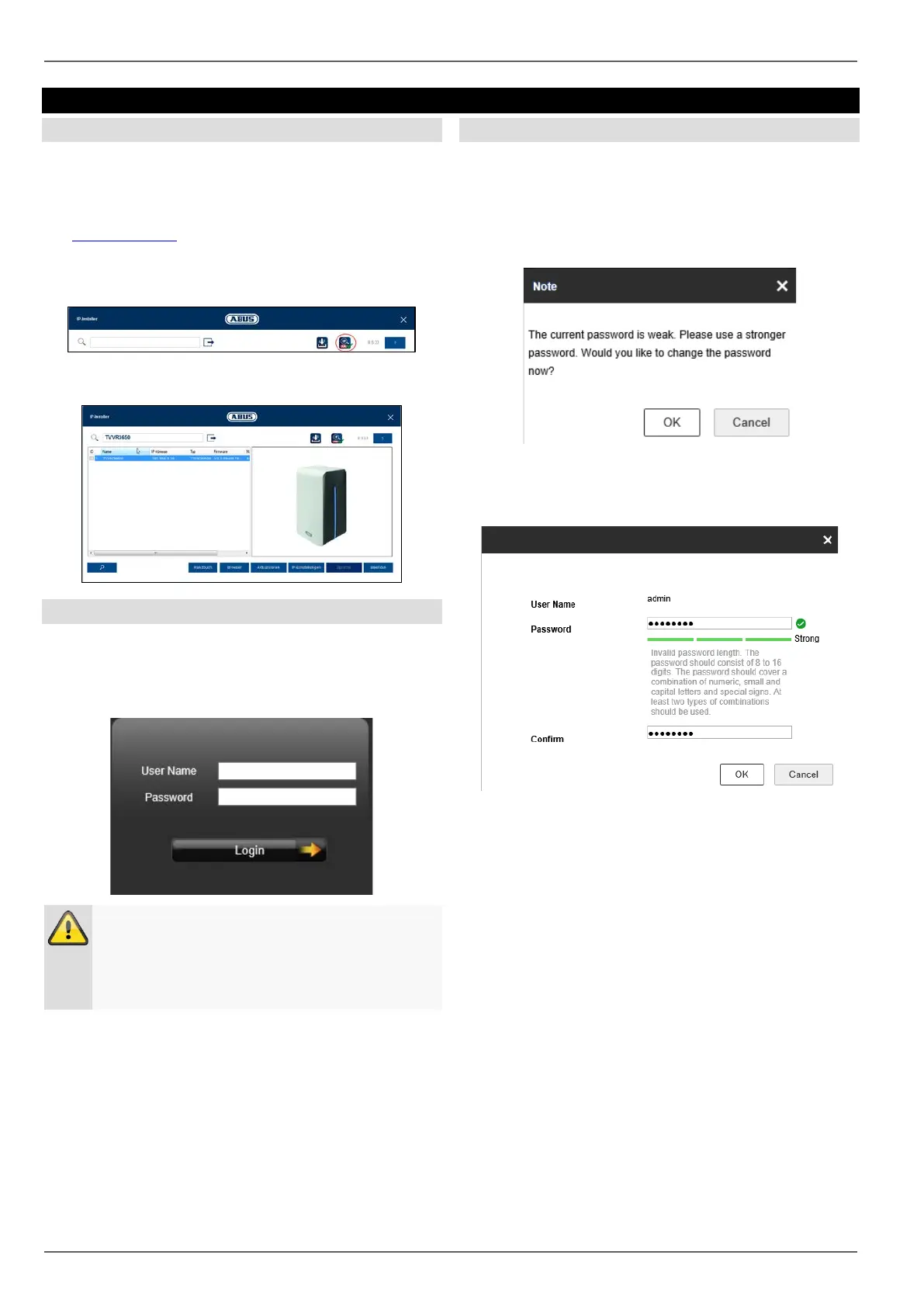
IP installer
If the recorder has been connected to your network, you
can search for it using the IP installer.
To do this, insert the CD provided into your PC. Alterna-
tively you can download the installation file from
the www.abus.com
website.
Following installation, launch the IP Installer. Make sure
that you have the most current version of the IP installer.
You will see this indicated on the icon (red circle)
Then, search for the recorder. The web interface is auto-
matically opened by a double-click on the entry.
Login
At the start of the setup wizard, first log in with the preset
user.
User name: admin
Password: 12345
Warning
Note down the admin password.
The preset password is:
“
”.
Recorder password note
Each time the device is started it will be checked if the
preset admin password “12345” has already been
changed. If this has not been changed, a notice will ap-
pear following each login reminding you to make the
change.
Click on OK to change the recorder password.
Enter the preset password “12345” and enter a new
password for your recorder. Pursuant to the description,
this must be made up of 8–16 characters and fulfil two of
the three specified criteria.
Then press ‘Ok’ to save the changes.
18



 To Next Page