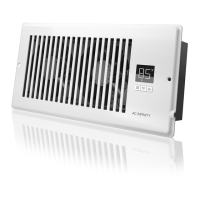
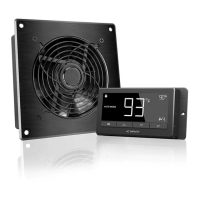
The AIRTAP Series Register Booster Fan System is designed to enhance the airflow of existing AC or heating systems, providing a solution for uneven temperature distribution in rooms. This user manual outlines the installation, programming, and features of the device, aiming to improve comfort and energy efficiency in your home.
Function Description
The primary function of the AIRTAP Series is to boost the airflow from your register vents. It acts as a supplementary fan system that activates based on temperature triggers, either for cooling or heating. When your air conditioner is on, the cooling trigger can be set to activate the fans when the airflow temperature falls below a certain point, pulling cold air from your duct and distributing it more effectively into the room. Conversely, when your central heating system is active, the heating trigger can be programmed to turn on the fans when the airflow temperature rises above a set point, boosting the distribution of warm air. This intelligent system ensures that conditioned air travels farther, helping to balance room temperatures and reduce hot or cold spots. The unit is equipped with a probe that measures the actual airflow temperature from your register vent, which is crucial for accurate triggering, as it may differ from your home thermostat's reading. The fans are designed to ramp up or down gradually, minimizing noise and optimizing power consumption.
Usage Features
The AIRTAP Series offers a range of features designed for user convenience and effective temperature management.
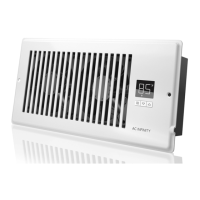
- Smart Controller: The integrated smart controller is the brain of the system, enabling temperature monitoring and allowing users to set both hot and cold temperature triggers. It also provides precise fan speed control, giving you command over the airflow intensity.
- Temperature Display: The default display mode shows the current airflow temperature measured by the probe. This is essential for monitoring the actual temperature of the air coming from your vent and for calibrating the cooling and heating triggers accurately.
- Cooling Trigger: This mode allows you to set a specific temperature threshold for your air conditioner. When the probe detects that the airflow temperature meets or falls below this setting, the fans will activate to boost the cold air. To disable this feature when not using your AC, you can hold the mode button for two seconds until "OF" is displayed.
- Heating Trigger: Similarly, this mode enables you to set a temperature trigger for your heater. When the probe detects that the airflow temperature meets or rises above this setting, the fans will turn on to boost the warm air. This feature can also be disabled by holding the mode button for two seconds.
- Fan Speed Control: The unit offers 10 fan speeds, from 1 to 10. This allows you to set the maximum running speed for the fans when the cooling or heating triggers are activated. Adjusting the fan speed helps manage the level of airflow boosting and, consequently, the operating noise. Holding the MODE button in this mode will set the fan speed to 0, effectively turning off the fans.
- Controller Lock: To prevent accidental changes to settings, the controller can be locked. While in the temperature display mode, holding the mode button for three or more seconds will lock the controller. In this state, you cannot switch modes or adjust settings, but the programmed functions will continue to operate in the background. Holding the mode button again for the same duration will unlock it.
- Hide Display: When the controller is locked, you have the option to hide the display and turn off its backlight by pressing the mode button. All programs and settings will remain active in the background. Pressing any button will bring the display back.
- Fahrenheit or Celsius Toggle: The temperature scale can be switched between Fahrenheit and Celsius by simultaneously holding the up and down buttons until the letters change. All displayed digits will automatically convert to the selected scale.
- Quiet PWM Motor: The fans are equipped with PWM-controlled motors, which allow for precise speed control, reduced noise levels, and energy-efficient DC power consumption.
- Stator Blades: Hydro-mechanical stator blades are incorporated into the design to enable air to travel farther, even in environments with high static pressure, enhancing the effectiveness of the booster fan.
Maintenance Features
While the manual does not explicitly detail maintenance features, the design of the AIRTAP Series suggests a focus on durability and protection.
- Aluminium Frame: The unit features an aluminum frame with CNC-machined corners, available in white or bronze finishes. This not only provides a clean aesthetic but also contributes to the overall robustness and longevity of the device.
- Dual Ball Bearings: The motors are equipped with dual-ball bearings, allowing the unit to be mounted in any direction without compromising performance. These bearings are designed for a long lifespan of 67,000 hours, indicating a durable and reliable motor system that requires minimal maintenance.
- Protective Back: The fans are enclosed in a thermoplastic casing with fan guards. This design serves to protect users from the high-speed fans and helps prevent clogging from dust or debris, which can be a common issue in HVAC systems. While not a direct maintenance feature, this protective design reduces the likelihood of internal damage and the need for frequent cleaning or repairs.
The AIRTAP Series is designed to be a "set and forget" system once the triggers and fan speeds are calibrated, minimizing the need for constant user intervention. The emphasis on durable components and protective design elements contributes to the device's overall low-maintenance profile.

 Need help?
 General


 To Next Page