14
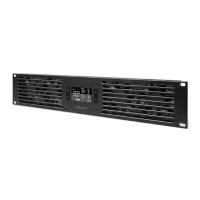
1. MODE BUTTON
Cycles through the controller’s
five modes: AUTO, SMART,
SPEED, ALARM, and
BUFFER. Holding the mode
button for three seconds will
lock or unlock the display.
10. ALERT ICONS
Displays the check fan,
alarm, and display lock icons.
These icons will flash and
beep when its corresponding
function is triggered.
2. LEAF BUTTON
Turns the screen off while
programs run in the background.
Holding this button for three
seconds will switch the
temperature scale between
Fahrenheit and Celsius.
3. UP / DOWN BUTTON
Adjusts the settings of
the mode that you are in.
Up button increases and
down button decreases.
4. PROBE TEMP.
Displays the current temp-
erature that the corded sensor
probe is measuring. Shows
“—“ if no probe is plugged in.
5. SETTING TEMP.
Displays the temperature
set for AUTO and SMART
mode, which shares the
same temperature setting.
6. ALARM TEMP.
Displays the temperature
set for the fan’s alarm
system.
7. FAN SPEED
Displays the current fan
speed, ranging from 0-6.
Pressing the up and down
buttons will adjust this setting.
8. BUFFER
Displays the buffer range set
for AUTO and SMART mode.
9. MODE
Displays the mode that the
controller is currently in.
Pressing the mode button
cycles through the modes.
PROGRAMMING



 To Next Page