13
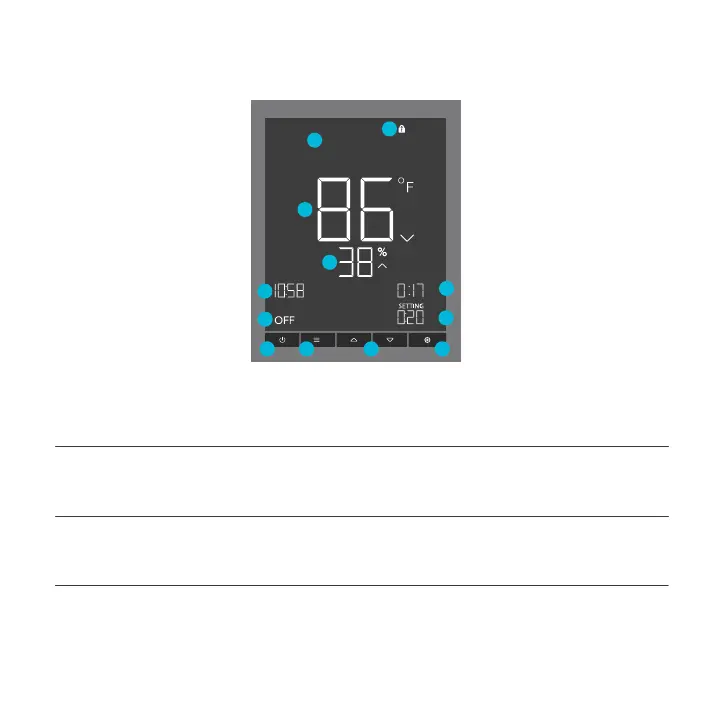
1. POWER BUTTON
Cycles through each of the controller’s mode: OFF, ON, AUTO (4 triggers), TIMER TO ON, TIMER
TO OFF, CYCLE (On and Off), and SCHEDULE (On and Off).
PROGRAMMING
CONTROLLER 75
2. MODE BUTTON
Cycles through each of the controller’s mode: OFF, ON, AUTO (4 triggers), TIMER TO ON, TIMER
TO OFF, CYCLE (On and Off), and SCHEDULE (On and Off).
3. SETTING BUTTON
Cycles through each of the controller’s settings: DISPLAY BRIGHTNESS, °F/ °C, CLOCK,
CALIBRATION (Temperature and Humidity), and BUFFER (Temperature and Humidity).
4. UP/DOWN BUTTONS
Adjusts the value of your current mode. The up button increases and down button decreases the
setting. Hold both to reset values to OFF or 0.
ON
TO
ON
TIMER TO
PM
1
2
3
6
7
8
9
10
11
4
5
12


 To Next Page