Installation & Operation Manual - Model AVC5000
Contents of this Manual are Subject to Change Without Notification Page 19
6.4 AVC Insight Software Product Registration
Once the AVC Insight Software has been installed on your PC, you will need to register the
product and obtain a valid software key from the factory by performing the following steps.
Note: This process will require an automatic email to be generated from your computer so
you will need to have internet access to generate the key request.
1. Double click on the desktop shortcut created during the installation, or go to the Start Menu
and select Programs>AVC Insight.
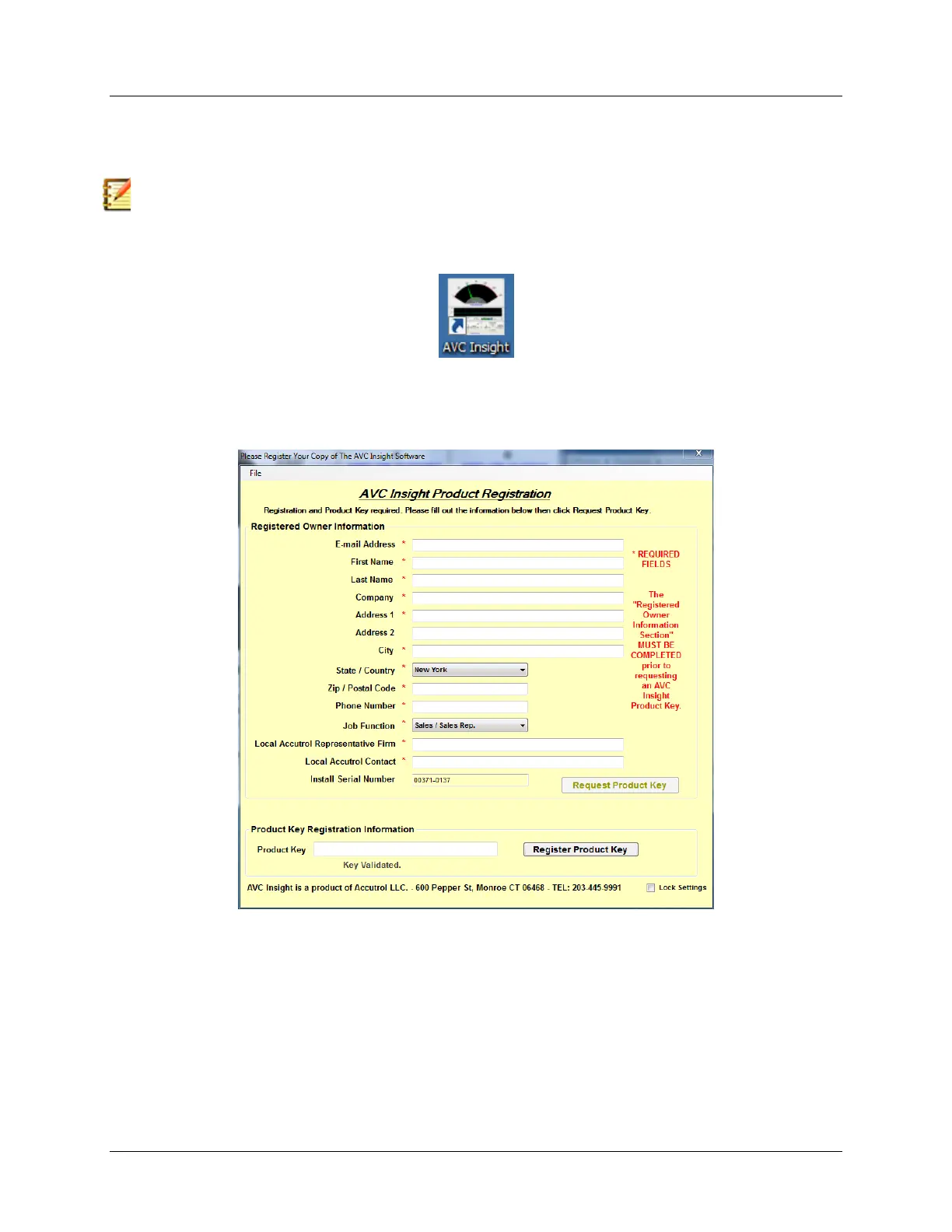
2. A Product Registration Form similar to the one shown below will open. Fill in the required
information on the form and click on the “Request Product Key” button to generate the
email key request to the factory.
3. Once the key request email has been received by the factory, a unique Product Key will be
generated and sent to the email address provided on the Registration Form.
4. After receiving the email from the factory, copy the product key and paste it into the field
provided at the bottom of the form then click on the “Register Product Key” button.
5. You will now be able to use the AVC Insight Software on this computer. If you have any
problems, contact Accutrol LLC at 203-445-9991.



 To Next Page