Installation & Operation Manual - Model AVC5000
Contents of this Manual are Subject to Change Without Notification Page 43
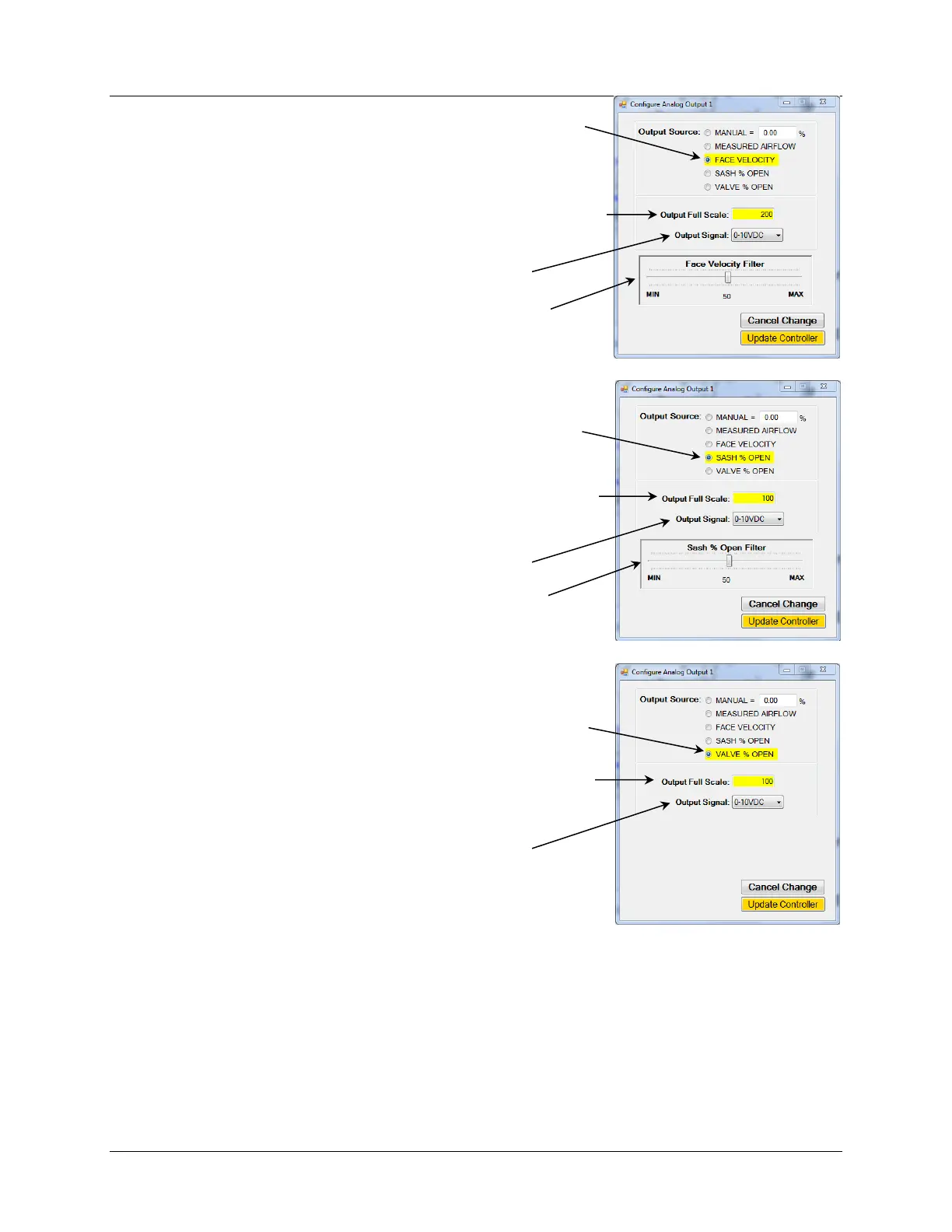
Selecting “FACE VELOCITY” sets the Analog Output to correspond with
the Face Velocity.
Note: This option is only available for Fume Hood Mode with sashes.
Selecting “SASH % OPEN” sets the Analog Output to correspond with
the Sash % Open value.
Note: This option is only available for Fume Hood Mode with sashes.
Selecting “VALVE % OPEN” sets the Analog Output to correspond with
the AccuValve % Open value.
The Output Full Scale provides the FS range for the Gauge and Analog
Output Signal. This example sets the AO Full Scale and Gauge FS to 200
FPM.
The Output Signal Type is selected from the dropdown list.
Filtering can be applied to the output value by using the slider
provided.
The Output Signal Type is selected from the dropdown list.
The Output Full Scale provides the FS range for the Gauge and Analog
Output Signal. This example sets the AO Full Scale and Gauge FS to
100% Open.
Filtering can be applied to the output value by using the slider
provided.
The Output Signal Type is selected from the dropdown list.
The Output Full Scale provides the FS range for the Gauge and Analog
Output Signal. This example sets the AO Full Scale and Gauge FS to 100
% Open.



 To Next Page