21 | Page
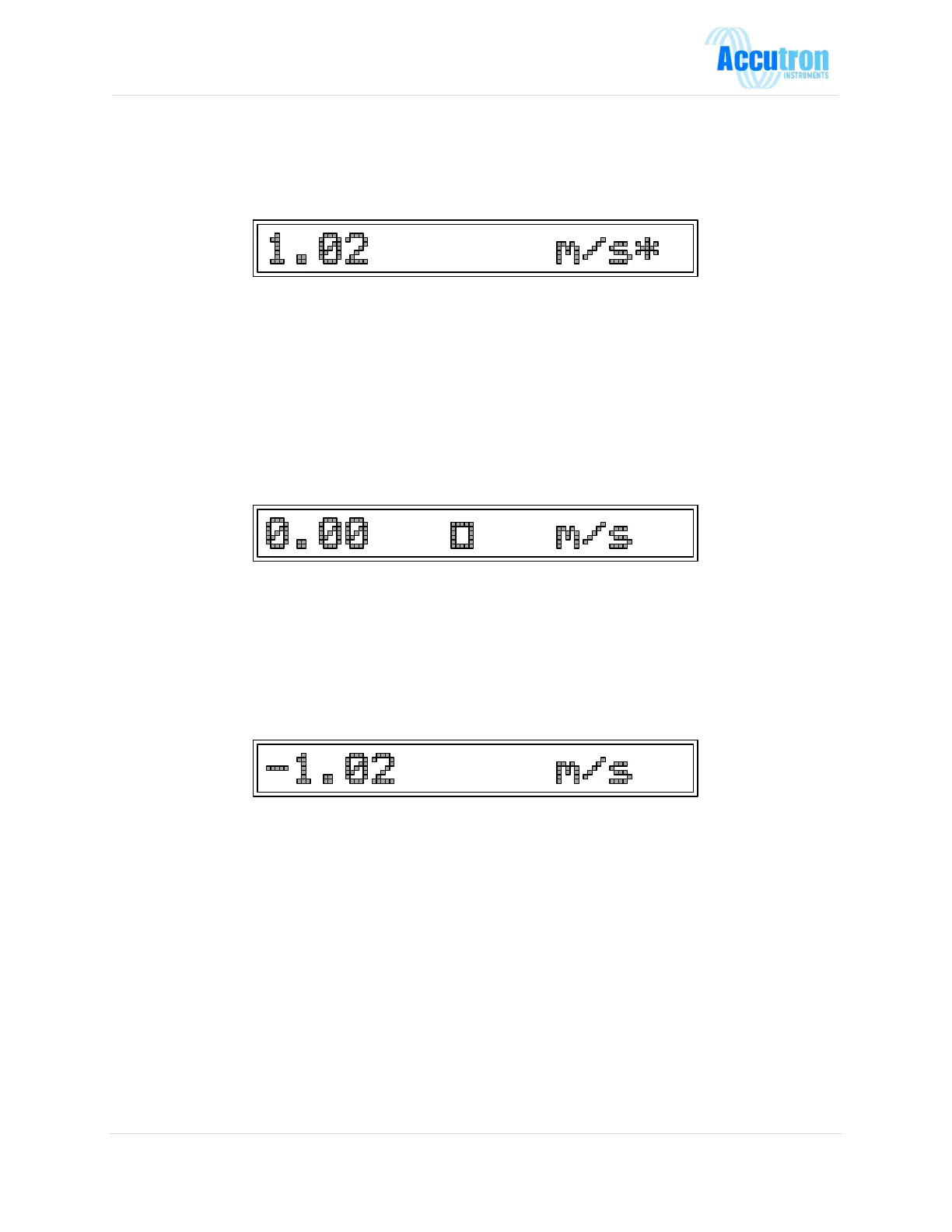
G) What does the star (*) mean at the end of my display?
• The star indicates that the reading is currently over the full-scale limit. You may want to verify if
this is the case. If so, you can adjust the full-scale limit to a higher value.
H) What does the square (donut) mean in the middle of the display?
• The donut means that the instrument is rejecting readings acquired because there is a problem
(could be an obstruction like a vehicle parked between both sensors).
• Check to see if there is an obstruction between both sensors.
• Make sure both sensors are aligned properly.
• Make sure both transducers are attached to the main unit with cables.
• Check to see if the cables are tightly connected.
I) What does the negative sign (-) mean on the display?
• One of the important features of the Accutron is the ability to measure bi-directional airflows. A
negative sign at the far-left hand side of the 16-digit display indicates this. Also, the 4-20mA
split mode can be used to pass this information to a PLC. In the configuration menu this can be
changed to show a positive value.
J) What is the difference between the 4-20mA normal/reverse/split mode?
Normal: Airflow of 0 will output 4mA while airflow reaching instrument full-scale will output
20mA.
Reverse: Airflow of 0 will output 20mA while airflow reaching instrument full scale will output
4mA.
Split: Airflow of 0 will output 12mA (half the distance between 4mA and 20mA). Positive
airflow reaching instrument full-scale will output 20mA while the negative value of
instrument full-scale will output 4mA.


 To Next Page