20CG48 User Guide English
• AMD FreeSync Premium: To control support AMD FreeSync Premium or not,
default is “On”.
• Refresh Rate Num: Display the panel’s current refresh rate on the screen.
• Ultra-Wide Mode: Default is “Off”. Can select “21:9” or “ 32:9”.
Note:
• When User selects 21:9” or 32:9”, Wide mode will be switched to 1:1 automatically
and grayed out.
• When User selects “Off”, Ultra-Wide Mode will go back to original setting.
• Ultra-wide mode only supports HDMI4 (2.1), DP and Type-C sources and
would be grayed out for function of PIP/PBP and 1:1 in wide mode.
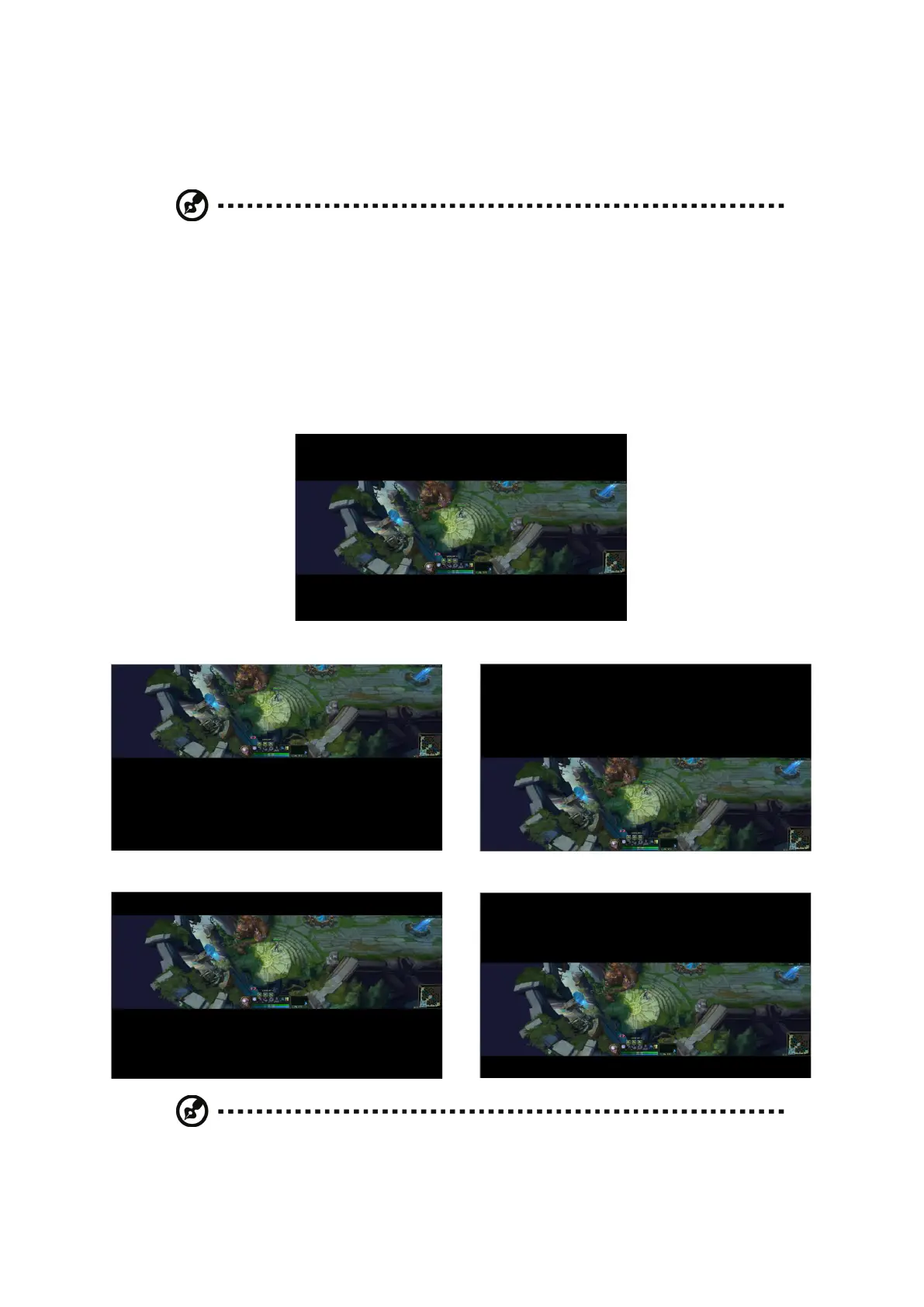
• Screen Position: Default is “0”. User can select “2”, “1”, “0”, “-1”, or “-2”.
Screen Position = 0, Center
Screen Position = 2, Top Screen Position = -2, Bottom
Screen Position = 1, Between Center and Top Screen Position = -1, Between Center and Bottom
Note:
• This function is only enabled if Ultra-Wide Mode is set to “21:9” or “32:9”.
• This function is grayed out when Ultra-Wide Mode is set to “Off”.


 To Next Page