7
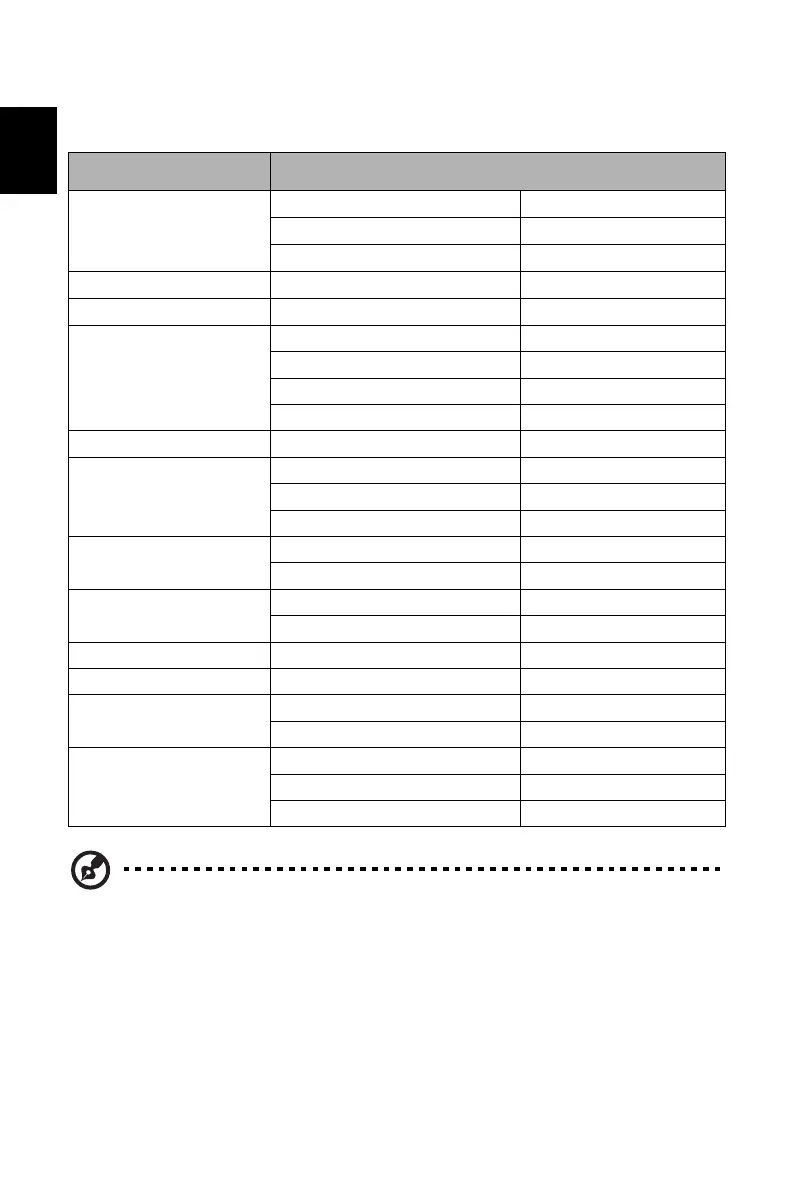
STANDARD TIMING TABLE
Mode Resolution
VGA
640 x 480 60 Hz
640 x 480 72 Hz
640 x 480 75 Hz
MAC 640 x 480 66.66 Hz
VESA 720 x 400 70 Hz
SVGA
800 x 600 56 Hz
800 x 600 60 Hz
800 x 600 72 Hz
800 x 600 75 Hz
MAC 832 x 624 74.55 Hz
XGA
1024 x 768 60 Hz
1024 x 768 70 Hz
1024 x 768 75 Hz
SXGA
1280 x1024 60 Hz
1280 x1024 75 Hz
VESA
1280 x 720 60 Hz
1280 x 960 60 Hz
WXGA+ 1440 x 900 60 Hz
WSXGA+ 1680 x 1050 60 Hz
FHD
1920 x 1080 60 Hz
1920 x 1080 75 Hz
DFHD
3840 x 1080 60 Hz
3840 x 1080 120 Hz
3840 x 1080 144 Hz
Note: 1. DP (1.2): 3840x1080 supports 120Hz (also support overclock to 144Hz, but
there is no guarantee for normal operation under Overclocking and
FreeSync "Extreme" mode), FreeSync2 and HDR technology.
HDMI (2.0): 3840x1080 (up to 120Hz), supports FreeSync2 and HDR
technology.
HDMI (1.4): 3840x1080 (up to 60Hz).
2. When Overclocking is enabled, Over Drive will be automatically set to Off.
Meanwhile, Overclocking may result in flicker or other adverse effects that
may derive from the total configuration of the system connected to the
display, and possibly, in addition, the display’s panel specifications. It may
be possible to resolve or reduce such effects by setting a lower refresh rate.


 To Next Page