EN-9
INSTALLATION
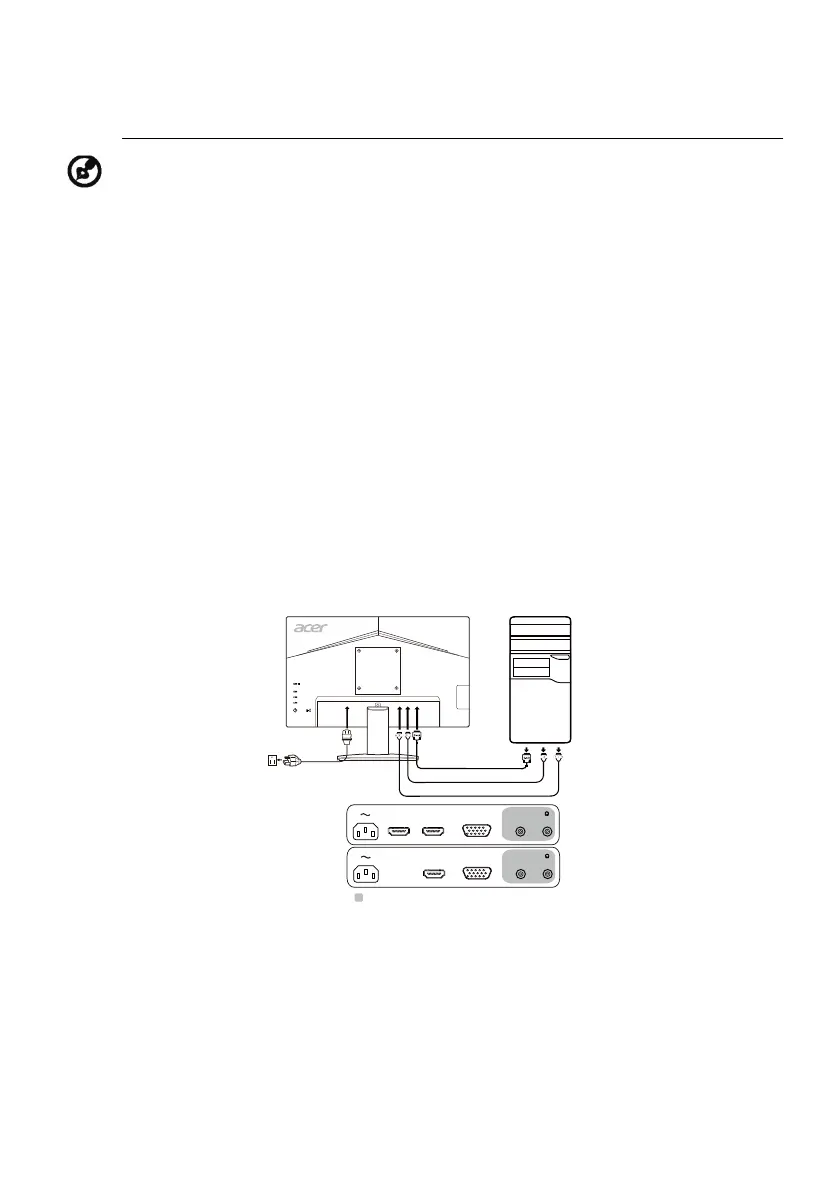
To install the monitor to your host system, please follow the steps as given
below:
Steps
1. 1-1 Connect Video Cable
a. Make sure both the monitor and computer are powered-OFF.
b. Connect the VGA cable to the computer.
1-2 Connect HDMI Cable (Only HDMI-input model)
a. Make sure both the monitor and computer are powered-OFF.
b. Connect the HDMI cable to the computer.
2. Connect the Audio Cable (Optional)
3. Insert the monitor power cable into the power port at the back of the
monitor.
4. Plug the power cords of your computer and your monitor into a nearby
electrical outlet.
Note: HDMI is purposely supporting the AMD FreeSync technology and target AMD
graphics solutions. For other GPUs, please contact the graphics card manufactures
whether they can support or not.
HDMI
HDMI
VGA
AUDIO INVGA INHDMI 2HDMI 1
AUDIO INVGA INHDMI



 To Next Page