19
English
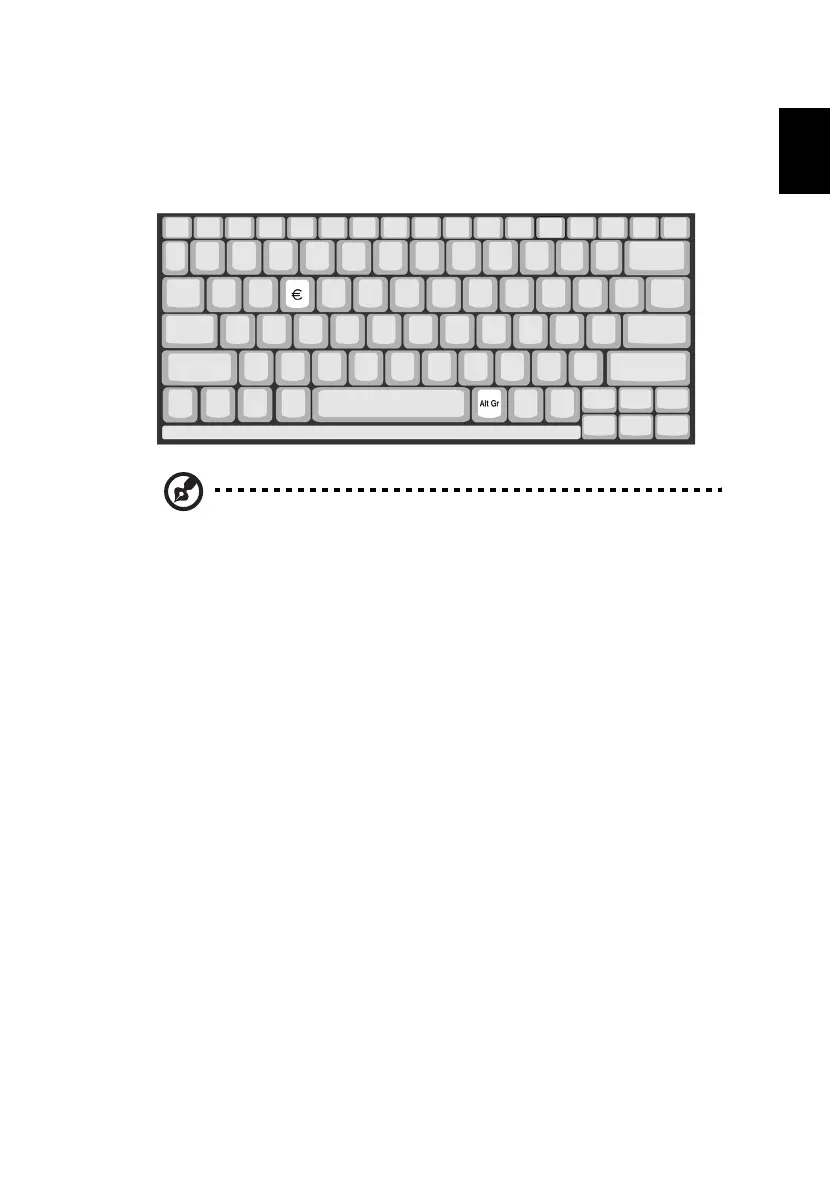
The Euro symbol
If your keyboard layout is set to United States-International or United
Kingdom or if you have a keyboard with a European layout, you can
type the Euro symbol on your keyboard.
Note for US keyboard users: The keyboard layout is set when
you first set up Windows. For the Euro symbol to work, the
keyboard layout has to be set to United States-International.
To verify the keyboard type in Windows Millennium Edition and
Windows 2000, follow the steps below:
1 Click on Start, Settings, Control Panel.
2 Double-click on Keyboard.
3 Click on the Language tab.
4 Verify that the keyboard layout used for "En English (United
States)" is set to United States-International.
If not, select and click on Properties; then select United States-
International and click on OK.
5 Click on OK.
To verify the keyboard type in Windows XP, follow the steps below:
1 Click on Start, Control Panel.
2 Double-click on Regional and Language Options.
3 Click on the Language tab and click on Details.
4 Verify that the keyboard layout used for "En English (United
States)" is set to United States-International.





 To Next Page