14 - Using the keyboard
Hotkeys
The computer uses hotkeys (key combinations) to access function
keys and navigation commands.
To activate hotkeys, press and hold the Fn key before pressing the
other key in the hotkey combination.
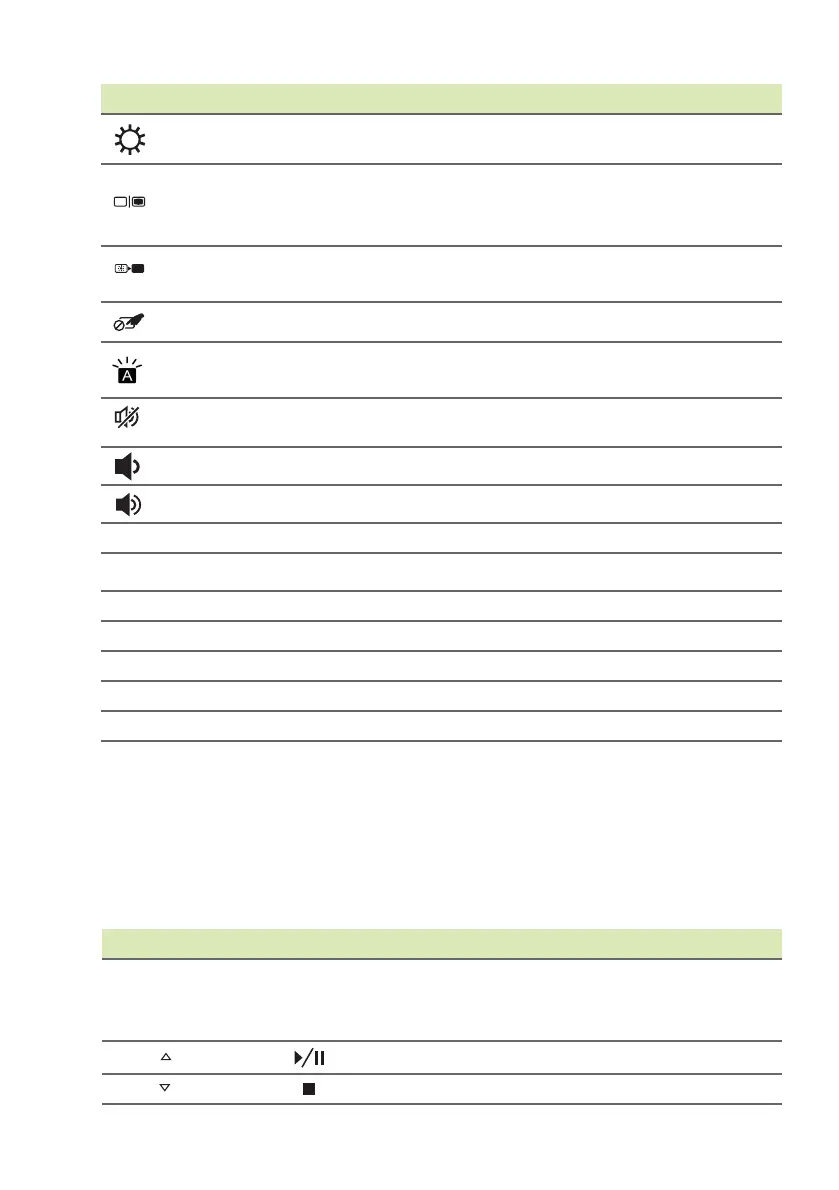
Brightness up Increases the screen brightness.
Display toggle
Switches display output between the display
screen, external monitor (if connected) and
both.
Display off
Turns the display screen backlight off to
save power. Press any key to return.
Touchpad toggle Turns the built-in touchpad on and off.
Keyboard
backlight toggle
Turns the keyboard backlight on and off.
Speaker toggle Turns the speakers on and off.
Volume down Decreases the sound volume.
Volume up Increases the sound volume.
Scr Lk
Scroll Lock Turns Scroll Lock on or off.
Pause
Break
Pause / Break Sends a Break Command.
Insert
Insert Turns Insert on or off.
Home
Home Scrolls to the beginning of a document.
Pg Up
Page up Scrolls up a page in a document.
Pg Dn
Page down Scrolls down a page in a document.
End
End Scrolls to the end of a document.
Icon Function Description
Hotkey Function Description
Fn + Special
keys (see page
13)
Function
keys
Activates the F1 to F12 keys.
Fn + Play/Pause
Fn + Stop










 To Next Page