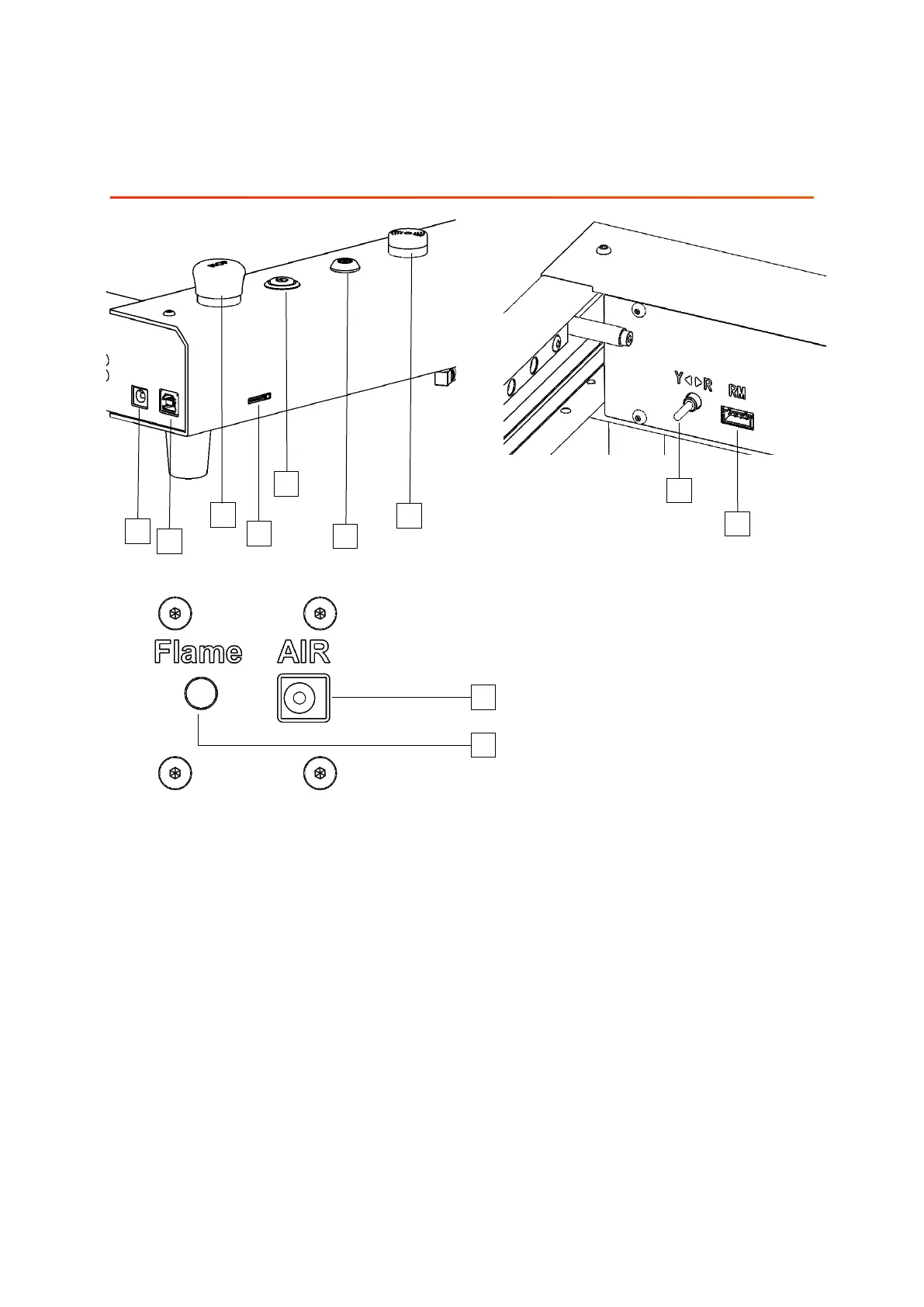
7.Port and Key Function Introduction
2
3
4
8
6
5
9
1. Power socket: input DC 24V power supply
4. TF card holder: insert TF card, used for APP operation to store data
5. Power switch
6. Key switch: lock and unlock by key rotation
9. Rotary module port: connect with rotary module
8. Rotary module changeover switch: please toggle the switch to the right end
when using the rotary module
2. USB port: communicate with computer through USB data
3. Emergency stop switch: press the emergency stop button, the machine stops
working; rotate the emergency stop button clockwise, the machine resets
1
10
11
7
7. Buzzer: will sound and flash when open flame is detected.
11. Flame sensor switch: turn on or off the flame detection function.
10. Air pump interface: air pump can be connected and controlled by software.
01 02
03 04
05 06
07 08
09 10
11
12
13 14
15 16
17 18
19 20
21 22
23 24
25 26
27 28
29 30
31 32
33 34



 To Next Page