8.Software Tutorials
8.1 LaserGRBL Tutorial
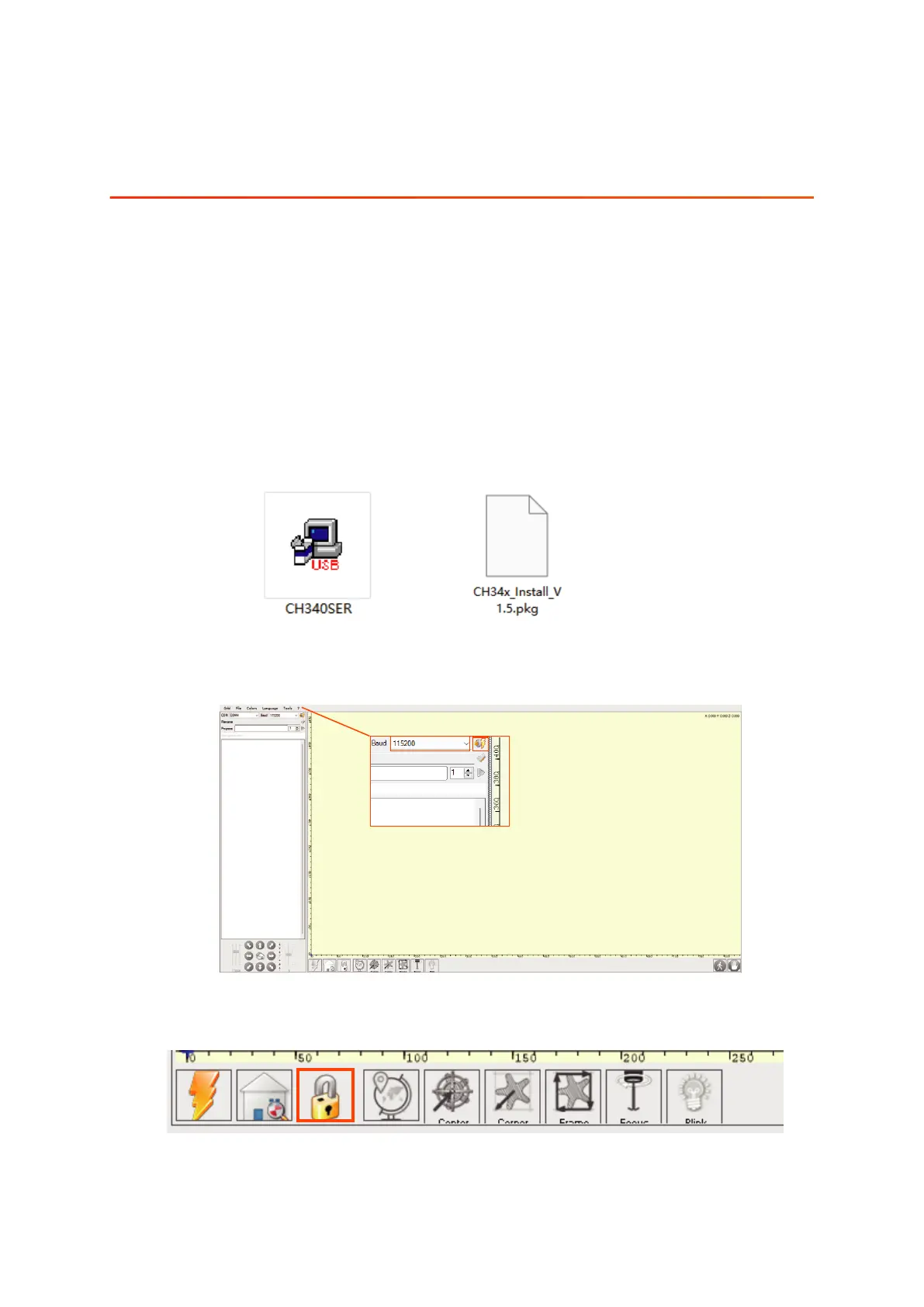
8.1.1 Select "115200", and then click "Connect".
ACMER laser engraver supports the most popular engraving software LaserGRBL and
Lightburn.
LaserGRBL is an open source, easy to use and powerful software that is perfect for
novice users to use, but LaserGRBL only supports Windows systems (Win XP/Win 7/
Win 8/XP/ Win 10). For Mac users, you can choose to operate LightBurn, which is also
an excellent engraving software, but it costs $40 (with a free one-month trial for the
first installation), and this software also supports Windows systems.
If you want to download and install LaserGRBL, you can get the data directly from the
TF card, or you can visit the official website of Laser GRBL to download; for Lightburn
users, you can Lightburn official website to download.
8.1.2 Click the Unlock button.
Note: If you are using this software for the first time, please get the driver file from
the TF card "Software->Drivers" file and install it.
01 02
03 04
05 06
07 08
09 10
11 12
13 14
15 16
17 18
19 20
21 22
23 24
25 26
27 28
29 30
31 32
33 34



 To Next Page