Replace the battery and repeat
the test.
Battery has discharged
and meter does not allow
more tests until discharged
battery is replacement with a
new battery
No code chip in the meter
Insert the code chip that
accompanied the box of test
strips.
Damaged code chip or the
code chip was removed
during a test
If the code chip is damaged, use a
new code chip with the correct code
number and run the test.
If the code chip is removed during a
test, confirm the code chip matches
the test strip code and repeat the test.
Meter electronics failure
If the problem persists,
contact your local distributor.
Strip testing error
Communications failure
There is an error in transferring data
to the PC.
See the package insert included
with the Data Management Kit for
troubleshooting.
Repeat test and apply enough
sample to fill the test strip check
window within 3 seconds.
When repeat testing, do not touch
the strip during meter count down.
Please make sure fresh blood
sample with intended hematocrit
level is used. Please make sure
blood sample is not contaminated.
If problem persists, contact your
local distributor.
®
Non On Call Advanced
code chip inserted in the
meter
Indicates an incorrect brand of code
chip was inserted in the meter.
Please make sure you use the On
®
Call Advanced brand of test strip
®
with the On Call Advanced Blood
Glucose Meter. If the problem
persists, contact your local
distributor.
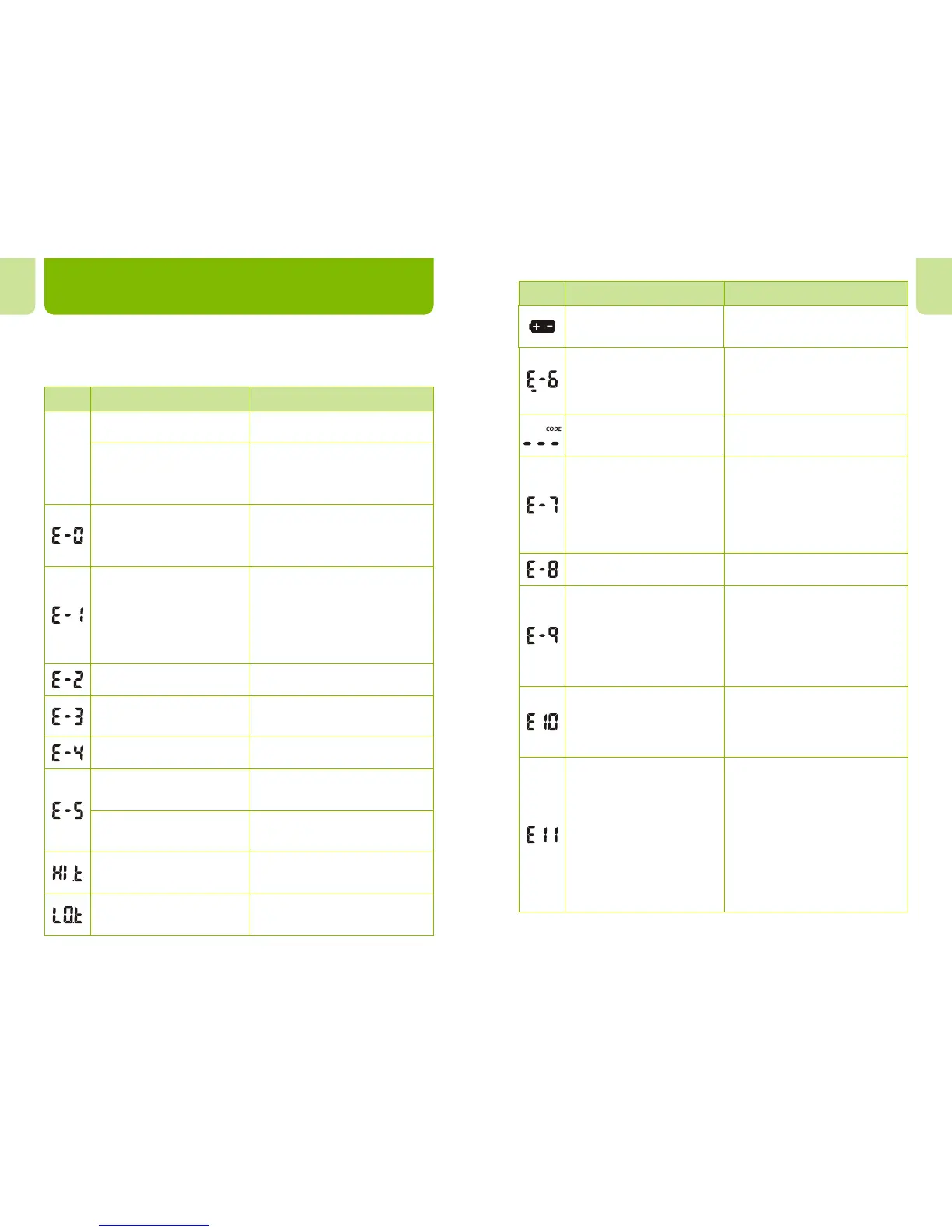
Troubleshooting Guide
The meter has built-in messages to alert you of problems. When error
messages appear, note the error number, turn off the meter and then
follow these instructions.
Display
Causes Solution
Meter
fails to
turn on
Battery may be damaged
or not be charged
Meter is too cold
Replace battery.
If meter has been exposed to or
stored in cold conditions, wait 30
minutes to allow meter to reach
room temperature then repeat test.
En En
Insufficient sample
Repeat test and apply enough
sample to fill the test strip check
window within 3 seconds.
Test strip is contaminated
or used
Repeat test with a new test strip.
Sample was applied to the
test strip too soon
Repeat test and apply sample after
blood drop/test strip icon appears.
Repeat the test and ensure test strip
remains in place.
Test strip was removed
during the test
Internal calibration check
error
If a cell phone, radio frequency
source or a high On/Off electrical
source is nearby, place more
distance between the meter and any
of these sources then retest.
If the problem persists, contact your
local distributor.
Power On self check error
Remove battery for 30 seconds and
then put battery back and turn meter
on again. If problem persists,
contact your local dealer.
Display
Causes Solution
Move to a cooler environment
and repeat the test.
Temperature has exceeded
the operating temperature of
the system
Battery is discharged but
has enough power to run
20 more tests
Test results will still be accurate,
but replace the battery as soon
as possible.
Temperature is below the
operating temperature
of the system
Move to a warmer environment and
repeat the test.
39 40
Sample application error due
to late sample re-dosing
Repeat test and apply enough
sample to fill the test strip check
window.


 To Next Page