En
Table of Contents
ii
Getting Started .................................................................................... 1
Install the Battery .............................................................................. 11
Meter Setup Before Testing .............................................................. 12
Performing a Quality Control Test ................................................... 17
Testing Your Blood ............................................................................ 20
Using the Meter Memory ................................................................... 31
Maintenance ....................................................................................... 35
Suggested Testing Times and Target Goals ................................... 37
Comparing Meter and Laboratory Results ...................................... 38
Troubleshooting Guide ..................................................................... 39
Specifications .................................................................................... 41
Warranty ............................................................................................. 42
Index of Symbol ................................................................................. 42
Index ................................................................................................... 43
Component Descriptions .............................................................. 2
®
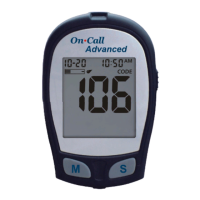
On Call Advanced Blood Glucose Meter .................................... 3
Meter Display ................................................................................5
®
On Call Advanced Blood Glucose Test Strips .............................6
®
On Call Advanced Glucose Control Solution .............................. 9
Step 1 - Coding the Meter ...........................................................12
Step 2 - Adjusting the Meter Settings ......................................... 12
Step 1 - Getting a Drop of Blood ................................................ 20
Step 2 - Testing Blood Glucose .................................................. 26
"HI" and "LO" Messages ............................................................ 28
"Hypo" and "Hyper" Messages ................................................... 29
"Ketone" Message ...................................................................... 29
Viewing Stored Records ............................................................. 31
Clearing the Memory .................................................................. 32
Transferring Records ..................................................................33
Replacing the Battery ................................................................. 35
®
Caring for Your On Call Advanced
Blood Glucose Monitoring System ............................................. 35


 To Next Page