10
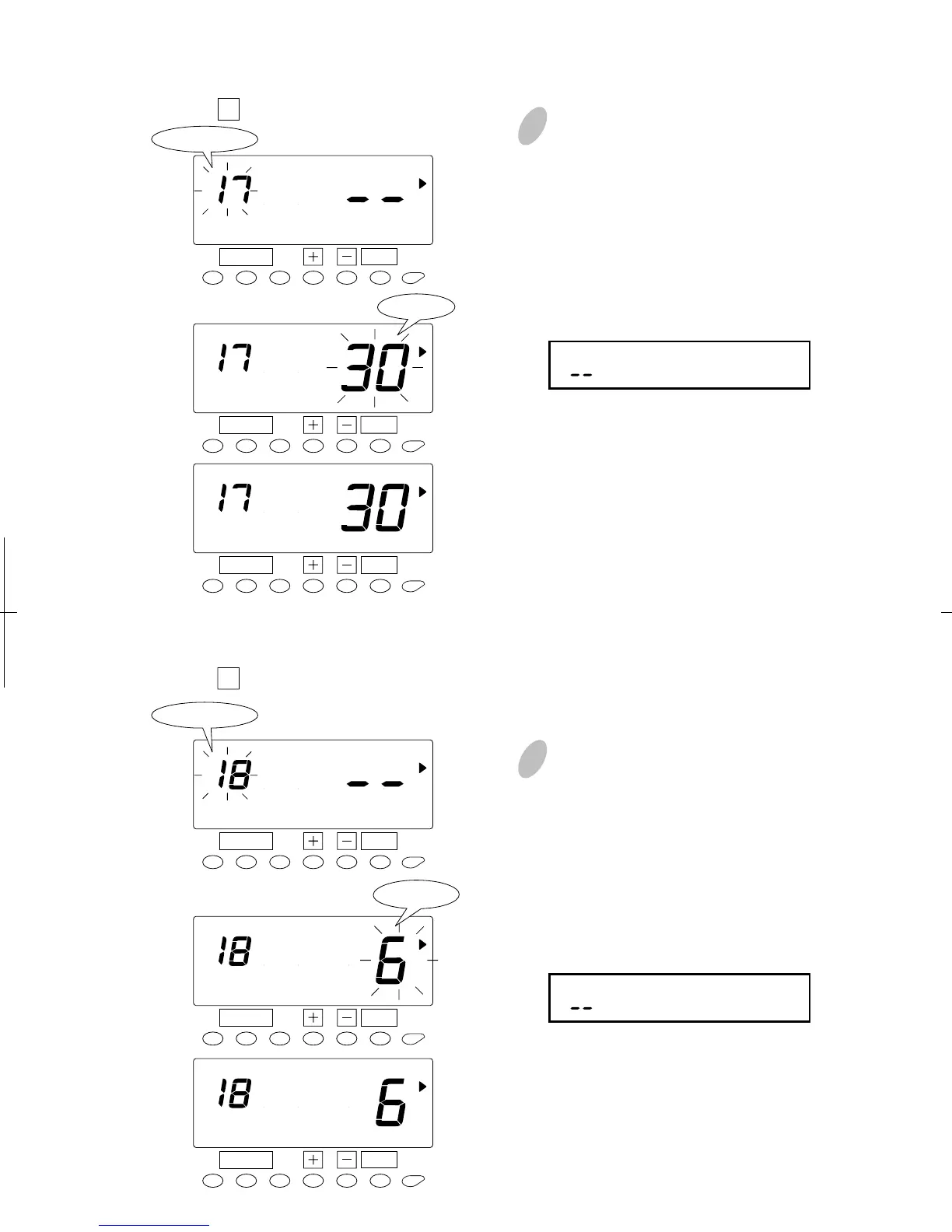
Push the [SET] button again to set
the left-side number at "18" by
pressing the [+] button. Once you
push the [SET] button, flashing of
the display will change to "Hour".
In case of the example, push the [+]
or [-] button to set at "6" and push
the [SET] button. At that moment,
the display will change from
flashing to steady.
Range of values: 1-24 hour(s)
(" " makes the function disabled.)
34
28
Duration of break time or the length of the "lunch" (hours/minutes) that can be deducted.
Set the " 17 Duration of break time".
9 Push the [SET] button again to set
the left-side number at "17" by
pressing the [+] button. Once you
push the [SET] button, flashing of
the display will change to
"Minutes". In case of the example,
push the [+] or [-] button to set at
"30" and push the [SET] button. At
that moment, the display will
change from flashing to steady.
Range of values: 1-99 min.
(" " makes the function disabled.)
SET
FUNCTION
Program No.
SCHEDULE
SET
FUNCTION
SCHEDULE
SET
FUNCTION
SCHEDULE
Minute
Threshold of overtime calculation or regular hours worked before time worked is considered
Overtime.
Set the " 18 Threshold hours of overtime calculation".
SET
FUNCTION
Program No.
SCHEDULE
SET
FUNCTION
SCHEDULE
SET
FUNCTION
SCHEDULE
Hour


 To Next Page