This function is available if weekly or bi-weekly ending has been selected in the pay
period setting.
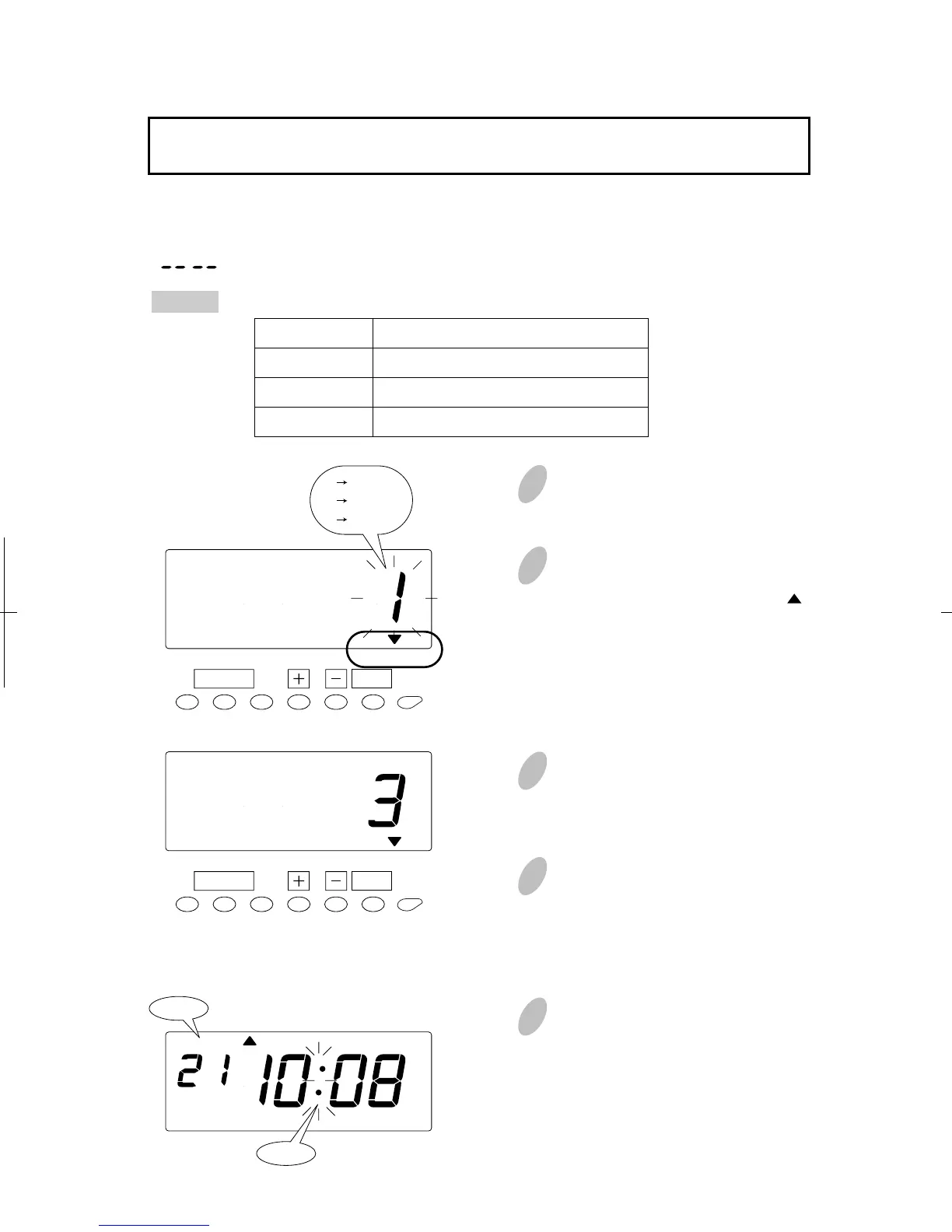
The print language can be selected from the following three.
Push the [SETTING START/END] button before you start setting. At that moment,
" " is shown on a display and you go into setting mode.
Example
Setting the Language
1
Push the [FUNCTION] button for 2
seconds.
3
Push the [+] or [-] button to select
the desired language. For example,
set 3 if "French" is desired.
4
Push the [SET] button to finish the
setting. At that moment, the display
will change from flashing to steady,
and the setting is now completed.
5
Push the [SETTING START/END]
button to get out of setting mode.
Make sure "date" and "time" are
indicated on the display and the
colon is flashing. Then replace the
cover and lock.
2
Once a number on the display
starts flashing, position the " "
mark over the "LANGUAGE"
mark by pressing the [
FUNCTION
]
button.
58
52
SET
FUNCTION
AM
Date
Colon
Print Example: Thursday 15:30
T
H 15:30
J
U 15:30
J
E 15:30
LANGUAGE
SET
FUNCTION
LANGUAGE
1 English
2 Spanish
3 French
Order Options
1. English
2. Spanish
3. French


 To Next Page