Once the password is set, you are requested to enter the current password before changing
any settings.
Push the [SETTING START/END] button before you start setting. At that moment,
" " is indicated on a display and you go into setting mode.
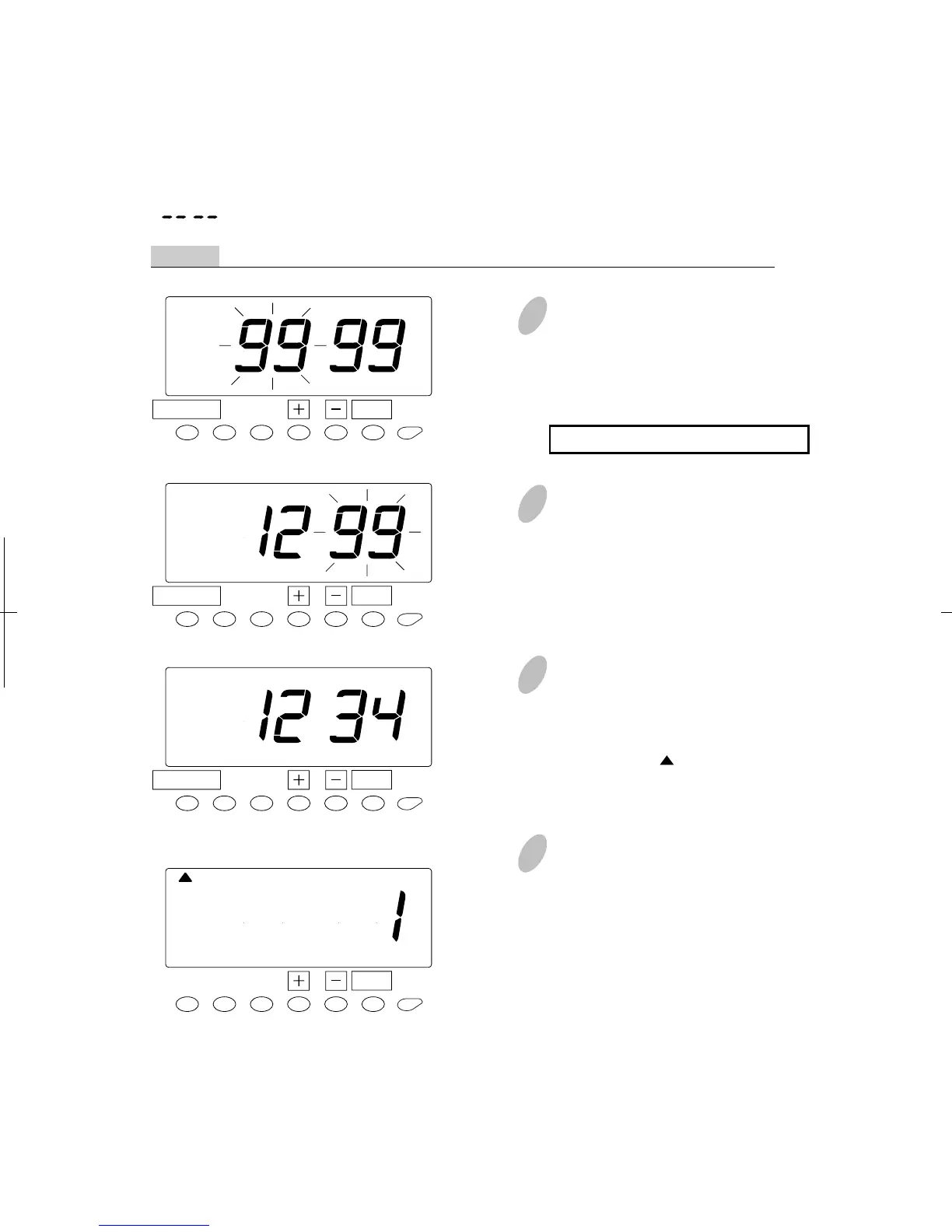
Example The current password is "1234" and go into the "DATE/TIME" setting mode.
How to Change Settings When the Password Is Set
1
Push the [DATE/TIME] button for
two seconds. Then, "9999" will be
indicated on the display and the first
two digits flash.
A flashing number can be changed.
3
In case of the example, push the [+]
or [-] button to set at "34" and then,
push the [SET] button. At that
moment, the " " mark is located
under "DISPLAY HOURS".
4
Select desired setting mode by
pressing the [DATE/TIME] button.
Then make any changes to setting
as explained.
2
In case of the example, push the [+]
or [-] button to set at "12" and then,
push the [SET] button. At that
moment, flashing of the display will
change to the last two digits.
60
54
SET
DATE/TIME
SET
DATE/TIME
SET
DATE/TIME
SET
DATE/TAIME
DISPLAY
HOURS


 To Next Page