2
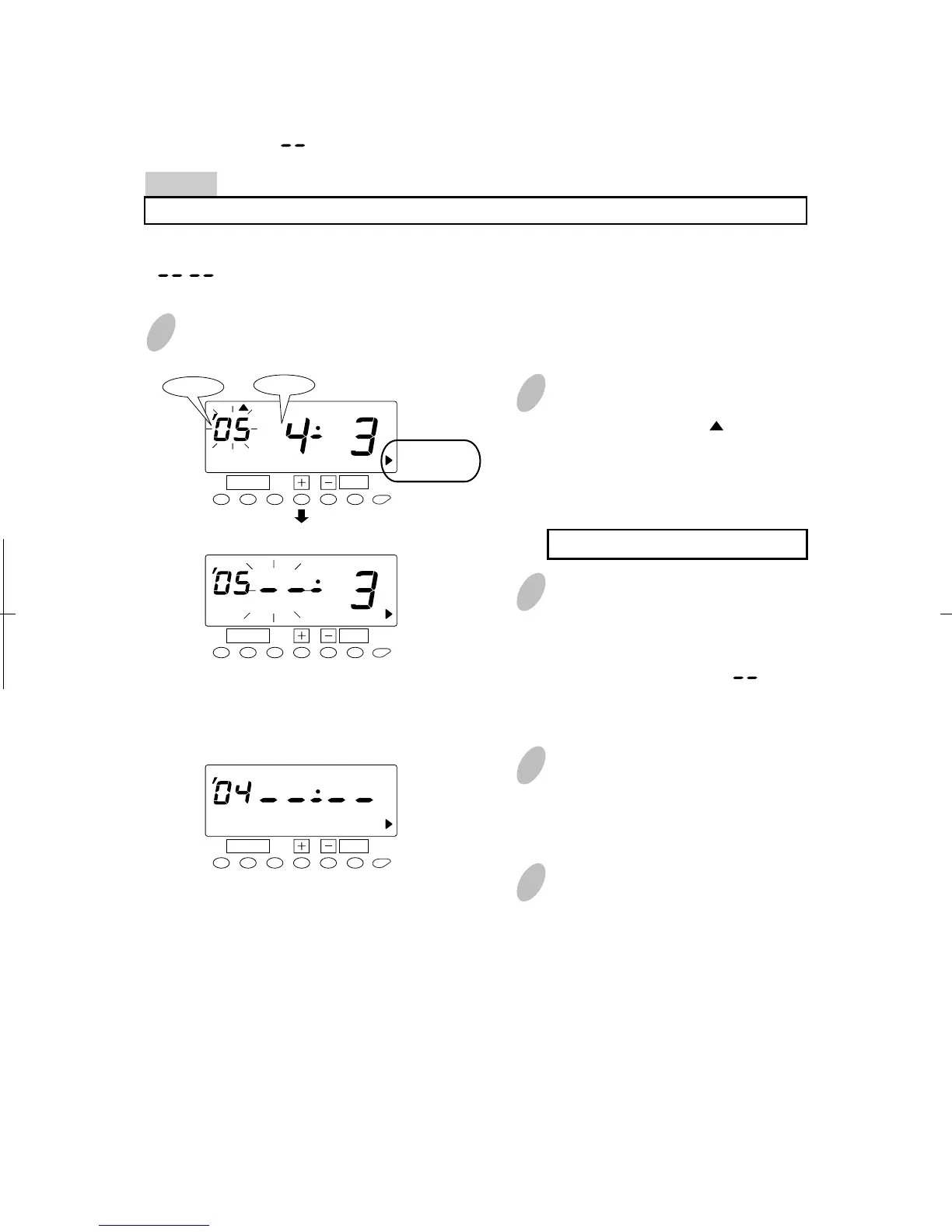
Once a number on the display starts
flashing, position the " " mark next
to the "DAYLIGHT SAVING TIME"
mark by pressing the [FUNCTION]
button.
A flashing number can be changed.
1
Push the [FUNCTION] button for 2 seconds.
3
Push the [SET] button and flashing
of the display will change from
"Year" to "Month". Next, push the
[+] or [-] button to set at " ".
4
Push the [SET] button twice. This
cancels the daylight saving time
settings.
5
Push the [SETTING START/END]
button to get out of setting mode.
Make sure "date" and "time"are
indicated on the display and the
colon is flashing. Then replace the
cover and lock.
Month
Year
DAYLIGHT
SAVING
TIME
DAYLIGHT
SAVING
TIME
DAYLIGHT
SAVING
TIME
57
51
Deleting the Daylight Saving Time Settings
To delete and cancel the daylight saving time settings, change the display of "Month" of the
starting setting to " ".
Example
To change "April 3, 2005" of "starting date" and delete daylight saving time settings.
Push the [SETTING START/END] button before you start setting. At that moment,
" " is indicated on a display and you go into setting mode.
SET
FUNCTION
SET
FUNCTION
SET
FUNCTION
SU
SU


 To Next Page