
 Need help?
Do you have a question about the Acroprint ES1000 and is the answer not in the manual?
States FCC compliance and provides disclaimers regarding manual content and reproduction.
Explains warning/caution symbols and provides general safety guidelines for operation.
Overview of ES1000 features, including Free Zone and Time Zone calculation methods.
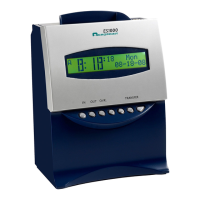
Lists package contents, unit overview, and ribbon cassette installation.
Advises on suitable and unsuitable environmental conditions for unit installation.
Details the process of inserting a time card for IN/OUT punches.
Explains schedule rules and how they affect daily working rules.
Details calculation types and provides examples for Type 1 and Type 2.
Outlines steps for preparing the ES1000 for settings configuration.
Explains the function of each button used for programming the ES1000.
Guides on how to set the display format to AM/PM or 24-hour.
Step-by-step instructions for setting the current time on the ES1000.
Detailed steps for setting the current date on the ES1000.
Instructions for setting monthly pay periods and their ending dates.
Steps to set weekly pay periods and their ending dates.
Steps to set bi-weekly pay periods and their ending dates.
Steps to set semi-monthly pay periods and their ending dates.
Explains how to set the time for shifting to the next line on a time card.
Guides on choosing between AM/PM and 24-hour format, and minute print format.
Instructions for enabling "Override" and "Card Transfer" functions.
Explains settings for "Types of Rounding" and "Rounding Unit".
Explains how to select schedules and determine features for time calculation.
Guides on selecting calculation rules like Free Zone or Time Zone.
Steps to set the minimum hours worked before auto lunch deduction.
Instructions for setting the duration of break time or lunch deduction.
Steps to set the threshold for overtime calculation based on regular hours.
Explains setting the time limit for an OUT punch to be considered a forgotten punch.
Details how to set limits for daily and weekly regular hours for overtime.
Explains how weekend/non-scheduled days are handled as overtime.
Describes setting round and grace time for Start/End times (ST/ET).
How to set up red printing for punches within grace time periods.
Instructions for setting weekly schedules for external signals like bells or horns.
Guides on configuring automatic daylight saving time adjustments.
Explains how to select the print language for the time recorder.
Steps to set a 4-digit password for accessing settings.
How to check hours summary for active time cards or previously closed cards.
How to check which time card numbers are used in the current pay period.
How to check the currently set rules and configurations in the clock.
Enables printing OUT punch records on the same line as IN punch, even across day advance time.
Allows transferring data from a full or damaged card to a new card.
How to manually reset a specific time card before the pay period end date.
How to manually reset all time cards to their default state.
Procedure to return all settings to their factory default configurations.
Lists common error codes and their corresponding actions for troubleshooting.
 General
| Type | Electronic Time Clock |
|---|---|
| Time Format | 12/24 Hour |
| Power Source | AC Adapter |
| Print Method | Dot Matrix |
| Card Capacity | 100 cards |
| Warranty | 1 Year |
| Automatic Card Feed | Yes |
| Display Type | LCD |
| Mounting | Desktop |
| Punch Method | Automatic |
| Battery Backup | Yes |
| Operating Temperature | 32°F to 104°F (0°C to 40°C) |

 To Next Page
