011807-EN--B (2022-12_S617 S717F S900 S950 C50_IFU)
14 / 49
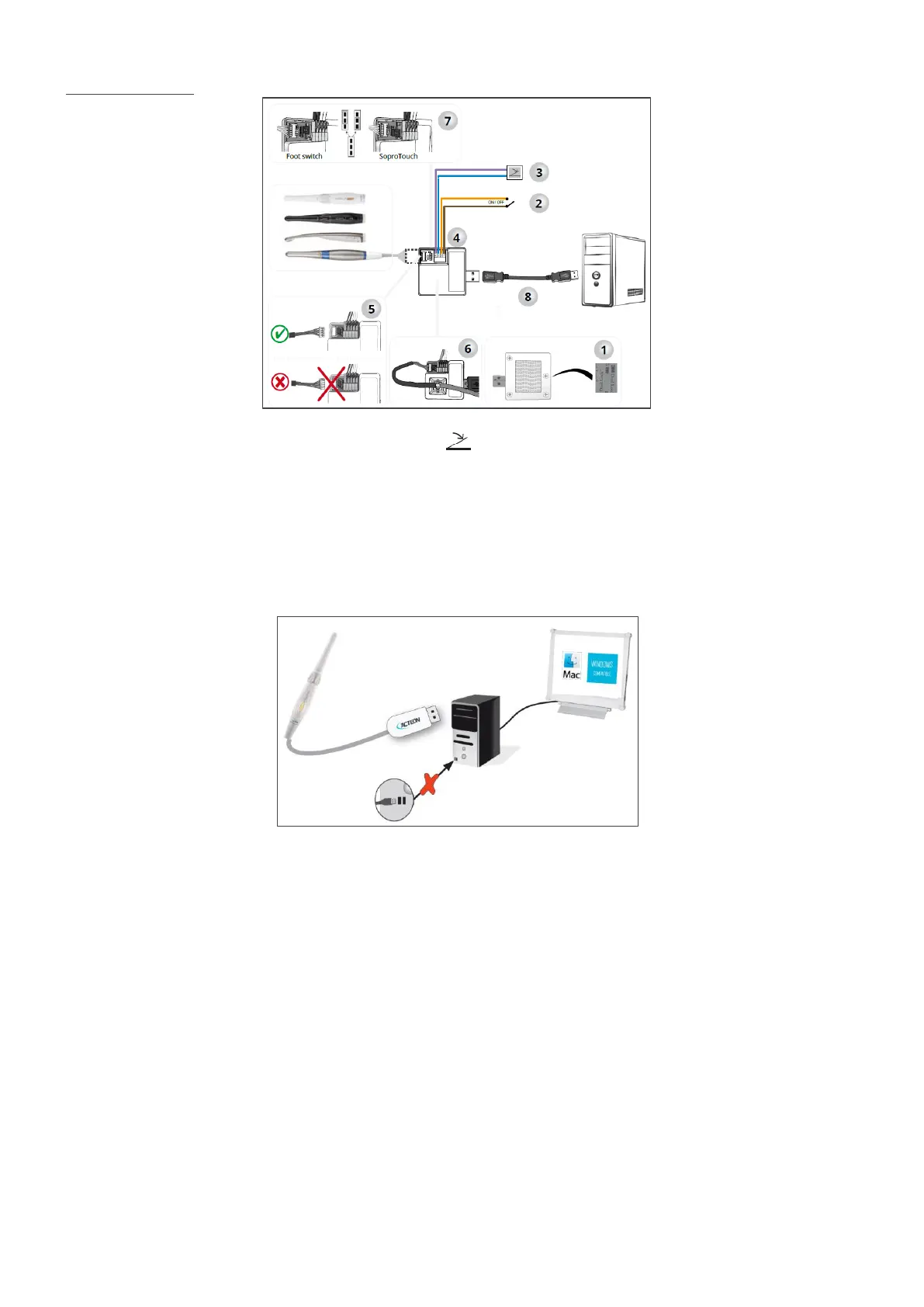
Installation diagram:
The footswitch should be connected to MINI DOCK U_USB2 if you have selected it to freeze the image.
4.1.3 MINI DOCK USB2 CONNECTION WITH A COMPUTER
The following section is only applicable for cameras for which a docking station is mandatory.
Connect the USB cable to one of the computer USB ports.
Connect the connecting cable to the handpiece (e.g., for SOPROCARE camera here below):
4.1.4 FURTHER DOCKING STATIONS (OPTIONAL)
You can install a connection box near each dental chair (no limitation). You will just have to transport the handpiece from one
chair to the other.
The handpiece holder is intended to maintain the connecting cable connector when the cable is not linked to the handpiece.
4.2 CONNECTING THE C50 INTRAORAL CAMERA TO A COMPUTER
4.2.1 REQUIRED COMPUTER CONFIGURATION
To use the C50, you must make sure the computer and its peripherals do not have any usage limitation that could concern
personal safety. The following requirements should be met:















 To Next Page