011807-EN--B (2022-12_S617 S717F S900 S950 C50_IFU)
16 / 49
4.3.2 IMAGING SOFTWARE INSTALLATION FOR C50 INTRAORAL CAMERA
The C50 can be used with ACTEON® Imaging Suite (AIS) software or any Other Imaging Software (OIS) supporting USB Video
Class (UVC).
The video acquisition module is installed when AIS or OIS (with SDK) is installed.
The video acquisition module is software that can captures films and images from ACTEON cameras video stream, according
with the dentist’s needs for patient oral heath follow-up.
4.4 INSTALLATION OF THE HANDPIECE HOLDER
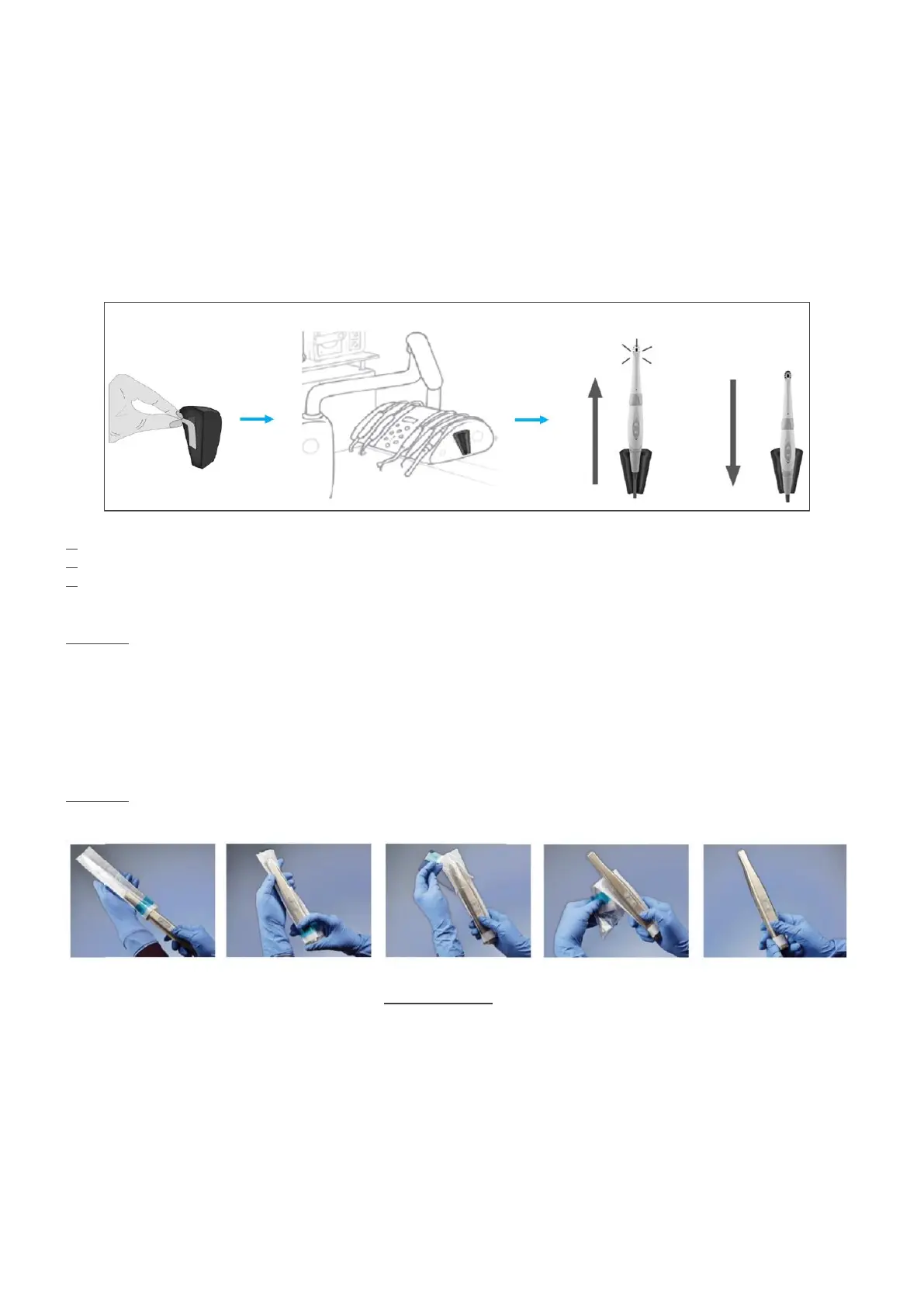
1. Choose an easily accessible flat surface.
2. Use the wipe provided to clean the surface on which you are going to fasten the holder.
3. Remove the double-sided adhesive tape protection from the handpiece holder and press it on the desired surface for a few
seconds. Full adhesion of the handpiece holder is achieved after 2 hours, so avoid any stress on the handpiece holder during
this two-hour period.
CAUTION: The handpiece holder is equipped with magnets that can damage devices sensitive to magnetic fields. Make sure
you do not install the handpiece holder near devices such cathode ray tube video screens, magnetic videotapes, etc.
4.5 USE OF THE SINGLE-USE PROTECTIVE SHEATH
Cover the camera with a single-use protective sheath before introducing the camera into the patient’s mouth, as shown on
the pictures below.
CAUTION: When inserting the camera head into the protective sheath, be sure to insert the tip first. Otherwise, the dental
image may be blurred.
4.6 USE OF C50TIPS AND SOPROTIPS FOR THE DIAGNOSTIC AID OPTION (C50TIPS WITH C50 INTRAORAL CAMERA AND
SOPROTIPS WITH SOPROCARE AND SOPROLIFE INTRAORAL CAMERAS)
Immediately before use, place a clean and sterile SOPROTIPS or C50TIPS on the camera head over the protective sheath.
SOPROTIPS and C50TIPS are intended to improve fluorescence imaging quality by shielding the camera from ambient light.















 To Next Page