ACM-4201 Hardware User’s Manual
15
If you are using multiple devices, you need to change the current device to another
unused IP address, so that when the next device is connected to the network, no two
devices use the same IP. Please perform the following steps.
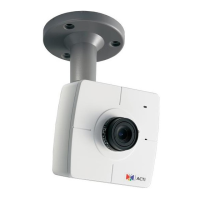
7. Go to Setup -> WAN Setting
8. Choose Static IP Address.
9. Change the IP to 192.168.0.101 or any other unused IPs. Do NOT use the PC’s IP
address or 192.168.0.100.). If this is not the first device you add to the network, please
also avoid other devices’ IPs.
10. Click “Apply”
11. Please go to Save Reboot, and click ”Apply”. Internet Explorer will close after a few
seconds. This is normal.


 To Next Page