Need help?
Do you have a question about the ACTi ACM-4201 and is the answer not in the manual?
Read all safety and operating instructions. Adhere to product warnings to avoid danger and damage.
Do not service yourself; refer to qualified personnel. Avoid water, moisture, and unrecommended attachments.
Includes FCC/CE compliance information, trademarks, and liability disclaimers regarding manual accuracy.
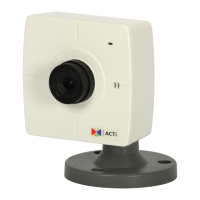
Details the items included in the ACM-4201 camera package, such as the camera unit, accessories, and documentation.
Supports MPEG-4/MJPEG dual codec and built-in hardware motion detection for enhanced surveillance capabilities.
Includes bundled surveillance software, SDK support for developers, and digital time code embedding for video logging.
Do not use incorrect voltage power supplies. Avoid water, moisture, and operating in unsuitable environments.
Do not open the housing. Refer servicing to qualified personnel. Disconnect power for damaged units.
Upon completion of service or repairs, ensure the video product is in proper operating condition via safety checks.
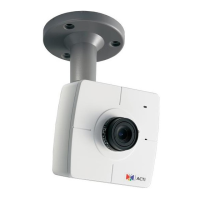
Describes the Action LED indicator, Microphone Input, and the PIR Motion Sensor on the camera unit.
Details the Audio Output jack, Ethernet port, and the DC 12V power input connector on the device.
Explains Digital Input/Output terminals and provides the procedure for resetting the device to factory defaults.
Procedure for connecting the IP camera to a PoE-enabled switch or injector using Ethernet cables.
Steps for connecting the camera using a power adapter and network switch if PoE is not available.
Details the camera's image sensor, effective pixels, resolution, lens specifications, and minimum scene illumination.
Lists supported functions like motion detection, shutter speeds, and video compression formats (MPEG-4/MJPEG) with bit rates.
Covers audio capabilities, digital input/output, network protocols, browser compatibility, and SDK information.
Specifies operating temperature, power requirements, consumption, dimensions, and weight of the camera.
Connect camera and PC to network; IP address acquired via DHCP. Use IP Utility to find and access the device.
Configure PC IP manually to match the camera's default subnet (192.168.0.100).
Access the camera via Internet Explorer using the default IP, username 'Admin', and password '123456'.
Change camera's IP address to a static one via WAN Setting for managing multiple devices on the network.
Save configuration changes, reboot the device, and adjust video stream settings like resolution and frame rate.
 General
| Maximum resolution | 1280 x 1024 pixels |
|---|---|
| Camera shutter speed | 1/5 - 1/15000 s |
| Minimum illumination | 0.5 lx |
| Sensor type | CMOS |
| Optical sensor size | 1/3 \ |
| Focal length range | 4.2 mm |
| Video motion detection | Yes |
| Sample rate | 8 kHz |
| Signal-to-Noise Ratio (SNR) | 58 dB |
| Supported network protocols | TCP, UDP, IP, HTTP, DHCP, PPPoE, RTP, RTSP, FTP, SMTP, DNS, DDNS, NTP, ICMP, IGMP, ARP |
| Power source type | PoE |
| Power consumption (typical) | 2.88 W |
| Ethernet LAN (RJ-45) ports | 1 |
| Dimensions (WxDxH) | 88 x 39 x 85 mm |
| Power requirements | DC 12V |
| F-number (relative aperture) | 1.8 |
| Operating temperature (T-T) | 0 - 40 °C |
| Certification | CE, FCC |
 Weight and Dimensions
| Weight | 150 g |
|---|

 To Next Page