Hardware Manual
10
Installation Procedures
This section describes procedures in mounting the camera on a flat surface.
NOTE: The camera images on this documentation are for reference only and may be different
from the actual camera.
Step 1: Prepare for Installation
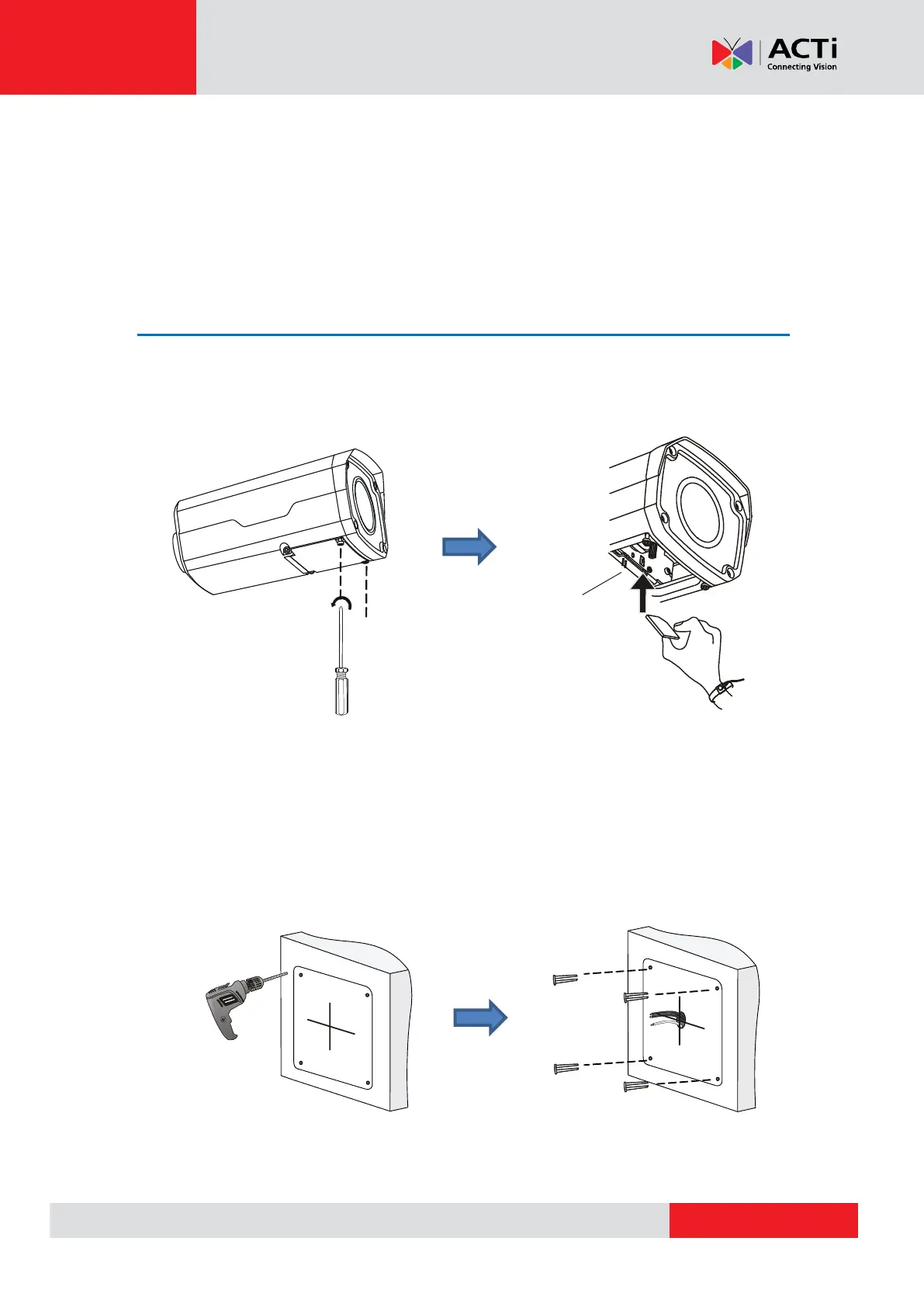
1. Before installing the camera, prepare other accessories required for installation. In case of
using a memory card for local recording, insert the memory card at this point.
2. Determine whether the cable will go through a hole on the surface or be routed along the
surface. Note also the direction to which the cable will be routed to attach the bundled drill
template on the surface according to the direction of the cable.
3. Drill the screw holes. Depending on the material of the surface where the camera will be
installed, it may be necessary to drill the four (4) screw holes and use the supplied screw tox.
Use a Ø6-6.5 mm drill bit to drill 30 mm-
depth guide holes according to the
positions marked by the sticker.
r
k
Knock the plastic anchors into
the guide holes and ensure that
they are tightened up.



 To Next Page