ACT550 USER MANUAL
480258EN-1.0 29/06/2016 Page 18 of 34
POL.
C/ CALIDAD, 66
28906 GETAFE
Tel: +34 91 665 26 26
Fax: +34 91 665 23 24
N.I.F. ES-A-28905065
ER-
6. Hands-Free and Wireless Audio
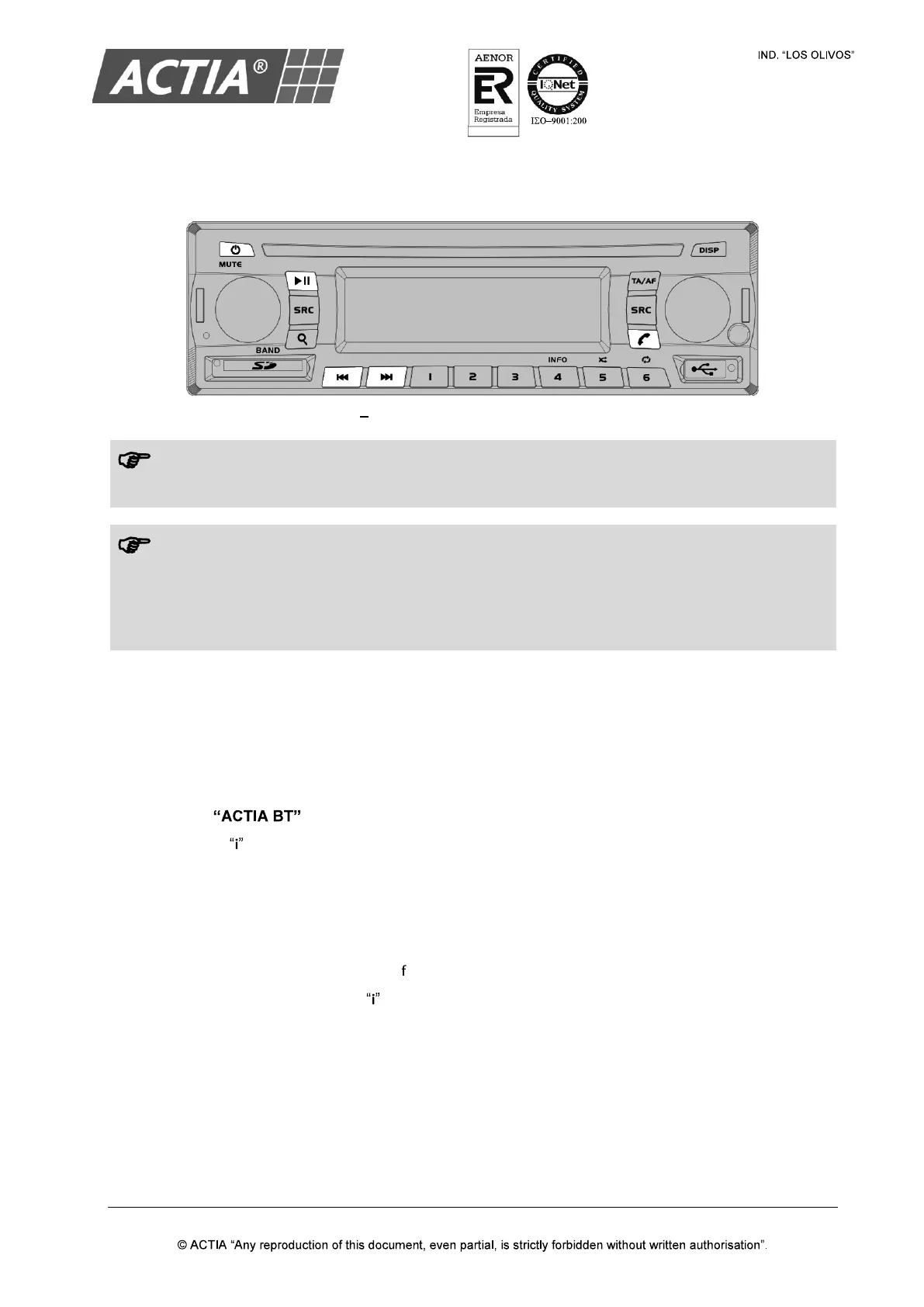
Figure 10 Hands-Free and Wireless Audio Controls
The Hands-Free and Wireless Audio service is only available for the driver zone.
The source Driver/Guide Microphone overrides the Hands-
Free service. If an incoming or
outgoing call takes place, the driver zone will not switch to Hands-
microphone is active.
During a call, it is not possible to switch to other source in the driver zone.
6.1. Pair a Device
With the equipment powered on:
1. Activate the Bluetooth function of the device to pair (for instance a smartphone)
2. From the menu of the device to pair, search for devices
3. Select
4. The icon on the LCD screen indicates that pairing has been sucessful.
6.2. Unpair a Device
To remove pairing with a device:
1. From any source, press and hold [ ] for 3 seconds
2. Two seconds later, the icon on the LCD screen will turn off indicating that there is no paired
device.


 To Next Page