| Continued
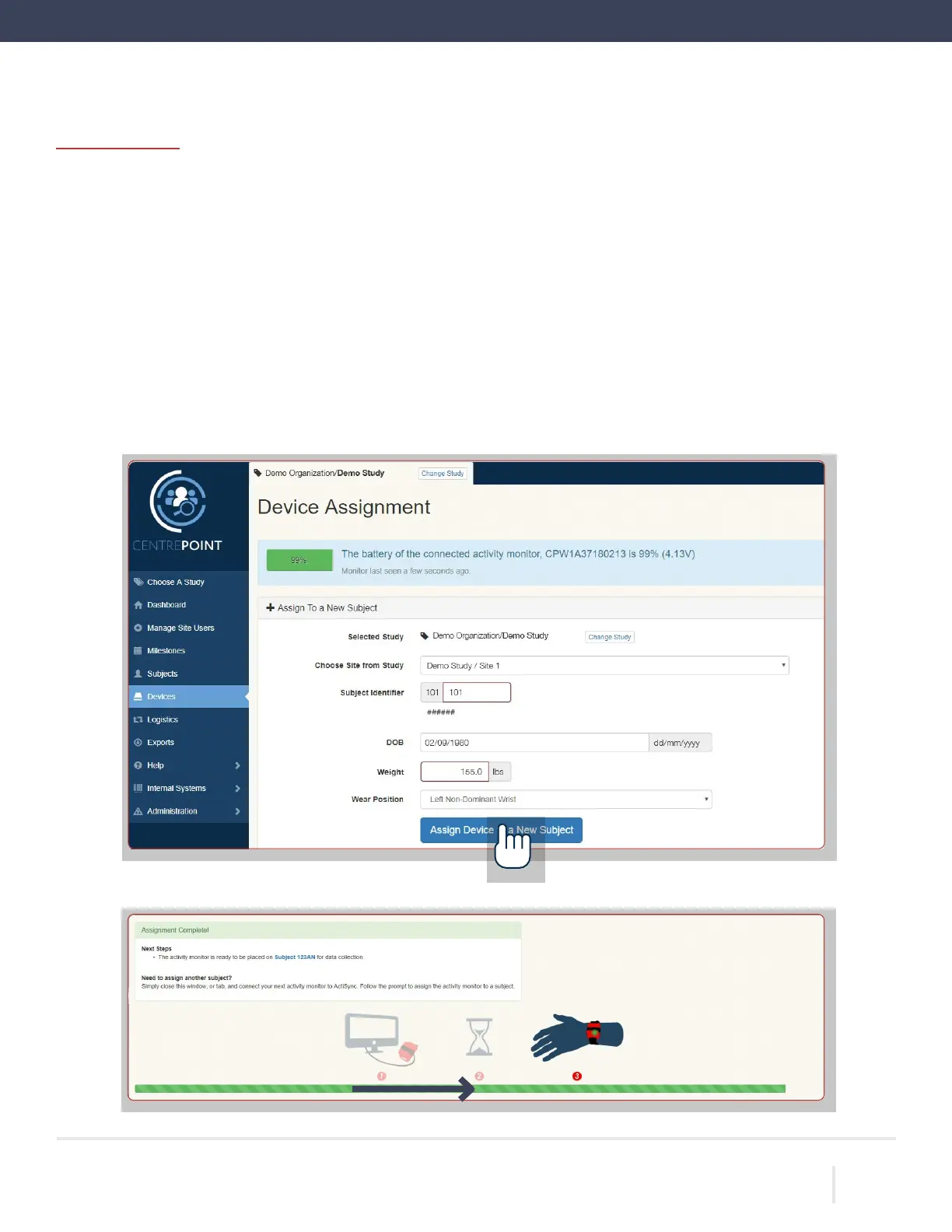
Device Assignment by entering the following information:
Site: Select the appropriate site from the dropdown menu. Site coordinators will only have one option
available (their site). If you have access to more than one study, select the correct study before you
with Device Assignment.
Subject Identifier: This will be six characters long (XXX-XXX), where the first three characters will be
with your site ID and the last three numeric digits are the participant number.
Date of Birth: (DD-MM-YYYY)
Weight: (kg or lbs)
Wear position: Left Non-Dominant Wrist or Right Non-Dominant Wrist.
“Assign Device to a New Subject.” Wait for progress bar to indicate that assignment is complete.
ACTIGRAPH LEAP™ | E.200.6025 | RELEASED: 10/09/2023 | REV: 0
THEACTIGRAPH.COM


 To Next Page