3 | English
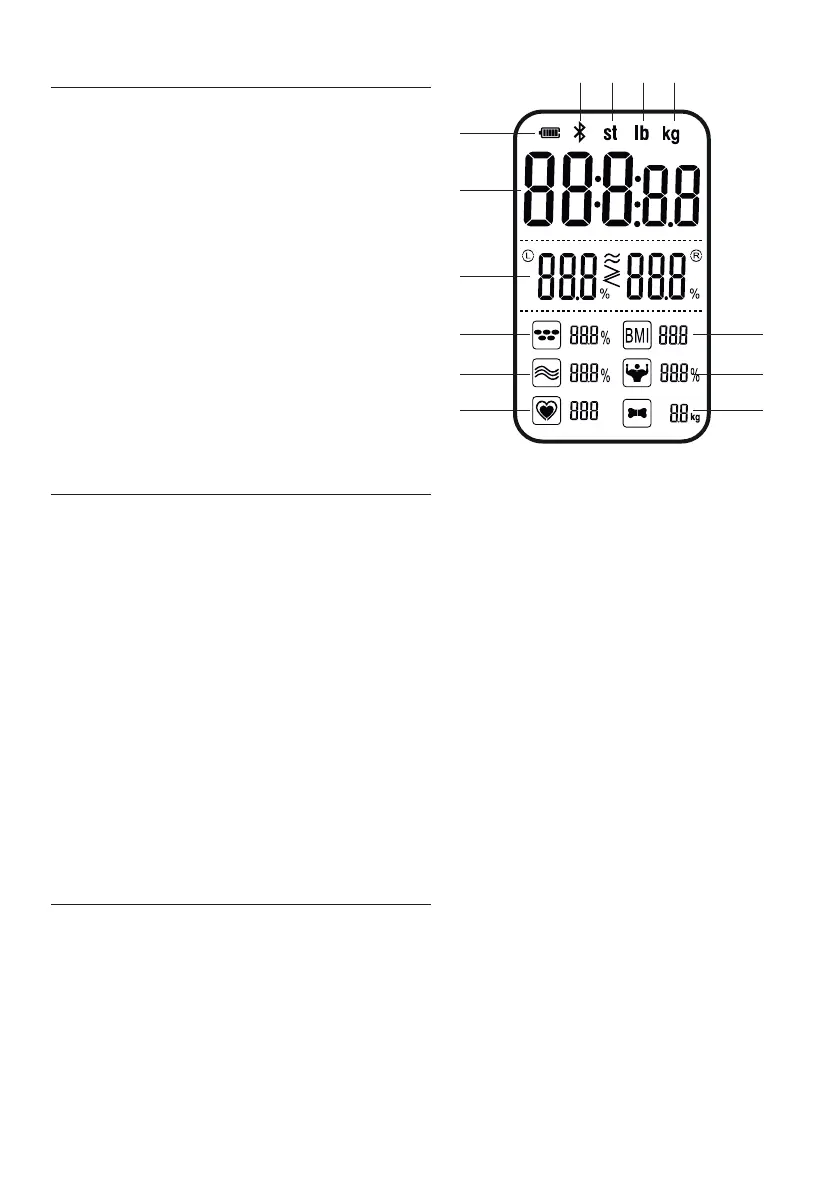
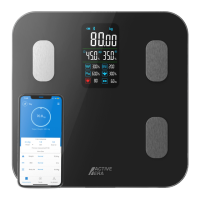
1. Battery charge indicator.
2. Bluetooth indicator.
3. Stone indicator.
4. Pound indicator.
5. Kilogram indicator.
6. Weight measurement.
7. Body balance % measurement.
8. Body fat % measurement.
9. BMI measurement.
10. Body water % measurement.
11. Skeletal muscle % measurement.
12. Heart rate measurement.
13. Bone mass measurement.
To charge the battery:
1. Insert the micro USB connector of the USB charging cable into the USB
charging socket.
2. Insert the male USB connector of the USB charging cable into a DC 5V
adapter and plug into a power outlet. Alternatively plug the cable into a
powered USB outlet.
3. The bars in the battery charge indicator will continuously ll as the smart
scales charge. When charged the battery charge indicator will show as full.
Note, to fully charge the battery will take two hours. If the smart scales are
used on average three times per day the battery charge will last for a period of
approximately 60 days.
Download the Active Era app from the App Store (iOS devices) or Google Play
(Android devices).
Note, when prompted ensure you give permission to the Active Era app to access
the smartphone or tablets Bluetooth connection.
VA DISPLAY
CHARGING THE BATTERY
ACTIVE ERA APP
1
2 3 4 5
6
7
8
10
12
9
11
13


 To Next Page