4. To operate the AWAY MODE feature, in unoccupied
areas only,* press the Away Mode button on remote
control until the desired time is reached (2, 4, 6, or
8 hours). The unit will display AWAY MODE and the
remaining time. To interrupt the AWAY MODE, press
the Normal/High button.
*Please note: “unoccupied areas” includes pets. Some
pets, like humans, may experience adverse reactions
from exposure to increased levels of ozone and should
not be present during AWAY MODE operation.
OPERATION
1. Adjust the fan speed to your preference, keeping in
mind that higher fan speeds will give better results.
2. Using the Normal/High button, set the unit to
NORMAL, for typical use, or HIGH, for increased smoke
and odor control.
3. For HIGH MODE, using the PURIFIER UP and PURIFIER
DOWN buttons on the remote control, adjust the
purification level to its lowest setting (250ft
2
(23 m
2
)) for
the first 24 hours of operation, then gradually adjust up
(if needed) to the square footage (or square meters) of
the indoor area.
If you are operating your central heating and
air conditioning fan, or other ventilation system,
continuously, set the coverage up to the total
ventilated indoor area. Otherwise, set the coverage up
to the size of the room. Do not exceed the size of the
ventilated indoor area when setting the purifier level.
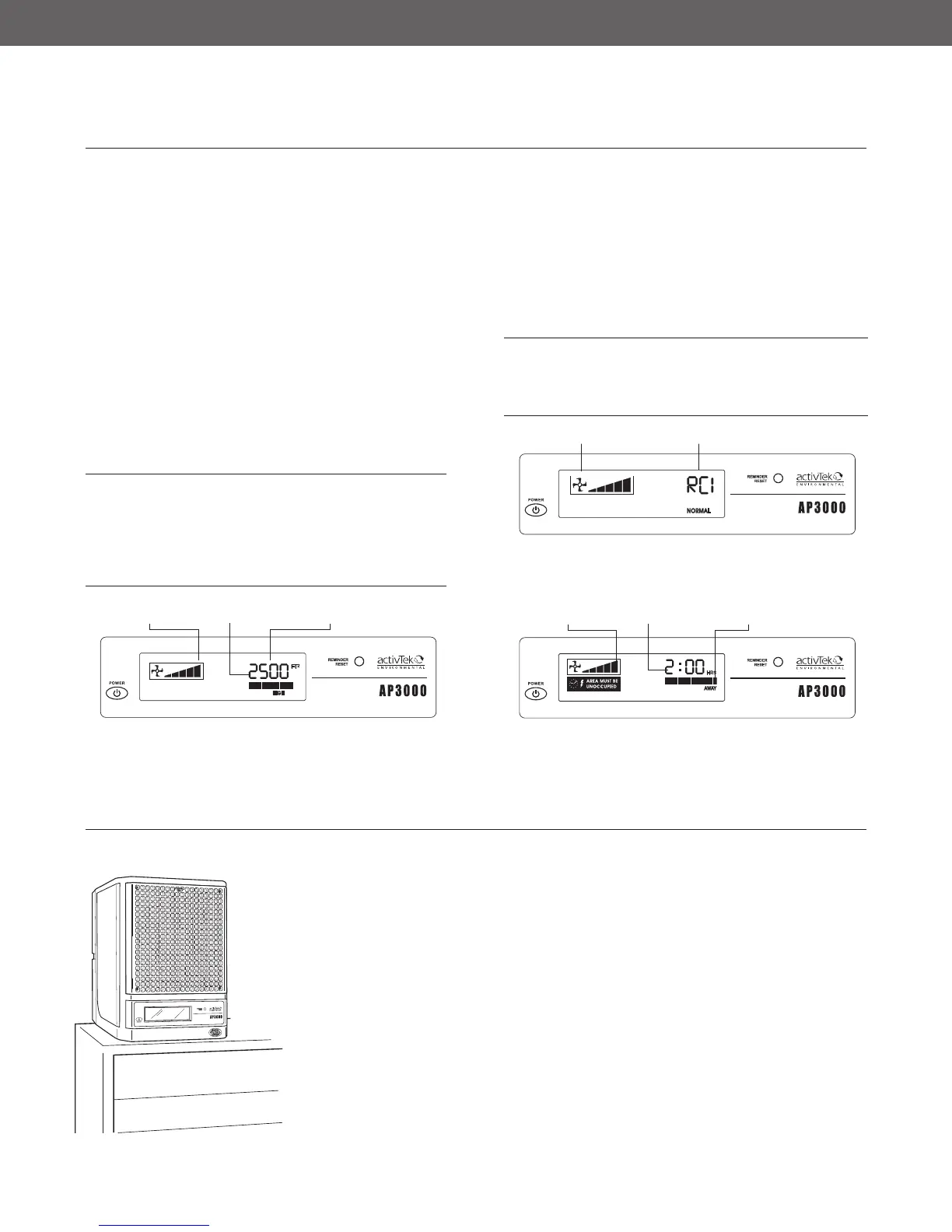
ActivePure (RCI) cell and IonizationFan Speed
NORMAL MODE: The unit’s display shows the fan speed (low
to high) and NORMAL to indicate that the ActivePure (RCI)
cell and ionization are both functioning normally.
HIGH MODE: The unit’s display shows the fan speed
(low to high), the purifier setting (1 bar to 12 bars), and
the purifier coverage in square feet, for U.S. models, and
square meters, for international units.
Purifier SettingFan Speed
Purifier Coverage
Away Mode
Fan Speed (Max)
AWAY MODE: The fan will show maximum, and AWAY
MODE will replace the purifier setting. The amount of
time remaining will depend on how long you have selected
for the AWAY MODE function to operate. The colon (:) will
flash to indicate time being counted down.
Time Remaining
PLACEMENT OF UNIT
Place the unit as high as possible to ensure
complete purification (On top of a bookshelf,
high cabinet, etc.).
Suggested locations listed in the order of
preference:
1. Nearest the source of the worst pollution.
2. Near a cold-air return to thoroughly circulate
the benefits of your AP3000 by activTek
throughout the area.
3. In the area most heavily used to achieve
maximum benefit.
Note:
• The rear of the unit should always
have at least one inch of open
area to allow unrestricted airflow.
• Point the unit toward the center of
the room for maximum dispersion
of ions.
• To prevent injury, be sure the
power cord is not accessible to
small children.
4


 To Next Page