EasyManua.ls Logo

activTek AP3000 - AP3000 General Maintenance; Cleaning Unit Case and Grills; Cleaning the ActivePure RCI Cell; Filter Assembly Care and Replacement

activTek AP3000
12 pages
Print Icon
To Next Page IconTo Next Page
To Previous Page IconTo Previous Page
Loading...
AP3000
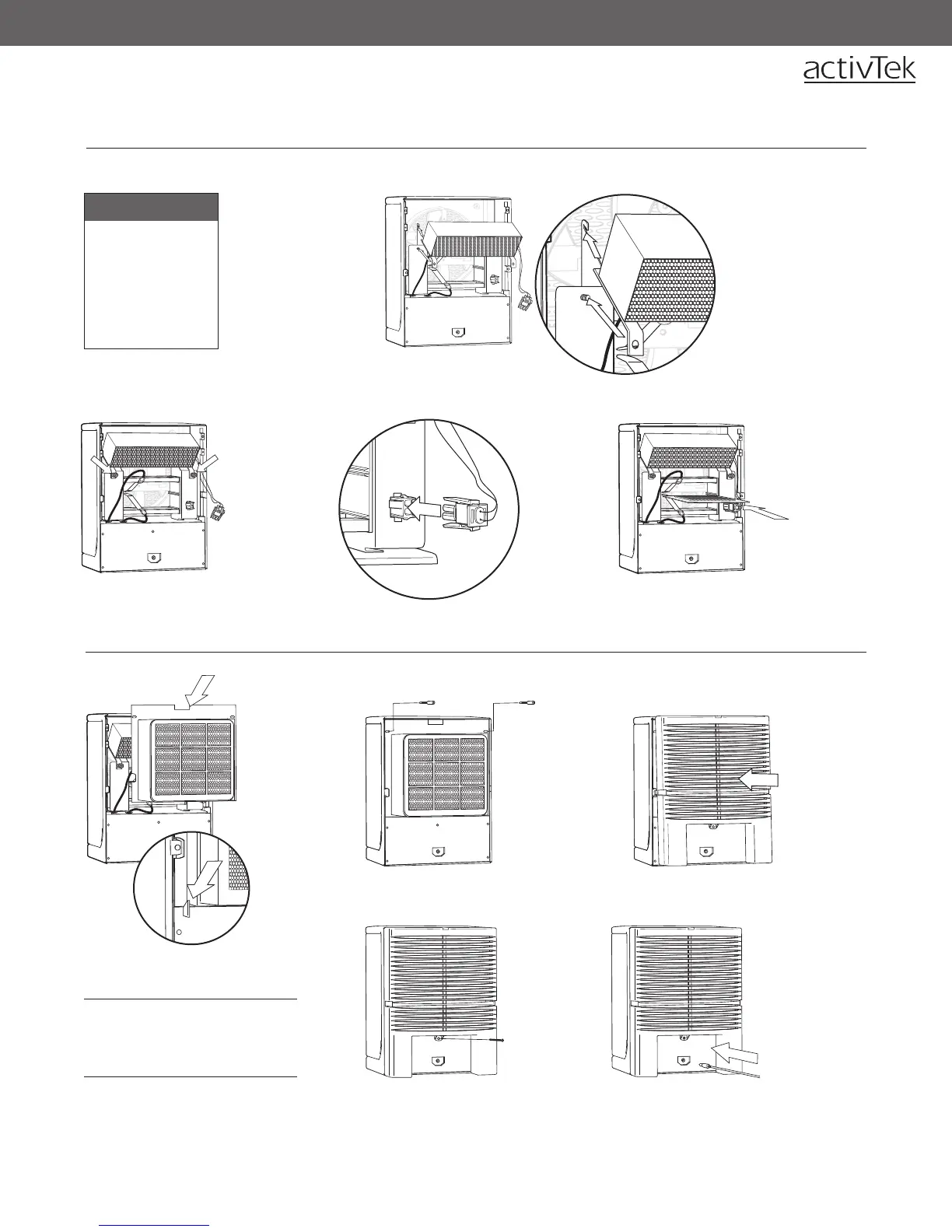
When installing the
purification plate,
be sure the metal
tabs are making
contact with the
screen on each side
of the plate.
2
2. Replace
the two (2)
thumbscrews
and tighten.
1
1. Slide the ActivePure
(RCI) cell up and into
the unit. Be sure
the back lip of the
ActivePure (RCI) cell
engages the two
slotted protrusions at
the rear of the plate
cage, and that the
angle brackets and
studs are correctly
aligned.
INSTALLING THE ACTIVEPURE (RCI) CELL & PURIFIER PLATE
4
4. Gently
insert the
purifier
plate
between
the guides
(inside the
cage) until
it stops.
To Install:
Rear Lint Screen
follow steps 5 - 9
Purifier Plate
follow steps 4 - 9
ActivePure (RCI) cell
follow steps 1 - 9
INSTALLING THE REAR LINT SCREEN
5
9
9. Reinstall the
power cord.
6
6. Secure the
top of the
lint screen by
replacing the
two (2) lint
screen holder
thumbscrews.
5. Replace
the rear
lint screen,
inserting
the bottom
of the lint
screen first.
Note: The bottom
of the rear lint
screen is held
into place by two
alignment guides
(see inset).
8
8. Replace
the back
cover
screw.
7
7. Replace
the back
cover by
snapping
into place.
For disassembly instructions,
see page 8.
3
3. Insert the
ActivePure
(RCI) cell
connector
into the plug
on the plate
cage. Press
the connector
firmly until the
two tabs lock
into place.
9
WARNING: Do not operate
AP3000 by activTek without the
rear lint screen and back cover
properly installed.

Other manuals for activTek AP3000

Related product manuals