EasyManua.ls Logo

activTek AP3000 - AP3000 Maintenance Reminders; Purifier Plate Replacement Alert; RCI Cell Replacement Alert; Perform Cleaning Reminder Actions

activTek AP3000
12 pages
Print Icon
To Next Page IconTo Next Page
To Previous Page IconTo Previous Page
Loading...
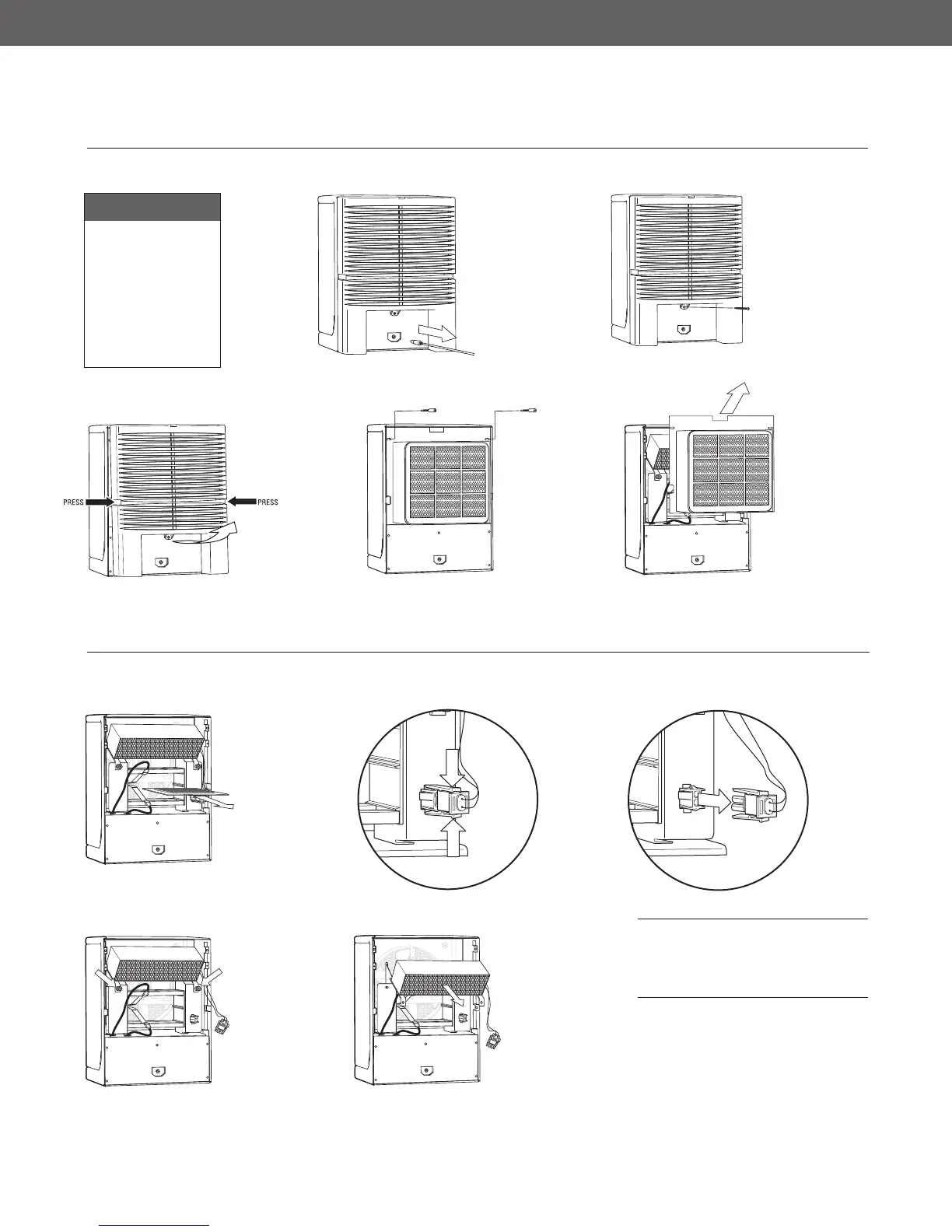
To Remove:
Rear Lint Screen
follow steps 1 - 5
Purifier Plate
follow steps 1 - 6
ActivePure (RCI) cell
follow steps 1 - 10
5
4
3
1
2
REMOVING THE REAR LINT SCREEN
1. Unplug unit.
2. Remove
the back
cover
screw.
3. Remove
back cover.
Press the
sides to
unlatch,
then tilt the
bottom out
to remove.
4. Remove two
thumbscrews
securing the
top of the lint
screen.
5. Remove
the lint
screen by
pulling
back the
top, then
lifting up
and out.
WARNING: Do not operate
AP3000 by activTek without the
rear lint screen and back cover
properly installed.
9
9. Remove
two (2)
thumbscrews.
10
10. Slide the
ActivePure
(RCI) cell
down and out
of unit.
REMOVING THE PURIFIER PLATE & ACTIVEPURE (RCI) CELL
6
6. To remove the
purification
plate, grasp
edge of plate in
the center and
gently pull out.
NOTE: If the
plate is difficult
to remove, gently
press down on
the lower metal
contact tab.
7
7. Unlock the
ActivePure
(RCI) cell
connector
by pressing
on the
connector’s
locking tabs.
8
8. Pull the
connector
straight out
to unplug.
8

Other manuals for activTek AP3000

Related product manuals