33
Installation and Commissioning Guide
Split Ducted ESP Indoor Unit
Installation and Commissioning Guide - Split Ducted ESP Plus/Ultima Indoor Unit
Doc. No.0525-078 Ver. 2 190925
System Start Up
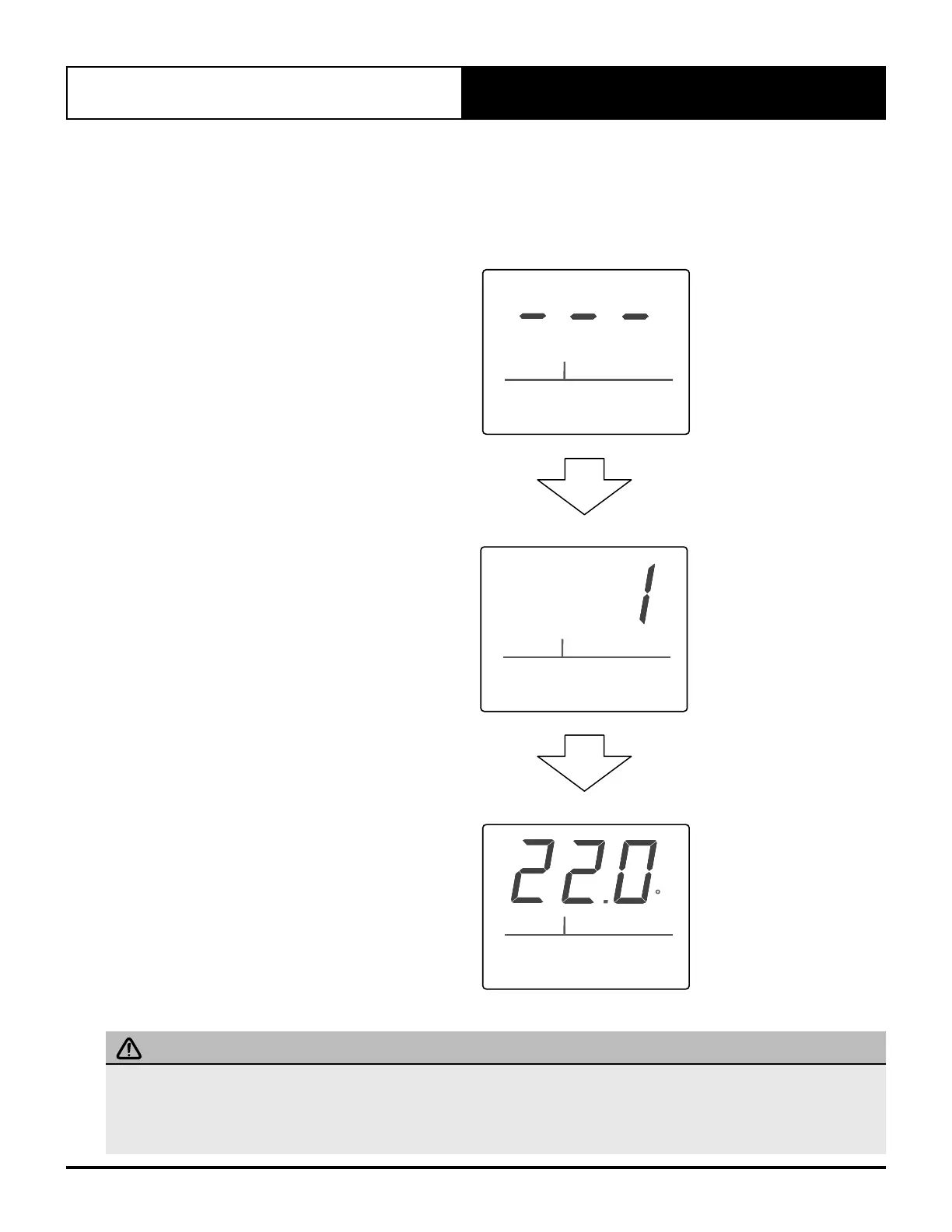
During initial system start up, Zone Control will boot up and show zone number. During this period the LED display will
initially show a horizontal bar moving back and forth. Once detected, its zone number will be displayed for several seconds
before normal display (temperature setpoint) will be shown.
During power up, horizontal bar
will move back and forth for
several seconds.
ROOM
TEMP
MODE
ON/OFF
SET
TEMP
ZONE CONTROL
ZONE
ZONE
OFF
C
Zone number will be displayed for
several seconds.
Zone Control will show normal
display.
IMPORTANT NOTES
If the Zone Control is then removed and replaced, the system will automatically re-acquire it. This may take few seconds. The
system recalls the last known state of specific zone. Thus, if Zone Control is removed and replaced, it will return to its previous
state.
Reset zone by turning Master Wall Control On then Off.



 To Next Page