Installation and Commissioning Guide - Split Ducted ESP Plus/Ultima Indoor Unit
Doc. No.0525-078 Ver. 2 190925
36
Installation and Commissioning Guide
Split Ducted ESP Indoor Unit
ESP Auto Mode
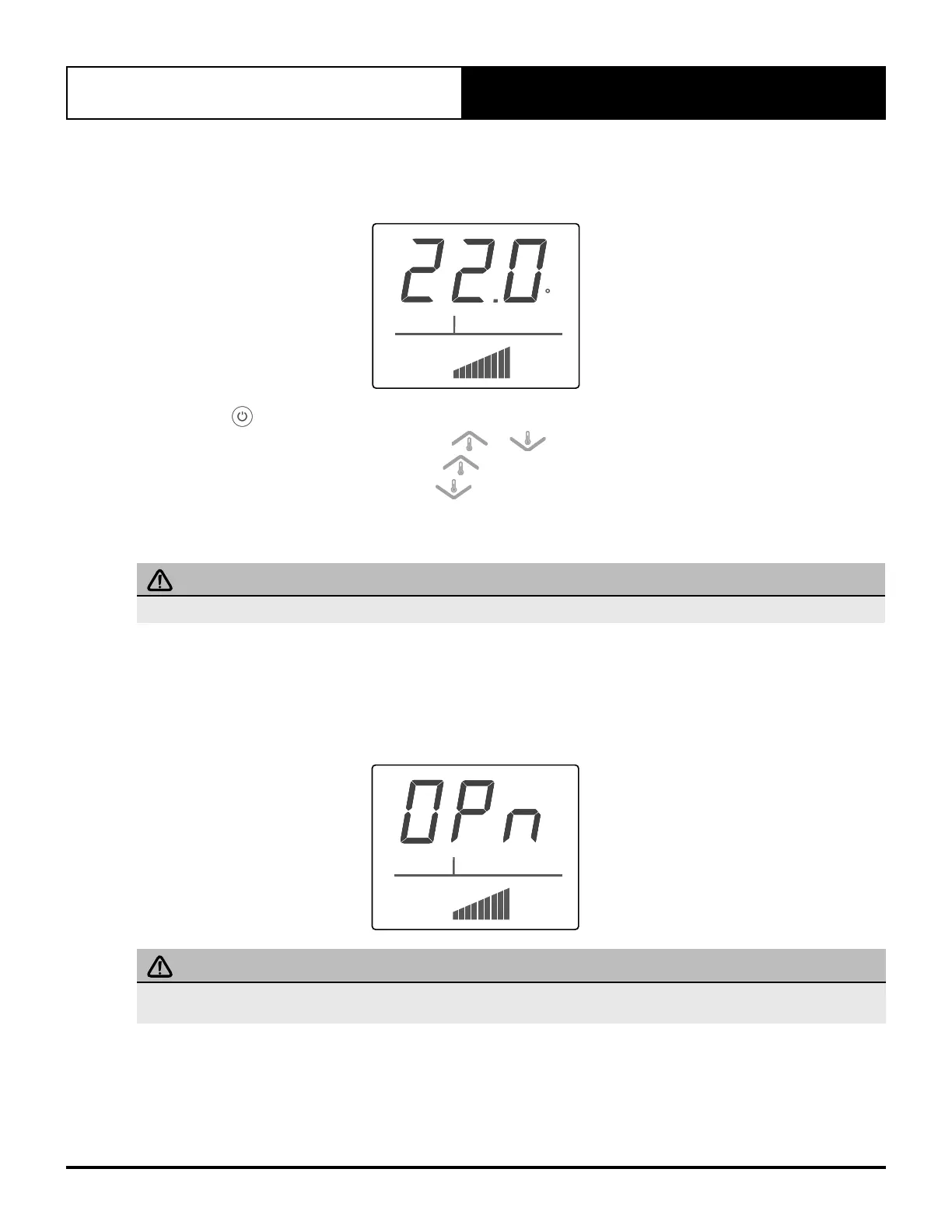
The system will allow the Zone Control to automatically control the position of zone damper blade. The opening angle
of damper blade will depend on the room temperature and setpoint temperature requirement.
ZONE
COOL
ESP AUTO
C
3. Press the button until ESP AUTO appears on the display.
4. Set the desired temperature by pressing the or buttons.
• For a warmer room temperature, press the button.
• For a cooler room temperature, press the button.
The number of vertical stripes (damper blade position indicator) may vary from time to time chasing your desired
conditions.
IMPORTANT NOTE
ESP Auto mode in Zone Control is different from ESP FAN mode of master Wall Control.
ESP Open Mode
In this mode, the zone damper blade will fully open to provide maximum circulation of air. This mode will disregard the
temperature settings of the Zone Control. It will continuously supply maximum air in the zones regardless of system
operating modes (COOL or HEAT). It is not possible to adjust set temperature during this mode.
ZONE
COOL
IMPORTANT NOTE
Since this feature will disregard temperature setting, the zone will continuously supply maximum airflow regardless of A/C
system HEAT or COOL status.



 To Next Page