i
CAUTION
Do not descend on a fully
charged Battery as a
standard procedure.
RECOMMENDATION
Empty a fully charged Battery
for improved descending by
running the Ascender unloaded
for 2 minutes at full speed before
the operation.
Whilst not recommended as a
standard procedure, the ACX
Ascender electronics and the BMS of
the ACX Battery allow descent with a
fully-charged Battery without the risk
of overcharging and eventual damage.
While descending, the Ascender
generates energy that is stored in
the Battery as long as there is storage
capacity. The Ascender electronics
will, in case of a fully charged Battery,
regulate the speed automatically
to prevent overcharging. On long
descents with heavy loads the speed
will be reduced substantially and the
Ascender might eventually shut itself
down temporarily.
E.06 DESCENDING ON
A FULL BATTERY
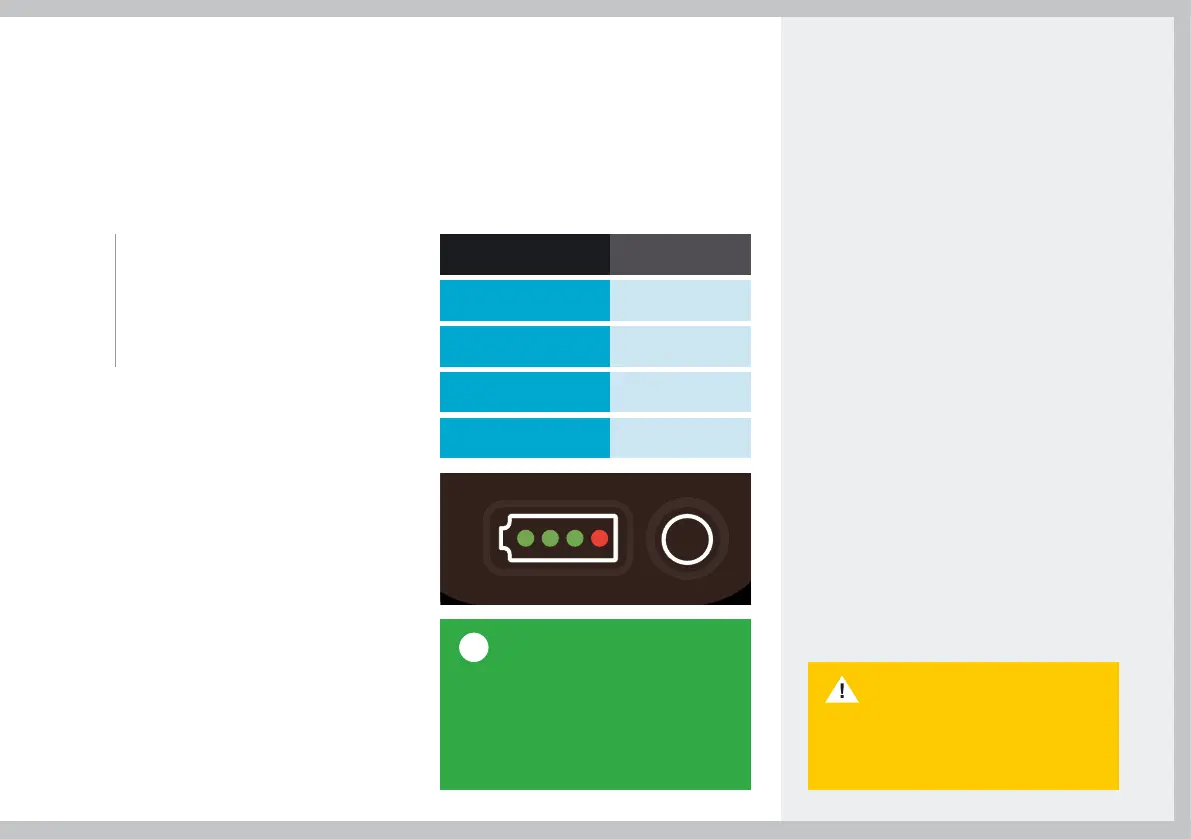
The Battery Status Indicator is
positioned at the back of the Battery
and can be activated by pushing
the button next to the LEDs. The
Battery Indicator has 4 LEDs
each representing 25% charge.
E.05 BATTERY STATUS INDICATOR
LEDs
Capacity
1 red, 3 green
75-100%
1 red, 2 green
50-75%
1 red, 1 green
25-50%
1 red
0-25%
39


 To Next Page