8
•
•
•
•
•
Display Setup
1
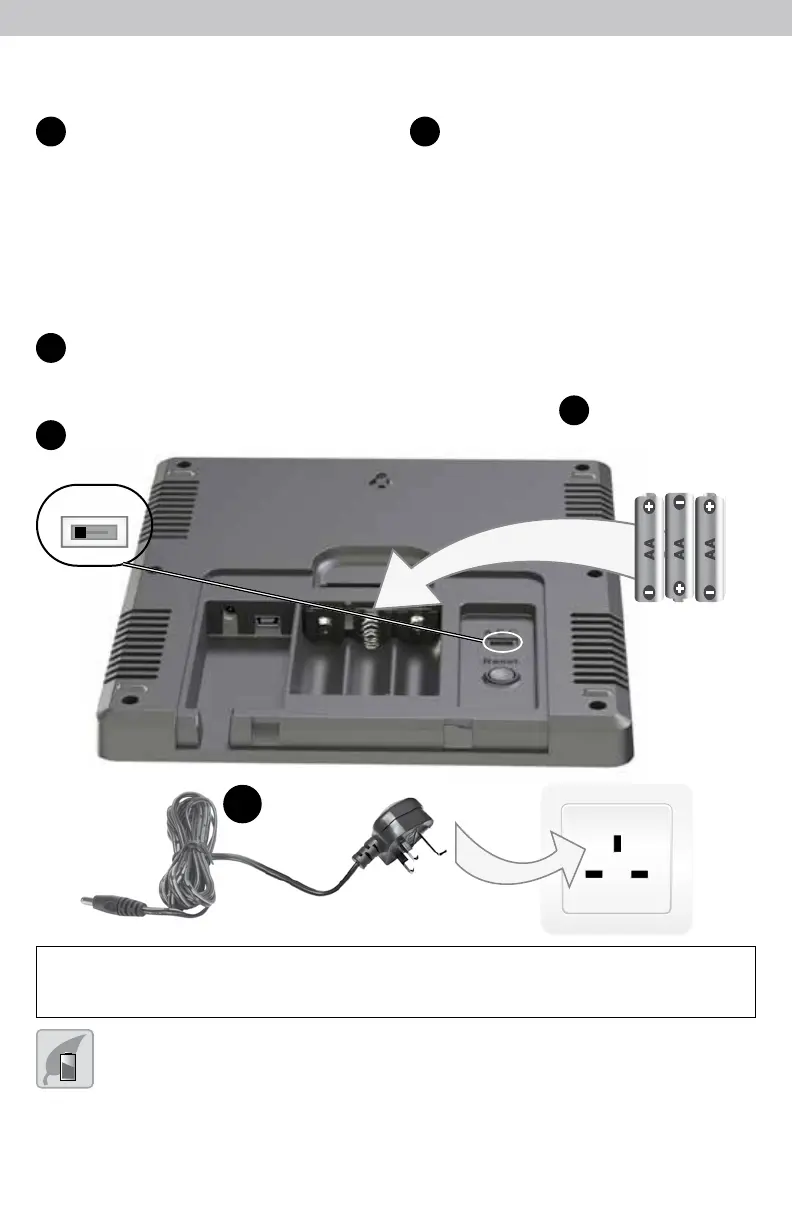
Set the A-B-C Switch
The A-B-C switch is located inside
the battery compartment. It can
be set to A, B or C. However,
you must select the same letter
choices for both the sensor and
the display in order for the units
to synchronize.
Plug Power Adapter into
Electric Outlet
2
1
A-B-C Switch
3
Install or Replace Backup
Batteries (optional)
Insert 3 x AA alkaline batteries
into the battery compartment,
as shown. Follow the polarity
(+/-) diagram in the battery
compartment.
3
Install Backup
Batteries (optional)
3 AA Batteries
A B C
set to match
sensor
2
Plug in Power
Adapter
IMPORTANT: Batteries are a backup power source to preserve records in the event
of a power outage. Power adapter is the recommended primary power source to
enjoy the full functionality of this product.
PLEASE DISPOSE OF OLD OR DEFECTIVE BATTERIES IN AN ENVIRONMENTALLY SAFE
WAY AND IN ACCORDANCE WITH YOUR LOCAL LAWS AND REGULATIONS.
BATTERY SAFETY: Clean the battery contacts and also those of the device prior to battery installation. Remove batteries from equipment which is not to
be used for an extended period of time. Follow the polarity (+/-) diagram in the battery compartment. Promptly remove dead batteries from the device. Dispose of
used batteries properly. Only batteries of the same or equivalent type as recommended are to be used. DO NOT incinerate used batteries. DO NOT dispose of batteries
in re, as batteries may explode or leak. DO NOT mix old and new batteries or types of batteries (alkaline/standard). DO NOT use rechargeable batteries. DO NOT
recharge non-rechargeable batteries. DO NOT short-circuit the supply terminals.



 To Next Page