EasyManua.ls Logo

AcuRite 00782 - User Manual

AcuRite 00782
2 pages
Print Icon
To Next Page IconTo Next Page
Loading...
00782 INST0328-06
Do not return product to retail store. For Technical Assistance and
product return information, please call Customer Care:
877-221-1252
HOURS: Monday through Friday from 8:00 a.m. to 4:45 pm CST.
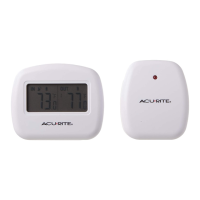
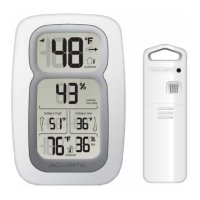
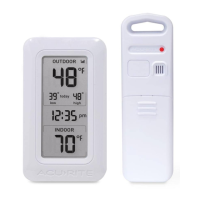
Main Unit Wireless Sensor
Wireless Thermometer
Instruction Manual
Thank You! We appreciate you for purchasing this wireless thermometer.
We hope you enjoy using this versatile wireless thermometer!
Features:
• Main unit with indoor and outdoor LCD temperature display.
• Wireless Sensor – range is 100’ (33m).
• Temperature measurement ranges:
Indoor display unit: 32º F to 122º F
Outdoor remote sensor: 0º F to 130º F
• Battery operated. (batteries not included)
1 CHECK PACKAGE CONTENTS
(1) Main unit - dimensions: 3” x 2.4” x 0.75”(7.6cm x 6.1cm x 2cm)*
(1) Wireless Sensor – dimensions: 2” x 2.5” x 1.3”(5.4cm x 6.4 cm x 2.9cm)*
(1) Instructions
*Dimensions are approximate.
NOTE: Carefully remove the units from their packaging. Discard the packaging and
save the instructions.
2 READ
Please read these instructions carefully before you set up the thermometer. In this
way you can become familiar with all of the thermometer’s features and get the most
benefit from them.
MODEL # 00782
PLEASE DISPOSE OF OLD OR DEFECTIVE BATTERIES IN AN
ENVIRONMENTALLY SAFE WAY IN ACCORDANCE WITH
YOUR LOCAL REGULATIONS
Question and Answer IconNeed help?

Do you have a question about the AcuRite 00782 and is the answer not in the manual?

Overview

This document describes the AcuRite Wireless Thermometer, Model # 00782, an electronic device designed for monitoring indoor and outdoor temperatures.

Function Description:

The AcuRite Wireless Thermometer provides temperature readings for both indoor and outdoor environments. It consists of two main components: a Main Unit and a Wireless Sensor. The Main Unit displays both indoor and outdoor temperatures on an LCD screen, while the Wireless Sensor transmits outdoor temperature data wirelessly to the Main Unit. This allows users to monitor outdoor conditions without needing to go outside.

Important Technical Specifications:

  • Temperature Measurement Ranges:
    • Indoor display unit: 32°F to 122°F (0°C to 50°C)
    • Outdoor remote sensor: 0°F to 130°F (-17.8°C to 54.4°C)
  • Wireless Sensor Range: 100 feet (33 meters)
  • Power Source: Battery operated (batteries not included). Requires 4 x AAA alkaline (or lithium) cell batteries in total (2 for the Main Unit, 2 for the Wireless Sensor).
  • Battery Type Recommendation: Lithium batteries are recommended for extremely low temperature conditions (below -4°F / -20°C) to ensure continued operation, as alkaline batteries may freeze and function improperly in such conditions.
  • Dimensions (approximate):
    • Main Unit: 3" x 2.4" x 0.75" (7.6cm x 6.1cm x 2cm)
    • Wireless Sensor: 2" x 2.5" x 1.3" (5.4cm x 6.4cm x 2.9cm)

Usage Features:

  • Dual Temperature Display: The Main Unit features an LCD screen that simultaneously displays both the indoor temperature (measured by the Main Unit itself) and the outdoor temperature (received from the Wireless Sensor).
  • Wireless Connectivity: The outdoor sensor transmits data wirelessly, eliminating the need for cables. The sensor's LED flashes momentarily (about once per minute) when sending information.
  • Placement Flexibility:
    • Main Unit: Intended for indoor use only. Can be placed on a tabletop using its integrated fold-out stand or mounted on a wall using the triangular indent on its back. It should be kept in a dry location, away from dust, dirt, mold, smoke, and extreme temperatures.
    • Wireless Sensor: Intended for outdoor use, but should be protected from direct sunlight and precipitation to ensure longevity and accurate readings. It can be mounted on a wall using the triangular indent on its back.
  • Setup Procedure:
    1. Install batteries in the Main Unit first, ensuring correct polarity.
    2. Install batteries in the Wireless Sensor, ensuring correct polarity.
    3. Allow a few minutes for the units to communicate. Both indoor and outdoor temperatures should appear on the Main Unit's LCD display.
  • Optimal Placement for Wireless Signal: Both units should be placed at least 10 feet away from other electronic devices that might interfere with the wireless signal. The maximum range between the sensor and main unit is 100 feet.

Maintenance Features:

  • Battery Replacement:
    • Main Unit: Access the battery compartment on the back, insert 2 AAA batteries, and replace the cover.
    • Wireless Sensor: Access the battery compartment on the back, insert 2 AAA batteries, and replace the cover.
  • Troubleshooting:
    • No Outdoor Reading (Main Unit shows "---"):
      • Move the wireless sensor closer to the main unit (it might be too far).
      • Replace the sensor batteries. After replacing sensor batteries, press the RESET button on the Main Unit.
    • Blank Main Unit LCD Display: Replace the batteries in the Main Unit.
    • Erratic Main Unit Operation: Press the RESET button on the Main Unit. This should restore indoor temperature immediately and outdoor temperature within one minute.
    • Erratic Wireless Sensor Operation: Press the RESET button on the remote sensor (located inside the battery compartment). If the sensor's RESET button is pressed, the Main Unit's RESET button must also be pressed. Relocating units away from electronic interference may also help.
  • Disposal Information: Old or defective batteries should be disposed of in an environmentally safe way, in accordance with local regulations. Waste electrical products should not be disposed of with household waste; they should be recycled where facilities exist.
  • Warranty: The device comes with a one-year limited international warranty from Chaney Instrument Company, covering defects in material and workmanship. For in-warranty repair, the product should be sent to Chaney Instrument Company with proof of purchase and a $5.00 fee for handling and postage.

Customer Support:

For technical assistance or product return information, contact Customer Care at 877-221-1252, Monday through Friday, 8:00 a.m. to 4:45 p.m. CST. Do not return the product to the retail store.

AcuRite 00782 Specifications

General IconGeneral
BrandAcuRite
Model00782
CategoryThermometer
LanguageEnglish

Related product manuals