Acurus MUSE Immersive Processor USER GUIDE
Revision 20190227
Document 1000905
basic operation
This section describes basic operation of the MUSE out-of-
the-box using the front panel features.
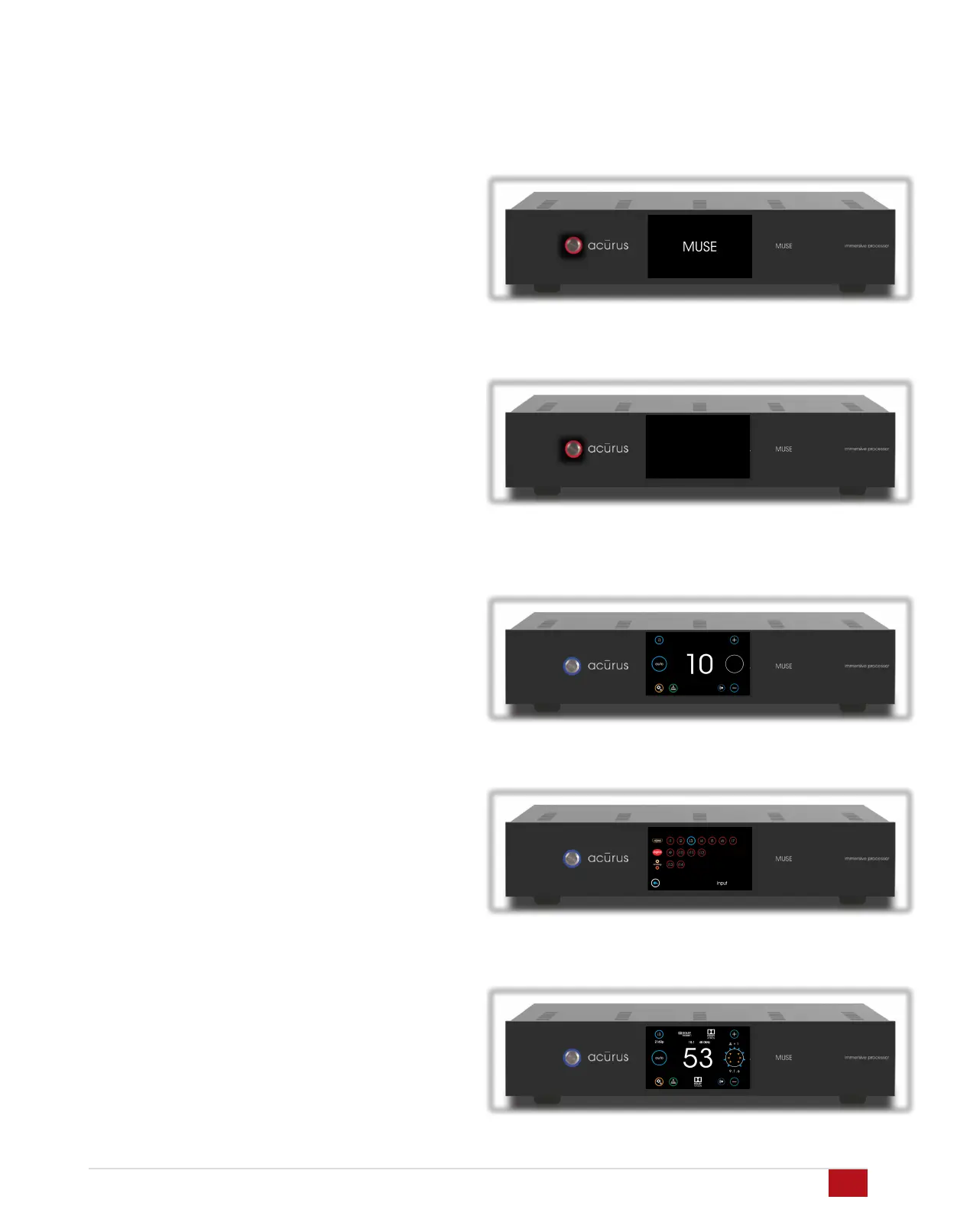
AC Power on and bootup
Ensure the MUSE rear panel power switch is set to on. With AC
power applied, the MUSE boots up and initializes. Allow 2 minutes
for initial bootup from full power off. Once the MUSE boots up,
standby mode can be used to turn the unit on and off instead of
booting up from a full power down.
Standby Mode
At the end of the bootup process, the MUSE power light blinks and
the LCD screen goes dark indicating that bootup is complete and
the unit is ready to operate.
Power On
Press the power button on the left side of the front panel. The
button illuminates blue and the LCD screen illuminates. With no
input signal present, the Loudspeaker Format Indicator on the right
side of the LCD display appears as a blank white circle.
Select Input
Select the input to be played on the upper left of the touch screen.
Adjust Volume
Adjust volume using the up/down buttons on the right side of the
LCD touch panel. With an active input stream, the LCD display will
show the incoming signal format and the active speakers playing.
14


 To Next Page