21
Acurus MUSE Immersive Processor USER GUIDE
Revision 20190227
Document 1000905
dts settings
Loudspeaker
Settings
Screen Preferences
settings overview
Settings Page
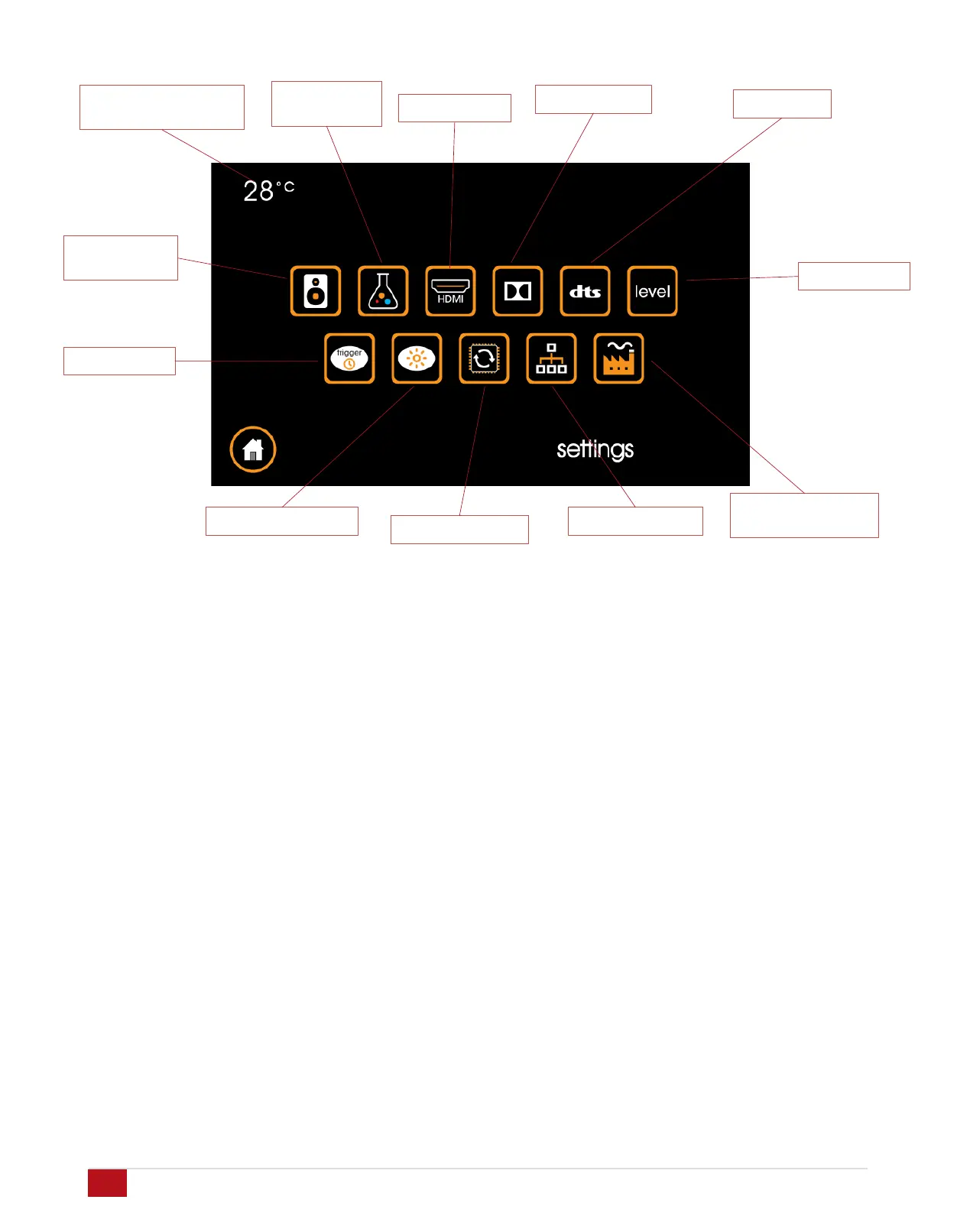
Touching the settings button brings up the settings page.
Internal Temperature Monitor: Displays the internal
temperature of the MUSE to ensure optimal operating
conditions. Recommended range is 25 to 45 degrees C.
Loudspeaker Settings: Opens the setup pages for loudspeaker
layout selection, EQ, delay and crossover.
Sound Mode Preferences: Preferences for Night mode and
PCM signal input handling.
HDMI Settings: Adjustments for lip sync delay and input/output
HDMI compatibility.
Dolby Settings: Settings include Dolby compression and center
spread.
DTS Settings: Settings include dts compression.
Level Settings: Settings for max volume, A/D sample rate and
input 16 mode.
Trigger Setup: Settings for delay on trigger outputs and IR
internal/external toggle
Screen Preferences: Settings related to screen brightness and
sleep timeout.
Firmware Update: Displays firmware version and restarts the
MUSE in order to enter reprogramming mode.
Network Settings: Settings to enable DHCP or Static IP setup
for network connectivity and control.
Factory Reset and System Restart: Restarts the MUSE with
setup parameters preserved (restart) or all settings including
setup parameters reset (factory reset).
Level settings
Factory Reset and
System Restart
Trigger Setup
Internal Temperature
Monitor
Firmware Update
Network Settings
Dolby settings
HDMI settings
Sound Mode
Preferences


 To Next Page