Remote Control Programming Manual
34 Graphics: Example 12 — Mixing text with graphics
6
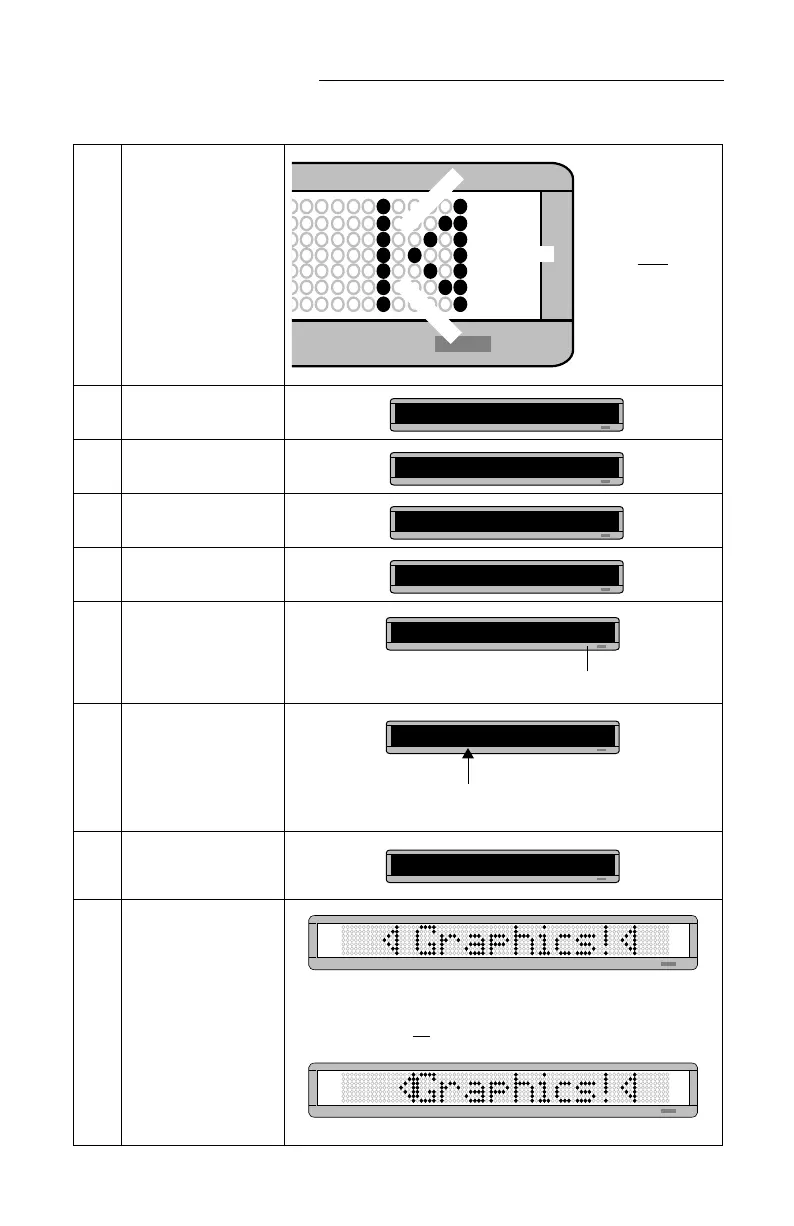
Draw the following graphic
using the keys indicated.
7 Press RUN twice.
8
Press BACK until
PROG
TEXT
appears.
9 Press ADV.
10
Hold down SHIFT and
press 6 for ROTATE.
11
Hold down SHIFT and
press 0 to insert your
DOTS graphic.
12
Using CAPS and SHIFT
when necessary, type
Graphics!
(Place a space before
Graphics!
)
13
Hold down SHIFT and
press 0 to insert your
DOTS graphic again.
14
Press RUN twice to see
your graphic and text
message move across the
sign.
SHIFT + F
SHIFT + D
SHIFT + Q
Remember:
To just move the
cursor, don’t hold
down SHIFT.
PROG DOTS ?
PROG TEXT A
A]
A] [ROT]
The
A
is the file name of your DOTS graphic.
A] [ROT][DOT]A
A]T]A Graphics!
Place a space before the word
Graphics!
(Otherwise, the first triangle will appear too close.)
A] [DOT]A
NOTE: If you had not placed a space after the first triangle graphic,
the message would look like the following:



 To Next Page