Remote Control Programming Manual
Appendixes: Appendix C — Connecting the sign to a computer 39
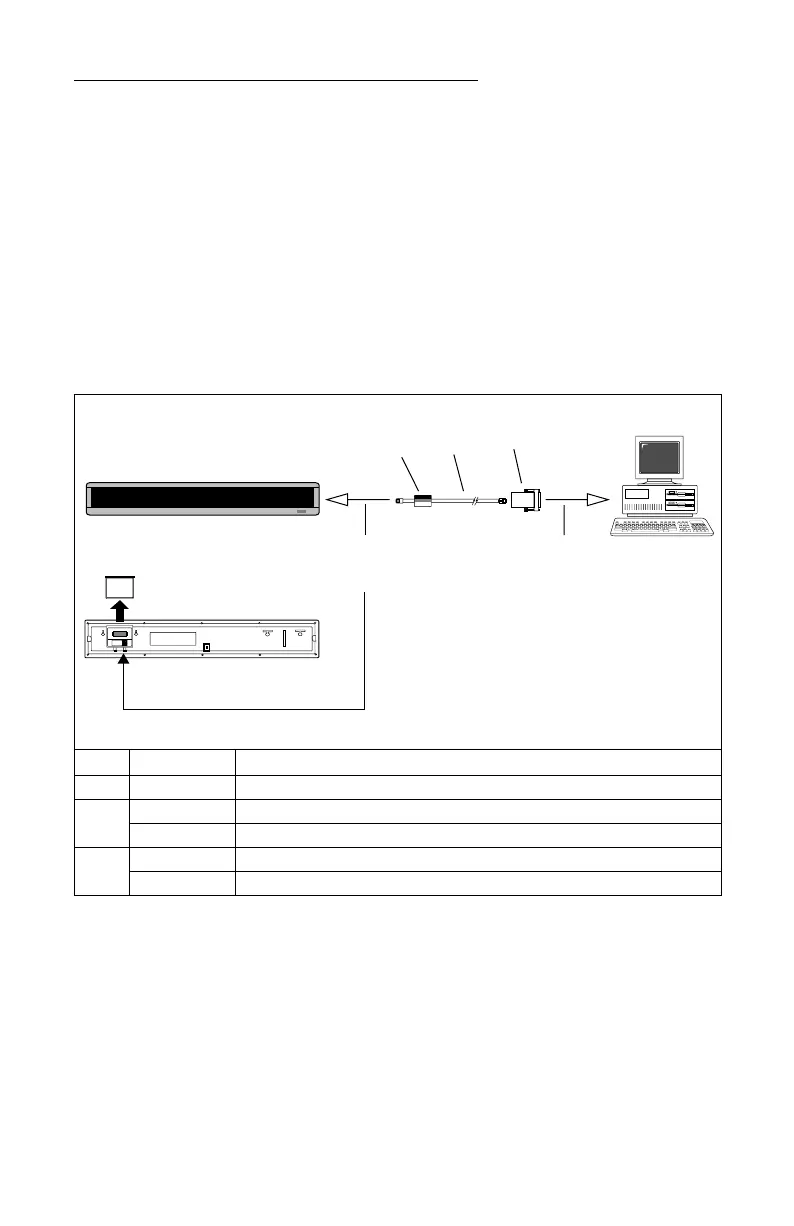
Appendix C — Connecting the sign to a computer
Though messages can be programmed into the sign using the hand-
held Remote Control, a more convenient method is to connect the sign to
a computer and use special software to send messages.
NOTE: Contact Adaptive Micro Systems to order the software
necessary to send messages to a sign from your PC.
NOTE: These signs cannot be networked together. That is, you can
connect a single sign to a computer, but not multiple signs.
Item Part # Description
A — Ferrite (ferrite end towards sign)
B
1088-8625 25-foot 6-conductor RS232 data cable
1088-8627 50-foot 6-conductor RS232 data cable
C
4370-0001C 25 pin sub-D/to 6 pos. RJ11 adapter
1088-9108 9 pin sub-D/to 6 pos. RJ11 adapter
A
B
C
To one of the
PC’s COM
(RS232) ports
To the sign’s
RS232 connector
(on back)
PC running
special software
(contact Adaptive
Micro Systems to
order)



 To Next Page