24 American Dryer Corp. 450269-2
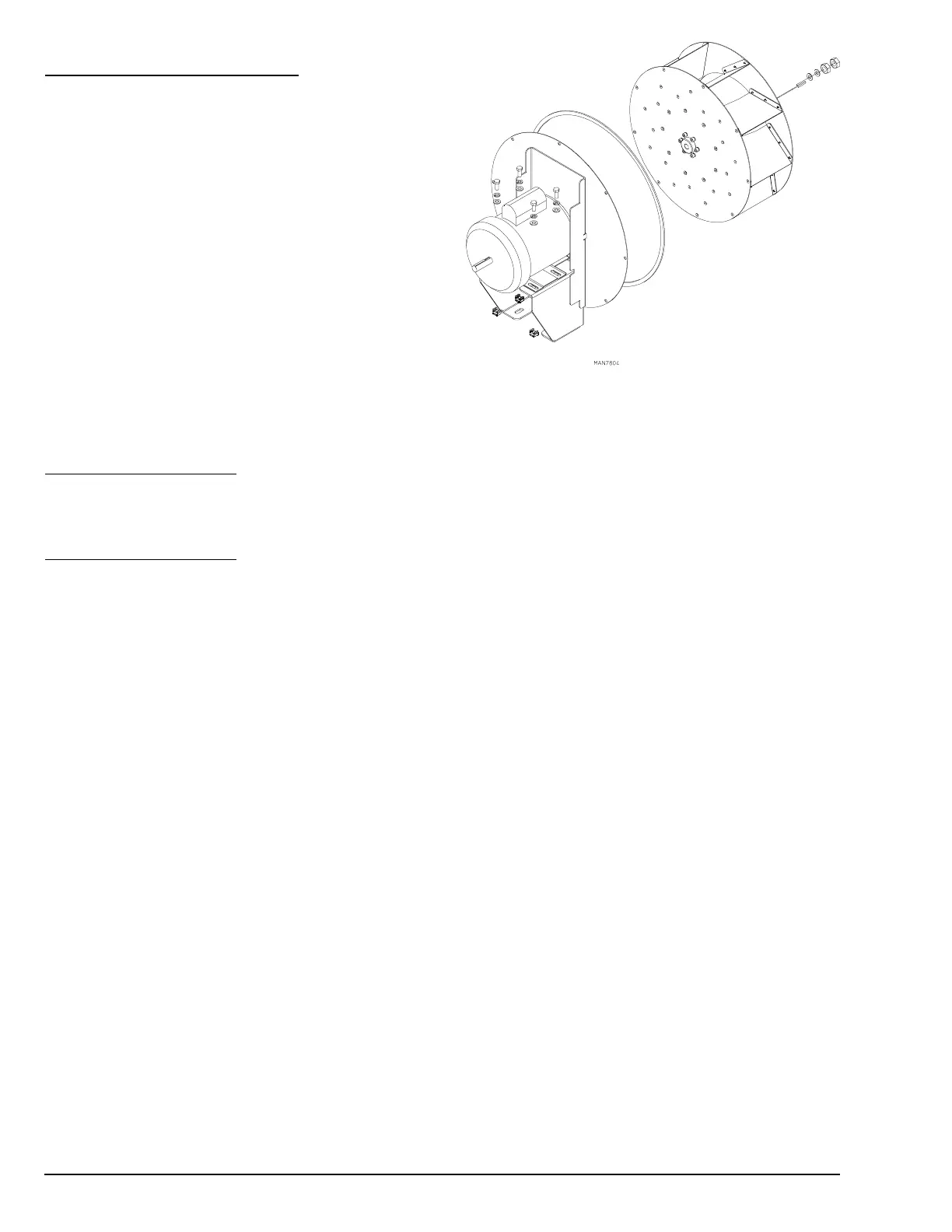
To Replace Impellor Motor
1. Discontinue electrical power to the dryer.
2. Disconnect motor harness from motor.
3. Remove nuts and washers holding the motor mount to
the rear of the dryer and pull motor mount away.
4. Remove the two left handed jam nuts on the motor
shaft retaining the impellor. Work the impellor free from
the motor shaft by means of a wheel puller to prevent
damage to the motor shaft.
5. Remove the bolts holding the motor to the motor mount
and replace it with the new motor.
6. Align motor with impellor face in plane with the motor
mount at no less than 3/16” clearance.
7. Install impellor onto new motor shaft.
8. Reinstall the motor mount and reconnect the motor harness.
9. Reestablish electrical power to the dryer.
To Replace Impellor
To replace the impellor, follow steps 1 through 4 of “To Replace Impellor Motor (Direct Drive).
To Replace Impellor
1. Discontinue electrical power to the dryer.
2. Remove the left side panel to access the fan shaft mount assembly.
3. Remove the two left handed jam nuts that hold the impellor to the fan shaft.
4. Remove the impellor, washers, and the key.
5. Replace the impellor, key, washers, left handed jam nuts, and the side panel.
6. Reestablish electrical power to the dryer.


 To Next Page