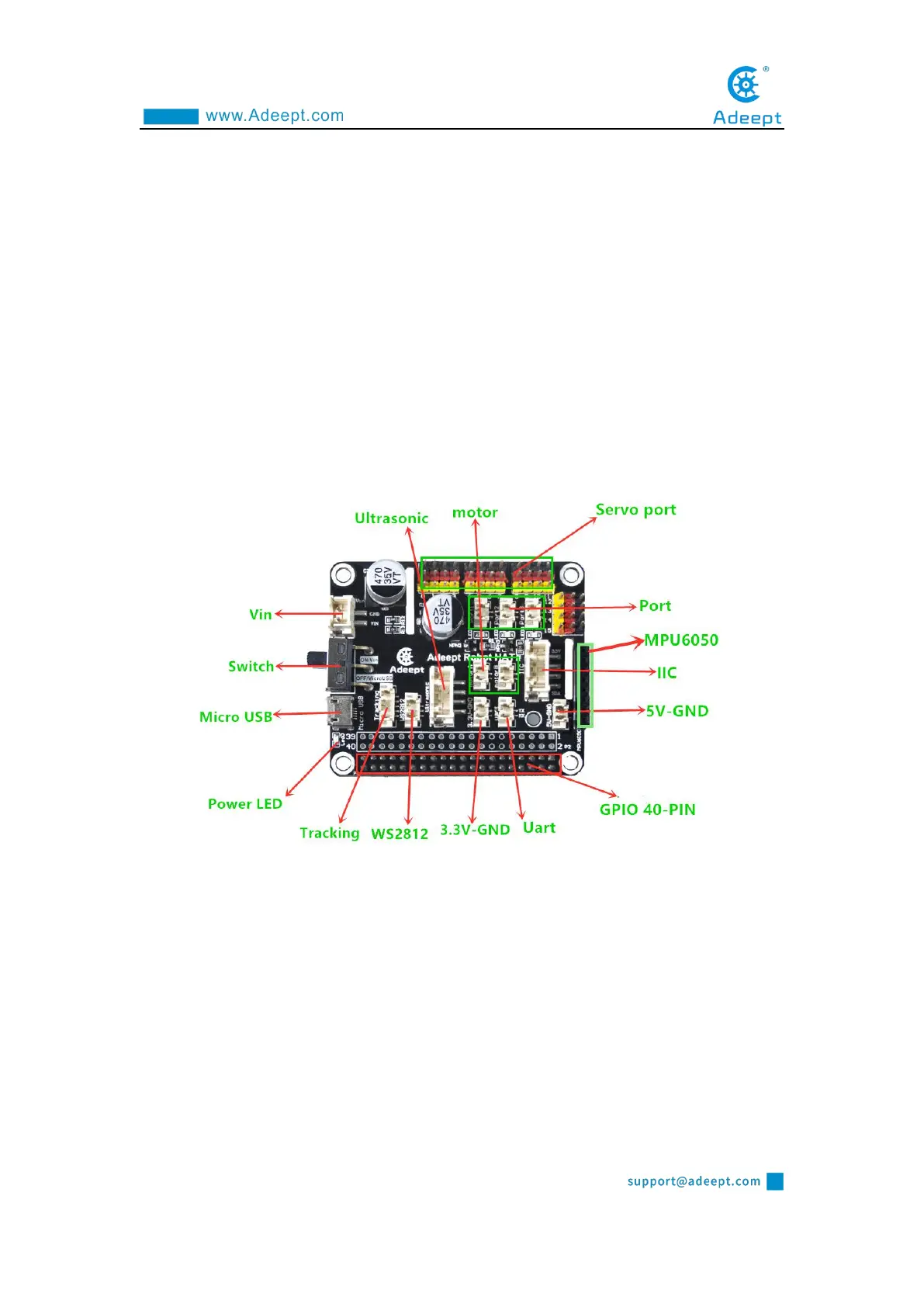
Introduction of Robot HAT Driver Board
1.Introduction of Robot HAT driver board
When you get the PiCar Pro product, you will see a board with its name printed
on it called: Adeept Robot HAT, which is an important part of PiCar Pro. There are
many interfaces on the Robot HAT driver board. By these interfaces, you can connect
some sensors and electronic hardware modules, so that you can achieve many
extended functions. Our PiCar Pro products need to be used in conjunction with the
Raspberry Pi. Let's first get to know the Robot HAT driver board.
【
Vin
】:
The vin interface is an interface for external power supply.
【
Switch
】:
Switch is the switch of Robot HAT driver board, ON is to open, and OFF
is to close.
【
Micro USB
】:
The Micro USB interface can connect the Robot HAT driver board to
a computer or other equipment, and can also supply power for the Robot HAT driver
board.
【
Power LED
】
Power LED is used to indicate the power status of Robot HAT driver
board. If the LED is on, it means that the Robot HAT driver board is powered on and



 To Next Page