10
MODE SETUP
UP DOWN
POWER IN-AC 100-240V, 50/60Hz
Fuse: T2A 250V
ON
I
O
OFF
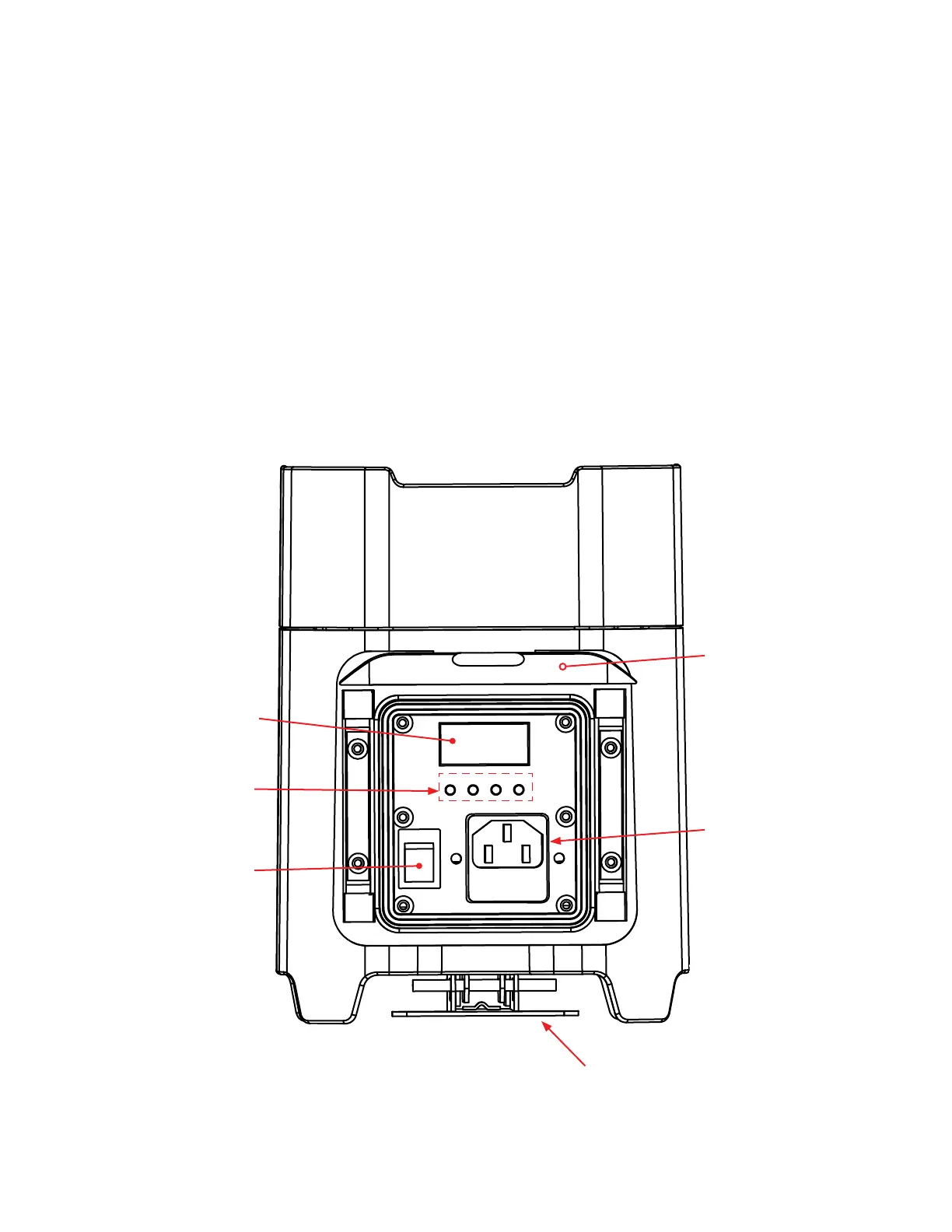
Battery On/Off Switch
Mode, Setup, Up,
& Down Buttons
Display Screen
Kickstand
OVERVIEW
Battery On/Off Switch: This switch is used to turn ON battery power and also turn ON the PCB output.
See page 22 “Load Setting” to activate.
Kickstand: This kickstand is used to angle the unit to various degrees. There are 3 different degree
levels. Note: Be very cautious at the degree in which you angle the unit at, due to the fact that it could
fall over.
Power Input & Fuse Holder: This input is used to connect the included I.E.C. power cord. After
connecting the power cord, plug the other end into a matching power source. Located inside the power
socket is the fuse housing. See page 35 for fuse replacement.
Mode Button: This button lets you scroll through the system menu. Setup Button: This button lets you
access the submenus.
Up & Down Button: These button’s are used to scroll through submenus and make adjustments in the
submenu’s.
Digital Display: This will display the various menus, submenus, and adjustments.
Control Panel Access Door: Lifting this door will allow you to access the controls and functions.
Power Input &
Fuse Holder
Control Panel
Access Door









 To Next Page