Mega 64 Profile Plus Operating Instructions
ADJ Products, LLC - www.adj.com - Mega 64 Prole Plus User Manual Page 7
LED Display On/Off:
To set the LED display to turn off after 10 seconds, press the MODE but-
ton until “don” is displayed, press the UP button to display “doff”. Now
the display will disappear after 10s. Press any button to turn the display
on again. Be advised though that the display will turn off automatically
after 10 seconds.
To set the display press the MODE button until “dXX” is displayed. Use
the UP or DOWN buttons to select either:
“don” = LED display on at all times.
“doFF” = LED display shuts off after 10 seconds.
LED Display Inversion:
Follow these instructions to flip the display 180° so that the display can
be read upside down.
1. Plug the fixture in and press the MODE button until “dXX” is dis-
played. “XX” represents either “on” or “oFF”.
2. Press the SET UP button until “Stnd” is displayed.
3. Press the UP or DOWN buttons to reverse the display 180°.
Operating Modes:
The Mega 64 Profile Plus has five operating modes:
• RGB+UV Dimmer Mode - Choose one of the four colors to remain
static or adjust the intensity of each color to make your desired
color.
• Sound Active mode - There are 16 sound active modes to choose
from.
• Auto Run Mode - In Auto Run mode, you can choose 1 of 16 color
change modes, 1 of 16 color fade modes, or a combo color change &
fade mode.
• Static Color Mode - There are 64 static colors to choose from.
• DMX control mode - This function will allow you to control each
individual fixtures traits with a standard DMX 512 controller.
RGB+UV Dimmer Mode:
1. Plug the fixture in and press the MODE button until:
2. When “r.XXX” is displayed you are in Red dimming mode. Press the
UP and DOWN buttons to adjust intensity.
3. When “G.XXX” is displayed you are in Green dimming mode. Press
the UP and DOWN buttons to adjust intensity.
ADJ Products, LLC - www.adj.com - Mega 64 Prole Plus User Manual Page 6
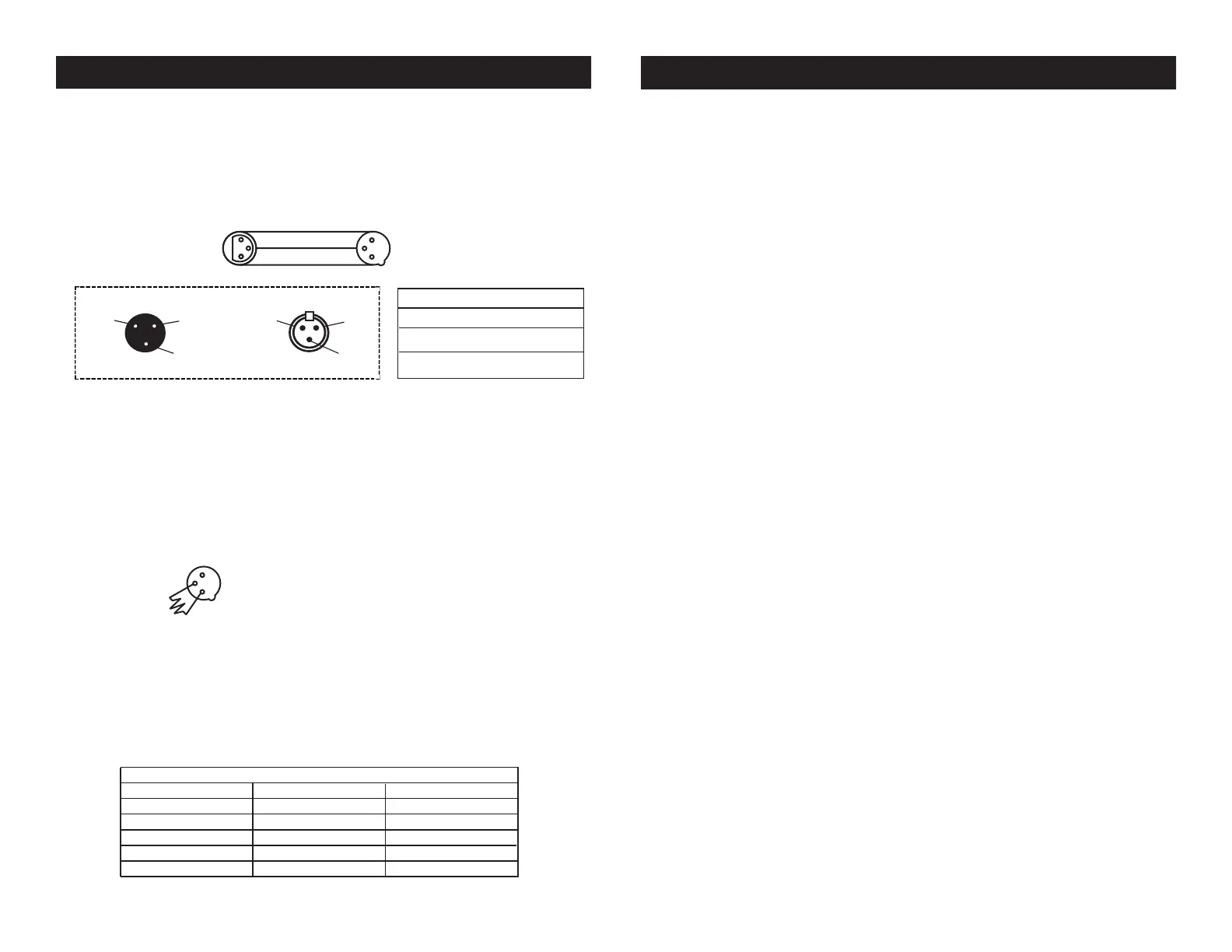
Notice: Be sure to follow gures two and three when making your own
cables. Do not use the ground lug on the XLR connector. Do not con-
nect the cable’s shield conductor to the ground lug or allow the shield
conductor to come in contact with the XLR’s outer casing. Grounding
the shield could cause a short circuit and erratic behavior.
Mega 64 Profile Plus DMX Set Up
DMX512 IN
3-PIN XLR
SOUND
REMOTE
CONTROL
INPUT
POWER
INPUT OUTPUT
SOUND
REMOTE
CONTROL
INPUT
POWER
INPUT OUTPUT
SOUND
REMOTE
CONTROL
INPUT
POWER
INPUT OUTPUT
DMX512
DMX+,DMX-,COMMON
1
2
3
Termination reduces signal errors and
avoids signal transmission problems
and interference. It is always advisable
to connect a DMX terminal, (Resistance
120 Ohm 1/4 W) between PIN 2 (DMX-)
and PIN 3 (DMX +) of the last fixture.
1
2
3
1
2
3
DMX +
DMX -
COMMON
DMX512 OUT
3-PIN XLR
Figure 2
Figure 3
1 Ground
1 Ground
XLR Male Socket
XLR Pin Conguration
3 Hot
2 Cold
2 Cold
3 Hot
XLR Female Socket
Pin 3 = Data True (positive)
Pin 2 = Data Compliment (negative)
Pin 1 = Ground
Special Note: Line Termination.
When longer runs of cable are
used, you may need to use a terminator on the last unit to avoid erratic
behavior. A terminator is a 110-120 ohm 1/4 watt resistor which is con-
nected between pins 2 and 3 of a male XLR connector (DATA + and
DATA -). This unit is inserted in the female XLR connector of the last
unit in your daisy chain to terminate the line. Using a cable terminator
(ADJ part number Z-DMX/T) will decrease the possibilities of erratic
behavior.
DMX512 IN
3-PIN XLR
SOUND
REMOTE
CONTROL
INPUT
POWER
INPUT OUTPUT
SOUND
REMOTE
CONTROL
INPUT
POWER
INPUT OUTPUT
SOUND
REMOTE
CONTROL
INPUT
POWER
INPUT OUTPUT
DMX512
DMX+,DMX-,COMMON
1
2
3
Termination reduces signal errors and
avoids signal transmission problems
and interference. It is always advisable
to connect a DMX terminal, (Resistance
120 Ohm 1/4 W) between PIN 2 (DMX-)
and PIN 3 (DMX +) of the last fixture.
1
2
3
1
2
3
DMX +
DMX -
COMMON
DMX512 OUT
3-PIN XLR
Figure 4
5-Pin XLR DMX Connectors.
Some manufactures use 5-pin DMX-
512 data cables for DATA transmission in place of 3-pin. 5-pin DMX
xtures may be implemented in a 3-pin DMX line. When inserting stan-
dard 5-pin data cables in to a 3-pin line a cable adaptor must be used,
these adaptors are readily available at most electric stores. The chart
below details a proper cable conversion.
Conductor 5-Pin XLR Male (In)3-Pin XLR Female (Out)
Pin 1
Do Not Use
Do Not Use
Pin 3
Pin 2
Pin 1
Pin 3
Pin 2
Not Used
Not Used
Data True (+ signal)
Data Compliment (- signal)
Ground/Shield
3-Pin XLR to 5-Pin XLR Conversion


 To Next Page