14
GENERAL OPERATION
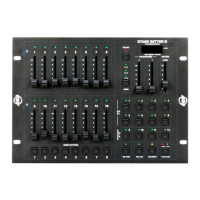
Flash Scenes are available only in 1x16 mode. In this mode, the Bump Buttons (10) can be pro-
grammed as Flash Scenes. These are scenes that can be created by any of the 16 channels. Once a
Flash Scene is created this scene may be activated by pressing on the Bump Button it was assigned
to.
To create a Flash Scene:
1. First, use the sliders in the Scene X (2) and Scene Y (11) section to create a scene.
2. Tap the Record Button to enter the record mode.
3. Tap the Bump Button that corresponds to a Scene Y slider that will be used to store the scene. The
scene will now be stored as a Master Scene in the Scene Y slider and will be ready for immediate
use.
Example:
In this example we will program Bump Button 8, with channels 3, 7, 14 and 15 to be at full; channels 1,
5, 10 and 16 at 50% output; and the remaining channel fully off.
1. Move all Scene X and Scene Y sliders to fully down.
2. Move Scene X sliders 3 and 7 to fully up.
3. Move Scene Y sliders 14 and 15 to fully up.
4. Move Scene X sliders 1 and 5 to 50%.
5. Move Scene Y sliders 10 and 16 to 50%.
6. Tap the Record Button causing its LED to light.
7. Tap Bump Button 8.
FLASH SCENES:










 To Next Page