ADJ Products, LLC - www.adj.com - Starbar Wash User Manual Page 23
Starbar Wash Set Up
Installation:
The Starbar Wash can be installed using the supplied tripod (light stand), using the supplied
brackets, or hung from a fixture using clamps (optional).
Stand:
1. Set the tripod on an even and stable surface. Extend the legs until the stays are horizontal and
secure the base by turning the knob at the base clockwise. Note: For safety, please use sandbags
to secure the tripod legs to prevent accidental tip overs.
2. Raise the center section to the desired height and insert safety pin. Tighten adjustment knob to
secure the center section.
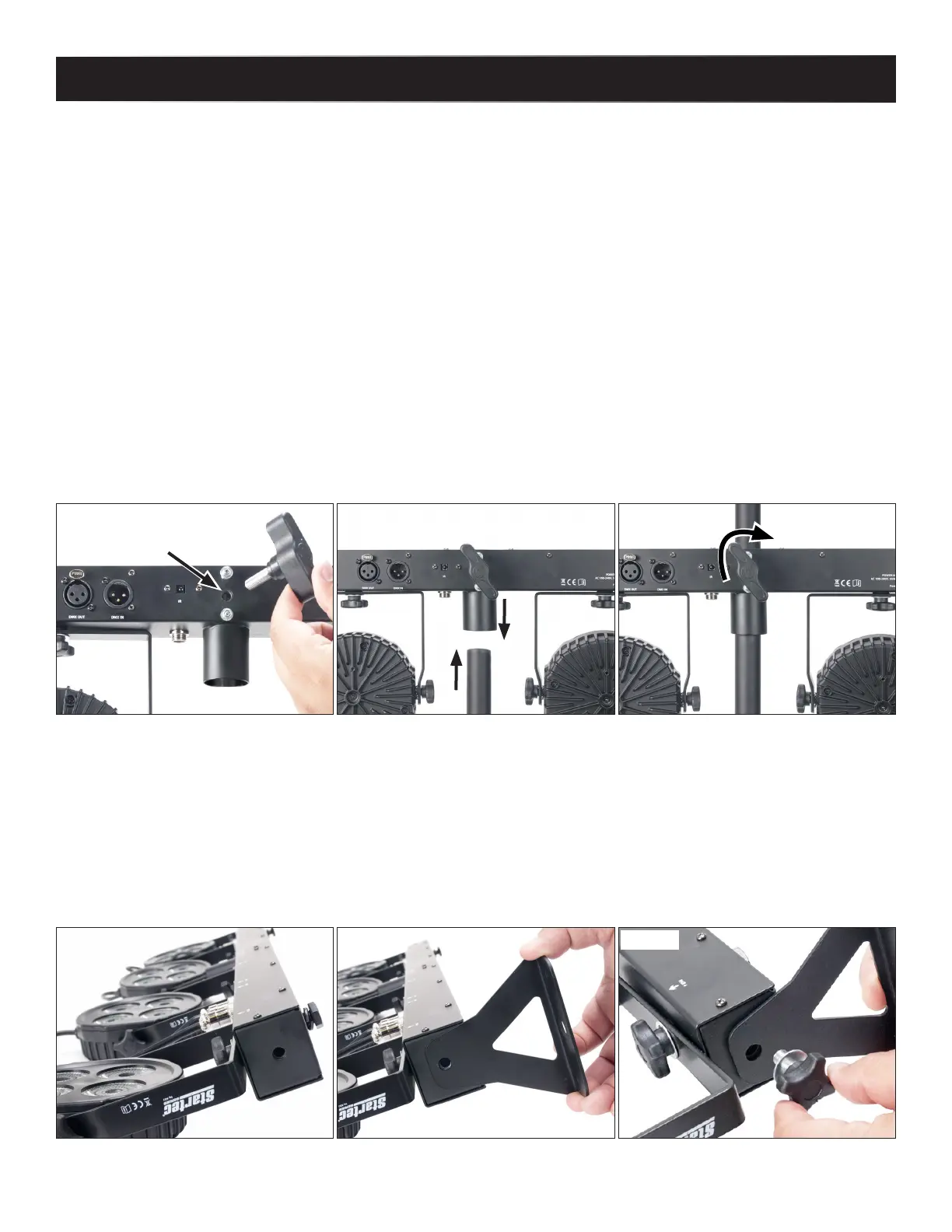
3. Install the tripod adjustment knob on the Starbar Wash (between the two spring loaded screws)
(see Figure 1). DO NOT tighten at this time.
4. Place the Starbar Wash onto the top section of the tripod with the tripod going through the
tripod mount at the center of the Starbar Wash (see Figure 2).
5. Tighten the adjustment knob by turning clockwise. Tighten until the top section is secure
(see Figure 3). Be careful not to over tighten.
6. Raise the top section of the tripod to the final desired height and insert safety pin. Tighten
adjustment knob to secure the top section.
End Brackets:
The Starbar Wash can be installed onto a ceiling or fixture using brackets and optional clamps.
1. Install the mounting bracket by lining up the holes on the bracket with the threaded hole on the
end of the Starbar Wash (see Figure 4).
2. With a washer between the bracket and adjustment knob, install the adjustment knob
(see Figure 5). Tighten the adjustment knob by turning clockwise.
3. Repeat steps 1 and 2 for the other side.
Figure 1
Figure 2
Figure 3
Figure 4
Figure 5






 To Next Page