189
USING ACROBAT 9 PRO EXTENDED
Forms
Last updated 9/30/2011
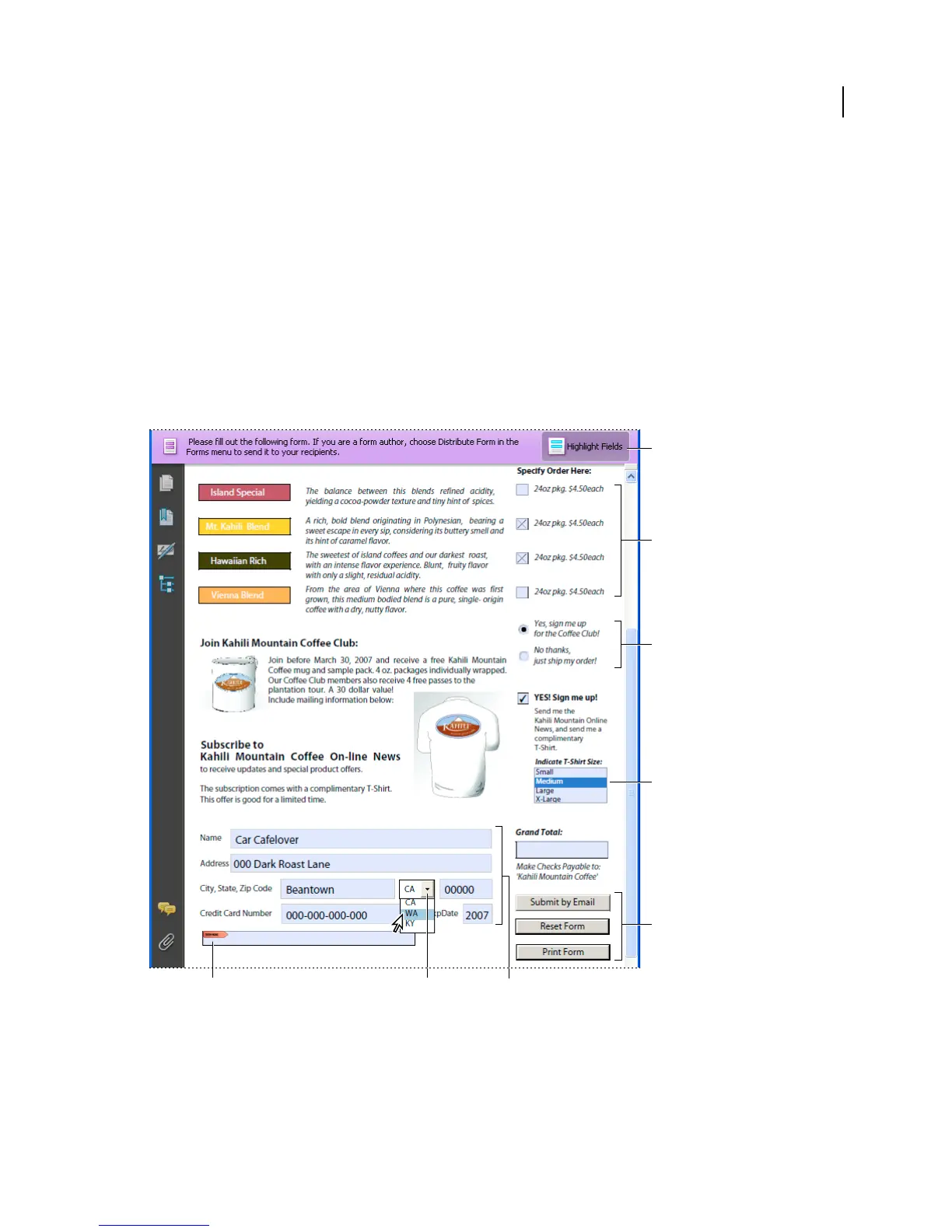
Document message bar Displays automatically generated information about the PDF form and can display action
buttons and other options. The document message bar informs Reader users about their usage rights for the form. It
also specifies if a form is certified or has signature fields and allows users to highlight fields. If the form doesn’t have a
submit button, a Submit Form button is added to the document message bar to allow the users to submit the form.
Note: If form recipients are using older versions of Acrobat or Reader, the document message bar may not be visible or
may contain different information.
List boxes Display a list of options the user can select.
Note: You can set a form field property that enables the user to Shift-click to select multiple items on the list.
Radio buttons Present a group of choices from which the user can select only one item. All radio buttons with the same
name work together as a group.
Text fields Let the user type text, such as name, address, or phone number.
Adobe Acrobat PDF form
A. Digital signature field B. Combo box C. Text fields D. Forms document message bar E. Check boxes F. Radio buttons G. List box
H. Buttons
More Help topics
“Setting action buttons” on page 210
“Enable Reader users to save form data” on page 191
G
F
E
D
H
A
B C



 To Next Page